








TP-Link ER706W Omada AX3000 Gigabit VPN Router
Business Routing and Wi-Fi 6 in One Compact Gateway The TP-Link ER706W combines business gateway functions with dual-band AX3000 Wi-Fi 6, making it a practical starting point for a small office, shop or branch. Connect wired equipment through Gigabit copper and SFP interfaces, create separate networks for staff and guests, and use supported VPN protocols for remote connections. The built-in wireless network reduces the equipment needed for a compact site, with compatible Omada access points available when a larger coverage plan is required. Highlights Connections for the Site 1 × Gigabit RJ45 WAN; 4 × Gigabit RJ45 WAN/LAN; 1 × Gigabit SFP WAN/LAN. 1 × USB 3.0 for supported LTE modems or USB storage. Internet and Remote Access Up to 5 Ethernet WAN connections, with load balancing and link backup. IPsec, WireGuard and OpenVPN support for compatible remote connections. A Managed Business Network Standalone operation or adoption into a compatible Omada controller. VLANs, DHCP services and access rules for a planned network. Key Features Choose the Right Uplink AX3000 describes the combined wireless PHY class: 574Mb/s at 2.4GHz plus 2,402Mb/s at 5GHz with 160MHz channels. Each wired network port is Gigabit. Pair the gateway with appropriate switching and cabling so the rest of the network can use the available link speed. Modules, internet services and connected equipment are separate. Wireless Access for a Compact Site Built-in AX3000 Wi-Fi 6 provides 2.4GHz and 5GHz access, with OFDMA, MU-MIMO and beamforming for compatible clients. The advertised combined PHY rate is not the speed of one download. Coverage depends on building layout, interference and placement; larger sites may need additional access points. Keep More Than One Internet Option Up to 5 Ethernet WAN connections, with load balancing and link backup. Use separate connections for resilience or distribute suitable traffic between services. Load balancing does not combine every circuit into one faster single download, and a failover can interrupt existing sessions. Connect People and Locations Securely Use supported VPN protocols to connect remote users or link sites. IPsec, WireGuard and OpenVPN have different throughput and configuration requirements. Select current encryption, maintain firmware and match the remote endpoint; a published maximum is not a guarantee for every connection. Separate Networks with a Clear Policy Use VLANs, access controls and DHCP settings to organise staff, guests and connected equipment. A complete design also needs compatible switches and access points, with the same VLAN plan carried through the network. Internet access and inter-network permissions should follow the site requirements. Manage Locally or Through Omada The gateway can operate independently through its management interface. A separate compatible hardware, software or cloud-based Omada controller brings supported devices into a shared management view. Controller adoption, device firmware and the chosen cloud service determine which advanced features are available. Plan Power and Installation Desktop or wall mounting; 3 detachable antennas. External 12V DC, 2A power adapter. Keep ventilation clear and allow space for the antennas. The gateway does not supply PoE to access points or cameras. Use a suitable PoE switch or injector for devices that need it. Summary The ER706W is a useful foundation when its interfaces and routing capability match the site. Plan the internet handoffs, switching, VPN requirements and power for connected devices together. This creates a network that is easier to install, manage and extend, with the right equipment doing each job. Frequently Asked Questions Can I use this without an Omada controller? Expand Collapse Yes. Standalone operation is supported. Use a separate compatible controller when you need central management across the Omada network; the gateway does not contain its own controller. Does it provide Wi-Fi? Expand Collapse Yes. ER706W includes dual-band AX3000 Wi-Fi 6 and detachable antennas. It has Gigabit wired ports and no 6GHz radio. Can I use multiple internet connections? Expand Collapse Up to 5 Ethernet WAN connections, with load balancing and link backup. Load balancing distributes traffic; it does not make one ordinary download equal to the sum of all WAN speeds. Failover depends on correct health checks and configuration. Does it power access points or cameras? Expand Collapse No. The Ethernet ports do not provide PoE output. Use an appropriate PoE switch or injector with enough per-port and total power for the connected equipment. What do the speed and VPN figures mean? Expand Collapse Port speeds are interface link rates. NAT and VPN results are manufacturer laboratory measurements using particular traffic and encryption settings. Security processing, packet sizes, remote endpoints and internet services can reduce real throughput. What is included with the gateway? Expand Collapse Gateway, power adapter and Quick Installation Guide. Cellular USB modem is separate. Match the optics, cabling and any cellular modem to the exact supported interface and firmware.
추가 상품 (3)
3005, Ubi Avenue 3, #01-88에서 픽업 가능
일반적으로 2~4일 후 준비 완료
TP-Link ER706W Omada AX3000 Gigabit VPN Router
제품 설명
Business Routing and Wi-Fi 6 in One Compact Gateway
The TP-Link ER706W combines business gateway functions with dual-band AX3000 Wi-Fi 6, making it a practical starting point for a small office, shop or branch. Connect wired equipment through Gigabit copper and SFP interfaces, create separate networks for staff and guests, and use supported VPN protocols for remote connections. The built-in wireless network reduces the equipment needed for a compact site, with compatible Omada access points available when a larger coverage plan is required.
Highlights
Connections for the Site
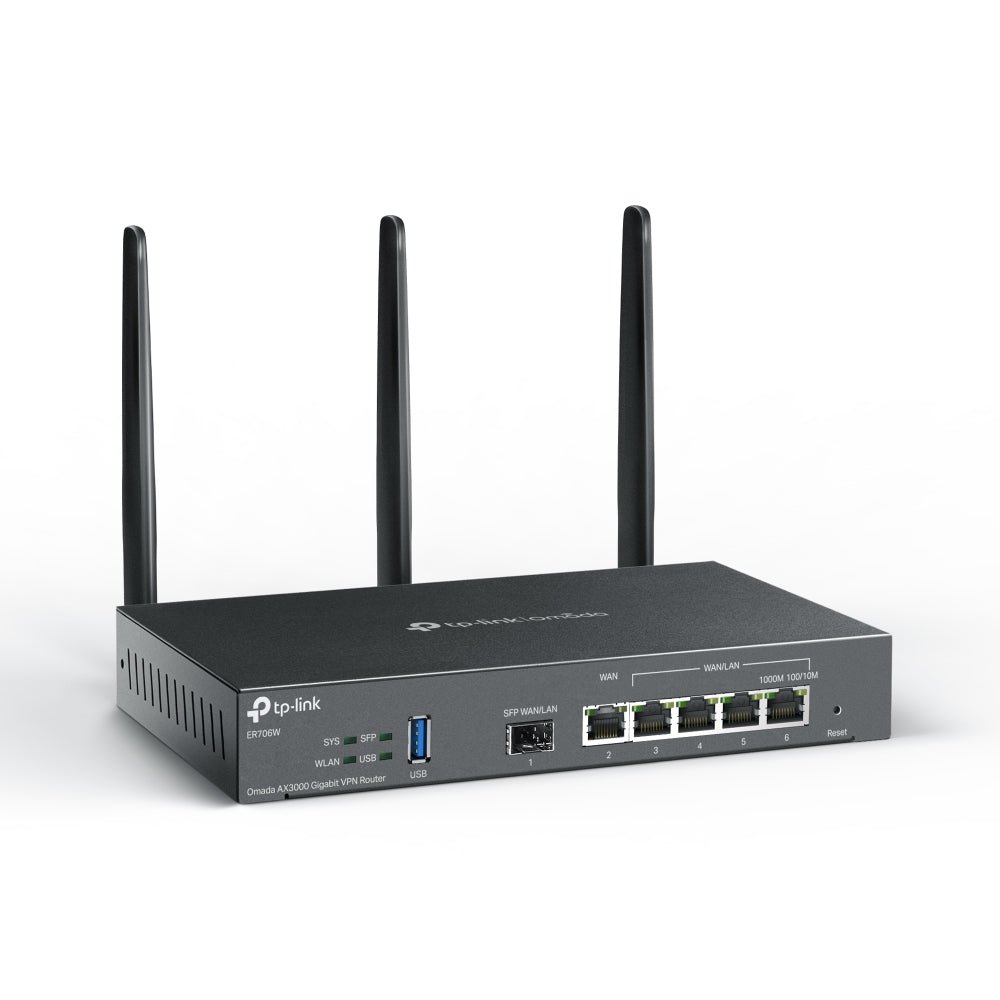
- 1 × Gigabit RJ45 WAN; 4 × Gigabit RJ45 WAN/LAN; 1 × Gigabit SFP WAN/LAN.
- 1 × USB 3.0 for supported LTE modems or USB storage.
Internet and Remote Access
- Up to 5 Ethernet WAN connections, with load balancing and link backup.
- IPsec, WireGuard and OpenVPN support for compatible remote connections.
A Managed Business Network
- Standalone operation or adoption into a compatible Omada controller.
- VLANs, DHCP services and access rules for a planned network.
Key Features
Choose the Right Uplink
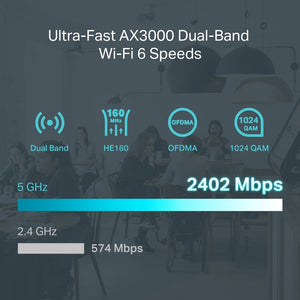
AX3000 describes the combined wireless PHY class: 574Mb/s at 2.4GHz plus 2,402Mb/s at 5GHz with 160MHz channels. Each wired network port is Gigabit. Pair the gateway with appropriate switching and cabling so the rest of the network can use the available link speed. Modules, internet services and connected equipment are separate.
Wireless Access for a Compact Site
Built-in AX3000 Wi-Fi 6 provides 2.4GHz and 5GHz access, with OFDMA, MU-MIMO and beamforming for compatible clients. The advertised combined PHY rate is not the speed of one download. Coverage depends on building layout, interference and placement; larger sites may need additional access points.
Keep More Than One Internet Option
Up to 5 Ethernet WAN connections, with load balancing and link backup. Use separate connections for resilience or distribute suitable traffic between services. Load balancing does not combine every circuit into one faster single download, and a failover can interrupt existing sessions.
Connect People and Locations Securely
Use supported VPN protocols to connect remote users or link sites. IPsec, WireGuard and OpenVPN have different throughput and configuration requirements. Select current encryption, maintain firmware and match the remote endpoint; a published maximum is not a guarantee for every connection.
Separate Networks with a Clear Policy
Use VLANs, access controls and DHCP settings to organise staff, guests and connected equipment. A complete design also needs compatible switches and access points, with the same VLAN plan carried through the network. Internet access and inter-network permissions should follow the site requirements.
Manage Locally or Through Omada
The gateway can operate independently through its management interface. A separate compatible hardware, software or cloud-based Omada controller brings supported devices into a shared management view. Controller adoption, device firmware and the chosen cloud service determine which advanced features are available.
Plan Power and Installation
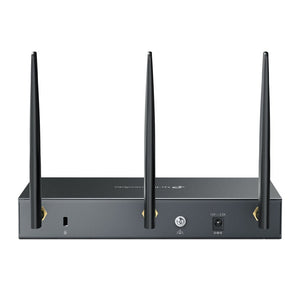
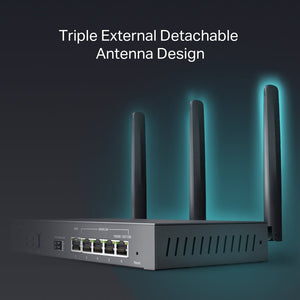
Desktop or wall mounting; 3 detachable antennas. External 12V DC, 2A power adapter. Keep ventilation clear and allow space for the antennas. The gateway does not supply PoE to access points or cameras. Use a suitable PoE switch or injector for devices that need it.
Summary
The ER706W is a useful foundation when its interfaces and routing capability match the site. Plan the internet handoffs, switching, VPN requirements and power for connected devices together. This creates a network that is easier to install, manage and extend, with the right equipment doing each job.
Frequently Asked Questions
Can I use this without an Omada controller?
Yes. Standalone operation is supported. Use a separate compatible controller when you need central management across the Omada network; the gateway does not contain its own controller.
Does it provide Wi-Fi?
Yes. ER706W includes dual-band AX3000 Wi-Fi 6 and detachable antennas. It has Gigabit wired ports and no 6GHz radio.
Can I use multiple internet connections?
Up to 5 Ethernet WAN connections, with load balancing and link backup. Load balancing distributes traffic; it does not make one ordinary download equal to the sum of all WAN speeds. Failover depends on correct health checks and configuration.
Does it power access points or cameras?
No. The Ethernet ports do not provide PoE output. Use an appropriate PoE switch or injector with enough per-port and total power for the connected equipment.
What do the speed and VPN figures mean?
Port speeds are interface link rates. NAT and VPN results are manufacturer laboratory measurements using particular traffic and encryption settings. Security processing, packet sizes, remote endpoints and internet services can reduce real throughput.
What is included with the gateway?
Gateway, power adapter and Quick Installation Guide. Cellular USB modem is separate. Match the optics, cabling and any cellular modem to the exact supported interface and firmware.
사양
TP-Link ER706W Omada AX3000 Gigabit VPN Router
The TP-Link ER706W is a dual-band Wi-Fi 6 business gateway for managed office and branch networks. It supports standalone configuration or adoption into a compatible Omada environment with a separate controller. The grouped specifications distinguish physical interfaces, routing functions and measured performance from installation requirements. Throughput results are manufacturer laboratory figures rather than guaranteed internet speeds. Match the hardware revision, firmware, VPN endpoints and connected equipment when planning the deployment.
| Specification | Details |
|---|---|
| Interfaces and Hardware | |
| Network connections | 1 × Gigabit RJ45 WAN; 4 × Gigabit RJ45 WAN/LAN; 1 × Gigabit SFP WAN/LAN. |
| USB and service connections | 1 × USB 3.0 for supported LTE modems or USB storage. |
| Memory and flash | 512MB DDR4; 128MB NAND flash. |
| Wireless Connectivity | |
| Radio bands and PHY rates | AX3000 Wi-Fi 6: 574Mb/s at 2.4GHz and 2,402Mb/s at 5GHz with HE160; actual throughput is lower. |
| Wireless functions | OFDMA, MU-MIMO, beamforming, supported roaming/mesh, guest access and WPA3. Some functions require compatible firmware, controller and clients. |
| Antennas | 3 detachable antennas. Regional published gains: 3dBi at 2.4GHz and 4.5dBi at 5GHz. |
| WAN and Network Services | |
| Multi-WAN | Up to 5 Ethernet WAN connections, with load balancing and link backup. |
| Routing and addressing | Static and policy routing; NAT, DHCP server, address reservation and multi-network DHCP; supported IPv6 modes depend on firmware. |
| Network segmentation | IEEE 802.1Q VLANs, IP-based access rules, bandwidth controls and supported guest-portal integration. |
| VPN and Security | |
| VPN protocols | IPsec, WireGuard and OpenVPN; additional SSL, L2TP and PPTP modes depend on the hardware/firmware and management mode. |
| Tunnel capacity | Up to 100 IPsec and 20 WireGuard tunnels, subject to firmware and configuration. |
| Security controls | Stateful access controls, supported web/URL filtering, IP-MAC binding and DoS/flood defence. Available inspection features depend on firmware and operating mode. |
| Performance | |
| NAT forwarding | Approximately 937Mb/s static-IP NAT in the manufacturer test. |
| IPsec forwarding | Up to 658.4Mb/s IPsec across the published ESP test configurations. |
| WireGuard forwarding | Up to 393.5Mb/s WireGuard. |
| Session handling | Up to 150,000 concurrent sessions; 5,100 new sessions/s. |
| Test conditions | Manufacturer laboratory maxima. Packet size, enabled inspection, encryption, firmware and traffic mix affect results; port speed is not VPN throughput. |
| Management and System Integration | |
| Deployment modes | Standalone management or a compatible Omada hardware, software or cloud-based controller; controller is separate. |
| Administration | Local web management, supported Omada app/cloud access, configuration backup, monitoring, diagnostics and firmware maintenance. |
| Cloud and software requirements | Compatible device and controller releases are required. Cloud-based controller editions and optional services can have separate terms or licences. |
| Power and Installation | |
| Power input | External 12V DC, 2A power adapter. |
| Maximum power consumption | EU test: up to 16.8W with USB and 11.8W without. US test: 22.7W with USB and 18.2W without; regional radio settings differ. |
| PoE output | Not provided. Connected PoE equipment needs a separate suitable power source. |
| Dimensions W × D × H | 226 × 131 × 35mm, excluding antennas |
| Mounting and enclosure | Desktop or wall mounting; 3 detachable antennas. |
| Cooling | Keep ventilation clear and allow space for the antennas. |
| Environment and Package | |
| Operating temperature | 0–40°C |
| Storage and humidity | Storage −40–70°C; operating 10–90% RH and storage 5–90% RH, non-condensing. |
| Package contents | Gateway, power adapter and Quick Installation Guide. Cellular USB modem is separate. |
| Warranty | 5 years |
추가 상품


TP-Link SG2210XMP-M2 Omada 8-Port 2.5GBASE-T and 2-Port 10GE SFP+ Smart Switch with 8-Port PoE+

