



QNAP QDA-UMP4 M.2 NVMe to U.2 PCIe 4.0 SSD Adapter
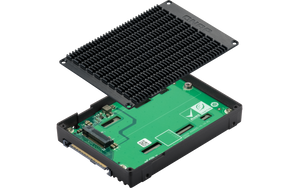
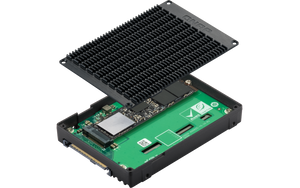
Give an M.2 SSD a Place in Your U.2 Storage System The QDA-UMP4 lets a compatible M.2 2280 NVMe SSD work in a 2.5-inch U.2 NVMe bay. It suits supported QNAP NAS systems and workstations where a U.2 interface is available but an M.2 drive is the more practical storage choice. A metal frame and supplied thermal pads help transfer heat away from the SSD, while the PCIe 4.0 x4 interface retains a high-bandwidth connection. The adapter is supplied without an SSD. Highlights One Drive in a Different Format Accepts one M-key M.2 2280 PCIe NVMe SSD. Connects through a U.2 SFF-8639 PCIe NVMe host interface. A High-Bandwidth Connection Supports PCIe 4.0 x4 and compatible PCIe 3.0 SSDs and bays. No additional adapter-specific driver is required. Thoughtful Physical Design Aluminium-alloy frame with supplied SSD thermal pads. 15 mm-high enclosure requires suitable bay clearance. Key Features Use the Storage Format Your Host Supports An M.2 SSD and a U.2 bay use different physical connections. This adapter brings one compatible M.2 NVMe drive into the U.2 form factor without turning it into a SATA drive. Check the host's NVMe support, supported SSD list and 15 mm bay clearance together. A connector that physically fits is not sufficient evidence that a SATA-only bay can use it. Keep PCIe Bandwidth Available The adapter supports a PCIe 4.0 x4 path and is backwards compatible with suitable PCIe 3.0 drives and U.2 connections. The negotiated generation, SSD, host and workload determine actual results. It does not increase the speed of a slower SSD or host link, and interface bandwidth should not be read as a guaranteed file-transfer rate. Transfer Heat through the Frame The metal frame and correctly placed thermal pads provide a route for heat to leave the installed SSD. Follow the installation guide for single- or double-sided modules and retain the host's required airflow. Fit the supplied pads as directed rather than leaving them out or stacking unrelated heatsinks inside the enclosure. Manage the SSD through the Supported Host The adapter does not need a separate software driver. The computer or NAS must still support the connected NVMe device. Compatible QNAP systems can monitor and manage the SSD through their storage tools. Existing data must be backed up before installation or initialisation; creating a new storage layout can erase the selected drive. Plan a Complete Storage Upgrade The package includes the adapter, two SSD screws, three thermal pads and an installation guide. The SSD and host are separate. Select an SSD with the compatibility, endurance and protection features appropriate to the workload, then plan RAID and an independent backup at the host. This single-drive adapter does not add a second drive or its own RAID controller. Summary Choose QDA-UMP4 when a verified U.2 NVMe host can benefit from an M.2 2280 SSD. Its straightforward single-drive design, PCIe 4.0 interface and thermal frame make the connection practical, provided the SSD, bay clearance, host support and backup plan are checked before installation. Which SSD Fits the Adapter?ExpandCollapse One compatible M-key M.2 2280 PCIe NVMe SSD. M.2 SATA SSDs and other module lengths are not the stated supported drive format. The SSD is purchased separately. Will It Work in a SATA-Only Drive Bay?ExpandCollapse No. The host connection must provide U.2 PCIe NVMe support. A 2.5-inch bay that only supports SATA does not become an NVMe bay by using this adapter. Does It Need a Separate Driver?ExpandCollapse No additional driver is required for the adapter itself. The operating system and host must still support the installed NVMe SSD. Can I Use a PCIe 3.0 SSD or Host?ExpandCollapse Yes, with a compatible PCIe 3.0 M.2 SSD or U.2 bay. The connection operates within the limits of the installed drive and host rather than always reaching PCIe 4.0 speeds. Is an SSD Included?ExpandCollapse No. The package contains the adapter, two SSD screws, three thermal pads and a Quick Installation Guide. Storage capacity comes from the separately purchased SSD. Will Installation Preserve the Files Already on My SSD?ExpandCollapse Do not assume so. Back up important files before moving a drive. Initialising a drive or creating a new storage pool can erase its data; follow the host's migration and installation procedures.
Pickup available at 3005, Ubi Avenue 3, #01-88
일반적으로 2~4일 후 준비 완료
QNAP QDA-UMP4 M.2 NVMe to U.2 PCIe 4.0 SSD Adapter
제품 설명
Give an M.2 SSD a Place in Your U.2 Storage System
The QDA-UMP4 lets a compatible M.2 2280 NVMe SSD work in a 2.5-inch U.2 NVMe bay. It suits supported QNAP NAS systems and workstations where a U.2 interface is available but an M.2 drive is the more practical storage choice. A metal frame and supplied thermal pads help transfer heat away from the SSD, while the PCIe 4.0 x4 interface retains a high-bandwidth connection. The adapter is supplied without an SSD.
Highlights
One Drive in a Different Format
- Accepts one M-key M.2 2280 PCIe NVMe SSD.
- Connects through a U.2 SFF-8639 PCIe NVMe host interface.
A High-Bandwidth Connection
- Supports PCIe 4.0 x4 and compatible PCIe 3.0 SSDs and bays.
- No additional adapter-specific driver is required.
Thoughtful Physical Design
- Aluminium-alloy frame with supplied SSD thermal pads.
- 15 mm-high enclosure requires suitable bay clearance.
Key Features
Use the Storage Format Your Host Supports
An M.2 SSD and a U.2 bay use different physical connections. This adapter brings one compatible M.2 NVMe drive into the U.2 form factor without turning it into a SATA drive. Check the host's NVMe support, supported SSD list and 15 mm bay clearance together. A connector that physically fits is not sufficient evidence that a SATA-only bay can use it.
Keep PCIe Bandwidth Available
The adapter supports a PCIe 4.0 x4 path and is backwards compatible with suitable PCIe 3.0 drives and U.2 connections. The negotiated generation, SSD, host and workload determine actual results. It does not increase the speed of a slower SSD or host link, and interface bandwidth should not be read as a guaranteed file-transfer rate.
Transfer Heat through the Frame
The metal frame and correctly placed thermal pads provide a route for heat to leave the installed SSD. Follow the installation guide for single- or double-sided modules and retain the host's required airflow. Fit the supplied pads as directed rather than leaving them out or stacking unrelated heatsinks inside the enclosure.
Manage the SSD through the Supported Host
The adapter does not need a separate software driver. The computer or NAS must still support the connected NVMe device. Compatible QNAP systems can monitor and manage the SSD through their storage tools. Existing data must be backed up before installation or initialisation; creating a new storage layout can erase the selected drive.
Plan a Complete Storage Upgrade
The package includes the adapter, two SSD screws, three thermal pads and an installation guide. The SSD and host are separate. Select an SSD with the compatibility, endurance and protection features appropriate to the workload, then plan RAID and an independent backup at the host. This single-drive adapter does not add a second drive or its own RAID controller.
Summary
Choose QDA-UMP4 when a verified U.2 NVMe host can benefit from an M.2 2280 SSD. Its straightforward single-drive design, PCIe 4.0 interface and thermal frame make the connection practical, provided the SSD, bay clearance, host support and backup plan are checked before installation.
Which SSD Fits the Adapter?
One compatible M-key M.2 2280 PCIe NVMe SSD. M.2 SATA SSDs and other module lengths are not the stated supported drive format. The SSD is purchased separately.
Will It Work in a SATA-Only Drive Bay?
No. The host connection must provide U.2 PCIe NVMe support. A 2.5-inch bay that only supports SATA does not become an NVMe bay by using this adapter.
Does It Need a Separate Driver?
No additional driver is required for the adapter itself. The operating system and host must still support the installed NVMe SSD.
Can I Use a PCIe 3.0 SSD or Host?
Yes, with a compatible PCIe 3.0 M.2 SSD or U.2 bay. The connection operates within the limits of the installed drive and host rather than always reaching PCIe 4.0 speeds.
Is an SSD Included?
No. The package contains the adapter, two SSD screws, three thermal pads and a Quick Installation Guide. Storage capacity comes from the separately purchased SSD.
Will Installation Preserve the Files Already on My SSD?
Do not assume so. Back up important files before moving a drive. Initialising a drive or creating a new storage pool can erase its data; follow the host's migration and installation procedures.
사양
QNAP QDA-UMP4 M.2 NVMe to U.2 PCIe 4.0 SSD Adapter
QDA-UMP4 adapts one M.2 2280 PCIe NVMe SSD to a compatible U.2 NVMe drive bay. It provides a PCIe 4.0 x4 interface, with backwards compatibility for supported PCIe 3.0 equipment. Its aluminium-alloy frame and supplied thermal pads assist heat transfer. This is an adapter without storage media, not a SATA converter or a multi-drive RAID enclosure. Confirm the exact host, SSD, firmware and bay clearance before installation, and back up existing data before changing its storage configuration.
| Specification | Details |
|---|---|
| Drive and Host Connection | |
| Supported Drive | 1 × M-key M.2 2280 PCIe NVMe SSD; sold separately |
| Host Interface | U.2 SFF-8639 PCIe 4.0 x4 |
| Backwards Compatibility | Compatible PCIe 3.0 NVMe SSDs and U.2 bays |
| Drive Presentation | One installed drive; no built-in multi-drive RAID |
| Installation and Compatibility | |
| QNAP Software | Supported NAS with QTS 4.4.1 or QuTS hero h4.5.1 or later; exact host and SSD compatibility required |
| Computer Support | Compatible Windows or Linux workstation with U.2 NVMe support; check the host and OS |
| Driver | No extra adapter-specific driver |
| Power | Powered through the U.2 connection |
| Cooling | Aluminium-alloy frame and supplied SSD thermal pads |
| Physical Details | |
| Dimensions L × W × H | 100.4 × 69.85 × 15 mm |
| Device Weight | 0.1045 kg |
| Bay Clearance | Suitable 2.5-inch U.2 NVMe bay with 15 mm height clearance |
| Package and Warranty | |
| Included | Adapter, 2 SSD screws, 3 thermal pads and Quick Installation Guide |
| Sold Separately | Compatible M.2 SSD and host system |
| Warranty | 2 years |