





Insta360 X6 Screen Protector
Keep the Screen Ready for the Next Frame Protect the display you use to frame shots and change camera settings. The Insta360 X6 Screen Protector combines camera-specific tempered glass with a fitting kit, including an alignment tool and cleaning items. Its shaped outline follows the X6 screen, helping you add a dedicated outer layer while keeping the display area clear and the installation controlled. Highlights Tempered-glass protector designed for the X6 screen. Camera-specific outline and edge fit. Alignment tool and film-removal stick included. Cleaning wipe, cloth, dust-removal sticker and scraper supplied. One screen protector per offer; camera sold separately. Key Features A Separate Layer over the Camera Display A screen is handled whenever you frame, review or adjust a recording. The tempered-glass protector adds an outer surface intended to resist everyday scratches and incidental knocks. It does not repair existing screen damage or guarantee that a hard impact cannot break the display beneath it. Designed Around the X6 Screen The protector follows the X6 screen’s shape rather than relying on a generic rectangular film. The specified outline and thickness help identify the correct accessory for this camera. Match the camera model before fitting, and do not trim or force the protector onto another generation’s display. Prepare a Clean Surface First Use the supplied cleaning items to remove marks, moisture and dust before exposing the adhesive side of the protector. A clean screen gives the installation a better starting point and reduces the chance of trapping particles beneath the glass. Arrange the fitting tools before beginning so the adhesive is not left exposed unnecessarily. Align Once and Work in One Direction Follow the illustrated fitting sequence with the alignment tool and film-removal stick. When using the scraper to clear bubbles, work from top to bottom in a single direction. Moving repeatedly in different directions can divide bubbles into smaller ones that are harder to remove. Avoid Repeated Removal and Reapplication Repeatedly lifting the protector can introduce dust and reduce adhesion, leading to persistent bubbles or a poor fit. Check the alignment carefully during the prescribed installation sequence rather than treating the protector as a reusable cover. The included tools support fitting; they do not restore a contaminated adhesive surface. Summary The Insta360 X6 Screen Protector provides a camera-specific tempered-glass layer with the tools needed for careful installation. Prepare a clean and dry screen, follow the alignment sequence and remove bubbles in one direction. Keep it fitted rather than repeatedly lifting and reapplying the glass. Frequently Asked Questions Is This Screen Protector Made for X6?ExpandCollapse Yes. Its shape and measurements are designed for the Insta360 X6 display. Do not assume that a protector for X5, X4 or another camera has the same fit. What Is Included?ExpandCollapse The offer contains one screen protector, one alignment tool, one film-removal stick, one screen-cleaning wipe, one cloth, one dust-removal sticker and one scraper. The camera is not included. How Should I Push Out Bubbles?ExpandCollapse Use the supplied scraper in one direction from top to bottom. Avoid scraping repeatedly in different directions, which can break larger bubbles into smaller ones that are harder to remove. Can I Keep Removing and Reapplying It?ExpandCollapse Repeated removal and reapplication are not recommended. They can introduce dust, weaken adhesion and cause permanent bubbles. Prepare the screen and check the alignment during the fitting process. Does It Protect the Camera Lenses Too?ExpandCollapse No. This accessory covers the X6 display, not the front and rear camera lenses. Lens guards and the lens cap are separate accessories with their own intended uses and fitting requirements.
Pickup available at 3005, Ubi Avenue 3, #01-88
일반적으로 2~4일 후 준비 완료
Insta360 X6 Screen Protector
제품 설명
Keep the Screen Ready for the Next Frame
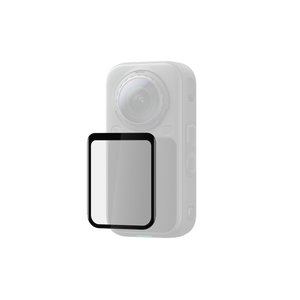
Protect the display you use to frame shots and change camera settings. The Insta360 X6 Screen Protector combines camera-specific tempered glass with a fitting kit, including an alignment tool and cleaning items. Its shaped outline follows the X6 screen, helping you add a dedicated outer layer while keeping the display area clear and the installation controlled.
Highlights
- Tempered-glass protector designed for the X6 screen.
- Camera-specific outline and edge fit.
- Alignment tool and film-removal stick included.
- Cleaning wipe, cloth, dust-removal sticker and scraper supplied.
- One screen protector per offer; camera sold separately.
Key Features
A Separate Layer over the Camera Display
A screen is handled whenever you frame, review or adjust a recording. The tempered-glass protector adds an outer surface intended to resist everyday scratches and incidental knocks. It does not repair existing screen damage or guarantee that a hard impact cannot break the display beneath it.
Designed Around the X6 Screen
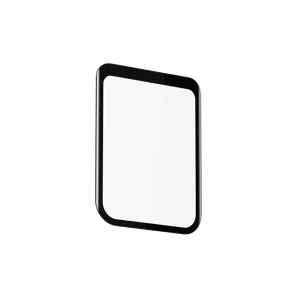
The protector follows the X6 screen’s shape rather than relying on a generic rectangular film. The specified outline and thickness help identify the correct accessory for this camera. Match the camera model before fitting, and do not trim or force the protector onto another generation’s display.
Prepare a Clean Surface First
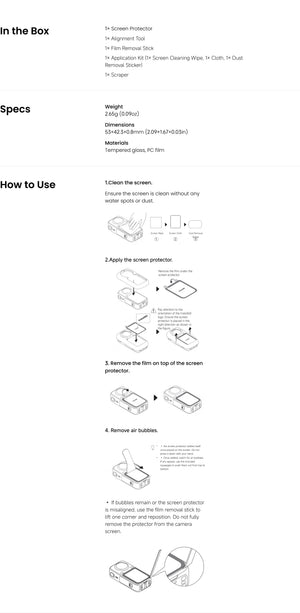
Use the supplied cleaning items to remove marks, moisture and dust before exposing the adhesive side of the protector. A clean screen gives the installation a better starting point and reduces the chance of trapping particles beneath the glass. Arrange the fitting tools before beginning so the adhesive is not left exposed unnecessarily.
Align Once and Work in One Direction
Follow the illustrated fitting sequence with the alignment tool and film-removal stick. When using the scraper to clear bubbles, work from top to bottom in a single direction. Moving repeatedly in different directions can divide bubbles into smaller ones that are harder to remove.
Avoid Repeated Removal and Reapplication
Repeatedly lifting the protector can introduce dust and reduce adhesion, leading to persistent bubbles or a poor fit. Check the alignment carefully during the prescribed installation sequence rather than treating the protector as a reusable cover. The included tools support fitting; they do not restore a contaminated adhesive surface.
Summary
The Insta360 X6 Screen Protector provides a camera-specific tempered-glass layer with the tools needed for careful installation. Prepare a clean and dry screen, follow the alignment sequence and remove bubbles in one direction. Keep it fitted rather than repeatedly lifting and reapplying the glass.
Frequently Asked Questions
Is This Screen Protector Made for X6?
Yes. Its shape and measurements are designed for the Insta360 X6 display. Do not assume that a protector for X5, X4 or another camera has the same fit.
What Is Included?
The offer contains one screen protector, one alignment tool, one film-removal stick, one screen-cleaning wipe, one cloth, one dust-removal sticker and one scraper. The camera is not included.
How Should I Push Out Bubbles?
Use the supplied scraper in one direction from top to bottom. Avoid scraping repeatedly in different directions, which can break larger bubbles into smaller ones that are harder to remove.
Can I Keep Removing and Reapplying It?
Repeated removal and reapplication are not recommended. They can introduce dust, weaken adhesion and cause permanent bubbles. Prepare the screen and check the alignment during the fitting process.
Does It Protect the Camera Lenses Too?
No. This accessory covers the X6 display, not the front and rear camera lenses. Lens guards and the lens cap are separate accessories with their own intended uses and fitting requirements.
사양
Insta360 X6 Screen Protector
Insta360 X6 Screen Protector is a camera-specific tempered-glass accessory supplied with cleaning and application tools. Its dimensions describe the protector itself, including its stated thickness, rather than the full display assembly or camera. Prepare a dry, dust-free screen and follow the alignment sequence before pressing the glass into place. Work in one direction when clearing bubbles and avoid repeated lifting, which can contaminate the adhesive and reduce the quality of the installation.
| Specification | Details |
|---|---|
| Fit and Construction | |
| Compatible Camera | Insta360 X6 |
| Coverage | Camera display; does not cover the camera lenses |
| Materials | Tempered glass and PC film |
| Dimensions | 53 × 42.3 × 0.8 mm |
| Weight | Approximately 2.65 g |
| Application | |
| Preparation | Clean screen with no water spots or dust |
| Alignment | Use the supplied alignment tool and follow the illustrated film-removal sequence |
| Bubble Removal | Scrape in one direction from top to bottom |
| Reapplication | Avoid repeated removal and reapplication; contamination can weaken adhesion and cause persistent bubbles |
| Package | |
| Protector and Fitting Tools | 1 screen protector, 1 alignment tool, 1 film-removal stick and 1 scraper |
| Cleaning Items | 1 screen-cleaning wipe, 1 cloth and 1 dust-removal sticker |
| Sold Separately | Insta360 X6 camera |