


D-Link DIR-X6080Z AX6000 Multi-Gigabit Wi-Fi 6 Mesh Router
Bring Multi-Gigabit Connections into Your Home The DIR-X6080Z combines AX6000 dual-band Wi-Fi 6 with compatible mesh expansion for a home that needs useful wired and wireless connections. Plan router placement around the rooms, walls and places where people work or relax. Each router provides 1 × 2.5gbe wan, 1 × 2.5gbe lan and 3 × gigabit lan. Match the Ethernet broadband hand-off, client interfaces and supported configuration to the intended installation. Highlights Wireless and Mesh AX6000 dual-band Wi-Fi 6. 2.4 GHz up to 1148 Mbps; 5 GHz up to 4804 Mbps. Mesh support with compatible equipment and firmware. Wired Connections 1 × 2.5GbE WAN, 1 × 2.5GbE LAN and 3 × Gigabit LAN. USB 3.0 network file sharing. Broadband service and upstream equipment required separately. Everyday Management 8 antennas. D-Link Wi-Fi Connect app and web management. Guest networks and supported access controls. Key Features Plan the Router or Pack around the Layout Choose the number of mesh points needed for the intended installation. Additional units can extend coverage but do not increase the broadband subscription speed. Walls, distance, interference and the connection between nodes determine useful performance, so assess the spaces where people actually use devices. Give Supported Clients Wi-Fi 6 Capability 2.4 GHz up to 1148 Mbps; 5 GHz up to 4804 Mbps. Published wireless rates are theoretical. Actual throughput depends on the router, client support, signal, interference, network traffic and broadband service. Supported OFDMA and MU-MIMO functions help compatible devices share the wireless network efficiently. Connect Important Devices by Ethernet 1 × 2.5GbE WAN, 1 × 2.5GbE LAN and 3 × Gigabit LAN provide wired connection choices. Use matching client interfaces and suitable cables when planning multi-gigabit links. End-to-end speed still depends on the service and receiving equipment. Expand with Compatible Mesh Equipment Use compatible D-Link mesh models and firmware for the intended main-router and node arrangement. The manufacturer identifies supported peer models; do not assume every device labelled mesh can be combined. Position nodes where their connecting path remains useful. Keep Shared Access Easier to Manage Guest access and network controls help organise household devices. Access control, guest networks and IP/MAC binding provide practical configuration tools. Use strong credentials and select security modes supported by the clients. Share Files through USB The USB 3.0 port is listed for supported network file sharing. This provides a convenient sharing option for compatible USB storage, but does not establish every filesystem or peripheral function, or the features of a dedicated NAS. Confirm the intended drive and firmware workflow before relying on it. Summary The DIR-X6080Z suits a home that wants AX6000 Wi-Fi 6 with useful Ethernet connections and compatible mesh expansion. Match the router or pack to the layout, check the supported equipment and choose suitable positions for everyday use. Frequently Asked Questions Does the Wireless Class Equal Internet Speed?ExpandCollapse No. AX6000 describes combined theoretical wireless capability. Published wireless rates are theoretical. Actual throughput depends on the router, client support, signal, interference, network traffic and broadband service. Which Wired Ports Does Each Router Have?ExpandCollapse 1 × 2.5GbE WAN, 1 × 2.5GbE LAN and 3 × Gigabit LAN. Use suitable cables and matching device interfaces for the available link speeds. Can I Add Other Mesh Equipment?ExpandCollapse Use models and firmware confirmed for the intended D-Link mesh arrangement. Additional units are sold separately; universal cross-brand compatibility is not established. Does It Include a Fibre Terminal or Mobile SIM Modem?ExpandCollapse No optical terminal or mobile SIM modem is specified. Use a suitable Ethernet broadband hand-off and the provider’s required configuration. How Is the Network Managed?ExpandCollapse The D-Link Wi-Fi Connect app and web interface provide management. What Can the USB Port Do?ExpandCollapse The manufacturer lists USB 3.0 network file sharing. Confirm the intended storage device, filesystem and installed firmware before relying on a specific function.
Pickup available at 3005, Ubi Avenue 3, #01-88
일반적으로 2~4일 후 준비 완료
D-Link DIR-X6080Z AX6000 Multi-Gigabit Wi-Fi 6 Mesh Router
제품 설명
Bring Multi-Gigabit Connections into Your Home
The DIR-X6080Z combines AX6000 dual-band Wi-Fi 6 with compatible mesh expansion for a home that needs useful wired and wireless connections. Plan router placement around the rooms, walls and places where people work or relax.
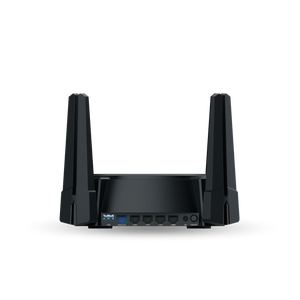
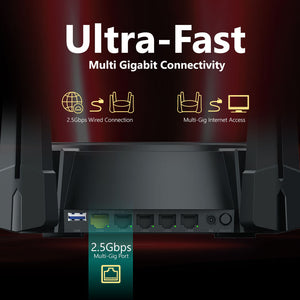
Each router provides 1 × 2.5gbe wan, 1 × 2.5gbe lan and 3 × gigabit lan. Match the Ethernet broadband hand-off, client interfaces and supported configuration to the intended installation.
Highlights
Wireless and Mesh
- AX6000 dual-band Wi-Fi 6.
- 2.4 GHz up to 1148 Mbps; 5 GHz up to 4804 Mbps.
- Mesh support with compatible equipment and firmware.
Wired Connections
- 1 × 2.5GbE WAN, 1 × 2.5GbE LAN and 3 × Gigabit LAN.
- USB 3.0 network file sharing.
- Broadband service and upstream equipment required separately.
Everyday Management
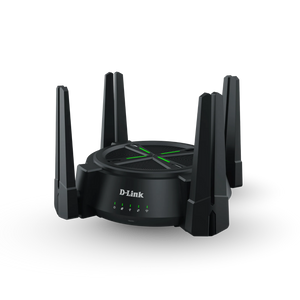
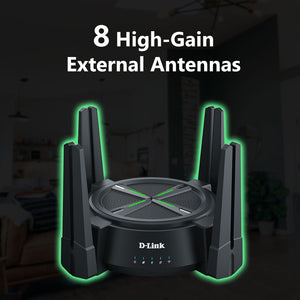
- 8 antennas.
- D-Link Wi-Fi Connect app and web management.
- Guest networks and supported access controls.
Key Features
Plan the Router or Pack around the Layout
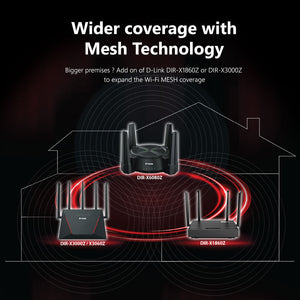
Choose the number of mesh points needed for the intended installation. Additional units can extend coverage but do not increase the broadband subscription speed. Walls, distance, interference and the connection between nodes determine useful performance, so assess the spaces where people actually use devices.
Give Supported Clients Wi-Fi 6 Capability
2.4 GHz up to 1148 Mbps; 5 GHz up to 4804 Mbps. Published wireless rates are theoretical. Actual throughput depends on the router, client support, signal, interference, network traffic and broadband service. Supported OFDMA and MU-MIMO functions help compatible devices share the wireless network efficiently.
Connect Important Devices by Ethernet
1 × 2.5GbE WAN, 1 × 2.5GbE LAN and 3 × Gigabit LAN provide wired connection choices. Use matching client interfaces and suitable cables when planning multi-gigabit links. End-to-end speed still depends on the service and receiving equipment.
Expand with Compatible Mesh Equipment
Use compatible D-Link mesh models and firmware for the intended main-router and node arrangement. The manufacturer identifies supported peer models; do not assume every device labelled mesh can be combined. Position nodes where their connecting path remains useful.
Keep Shared Access Easier to Manage
Guest access and network controls help organise household devices. Access control, guest networks and IP/MAC binding provide practical configuration tools. Use strong credentials and select security modes supported by the clients.
Share Files through USB
The USB 3.0 port is listed for supported network file sharing. This provides a convenient sharing option for compatible USB storage, but does not establish every filesystem or peripheral function, or the features of a dedicated NAS. Confirm the intended drive and firmware workflow before relying on it.
Summary
The DIR-X6080Z suits a home that wants AX6000 Wi-Fi 6 with useful Ethernet connections and compatible mesh expansion. Match the router or pack to the layout, check the supported equipment and choose suitable positions for everyday use.
Frequently Asked Questions
Does the Wireless Class Equal Internet Speed?
No. AX6000 describes combined theoretical wireless capability. Published wireless rates are theoretical. Actual throughput depends on the router, client support, signal, interference, network traffic and broadband service.
Which Wired Ports Does Each Router Have?
1 × 2.5GbE WAN, 1 × 2.5GbE LAN and 3 × Gigabit LAN. Use suitable cables and matching device interfaces for the available link speeds.
Can I Add Other Mesh Equipment?
Use models and firmware confirmed for the intended D-Link mesh arrangement. Additional units are sold separately; universal cross-brand compatibility is not established.
Does It Include a Fibre Terminal or Mobile SIM Modem?
No optical terminal or mobile SIM modem is specified. Use a suitable Ethernet broadband hand-off and the provider’s required configuration.
How Is the Network Managed?
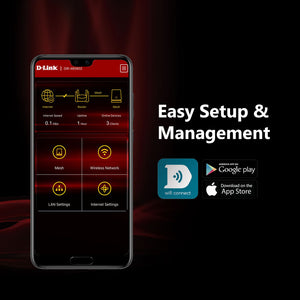
The D-Link Wi-Fi Connect app and web interface provide management.
What Can the USB Port Do?
The manufacturer lists USB 3.0 network file sharing. Confirm the intended storage device, filesystem and installed firmware before relying on a specific function.
사양
D-Link DIR-X6080Z AX6000 Multi-Gigabit Wi-Fi 6 Mesh Router
The DIR-X6080Z is a AX6000 Wi-Fi 6 router for a considered wired and wireless installation. The grouped specifications below separate connection capability, setup requirements and the practical controls relevant to the intended use. Choose compatible equipment and appropriate firmware or drivers. Published wireless rates are theoretical, while useful application throughput also depends on the service, host interfaces, traffic, signal and installation conditions.
| Specification | Details |
|---|---|
| Wireless and Mesh | |
| Class and Bands | AX6000 Wi-Fi 6; 2.4 GHz and 5 GHz |
| Published Link Rates | 2.4 GHz up to 1148 Mbps; 5 GHz up to 4804 Mbps |
| Antennas | 8 antennas |
| Mesh | EasyMesh with compatible models/firmware |
| Wireless Features | Supported OFDMA, MU-MIMO and beamforming; client capability applies |
| Hardware and Connections | |
| Ethernet | 1 × 2.5GbE WAN, 1 × 2.5GbE LAN and 3 × Gigabit LAN |
| Memory and Flash | 512 MB RAM; 128 MB flash |
| Processor | 2.0 GHz quad-core |
| USB | 1 × USB 3.0; supported network file sharing |
| Network and Management | |
| Operating Modes | Router and supported mesh-node operation |
| WAN Configuration | DHCP/Dynamic IP, static IP and PPPoE |
| IP Support | IPv4 and IPv6 |
| Security | WPA-PSK, WPA2-PSK and WPA/WPA2-PSK in current exact PDP |
| Access and Traffic | Access control, guest networks, IP/MAC binding and supported QoS |
| Forwarding and Services | Virtual servers/port forwarding, DMZ and UPnP |
| Management | D-Link Wi-Fi Connect app and web interface |
| Physical and Power | |
| Power Input | 12 V / 3 A |
| Device Dimensions and Weight | 267 × 267 × 167 mm; 680 g, following current exact PDP |
| Published Box Dimensions and Mass | 405 × 340 × 186 mm; 1260 g including device |
| Warranty | |
| Warranty | 3 years |