


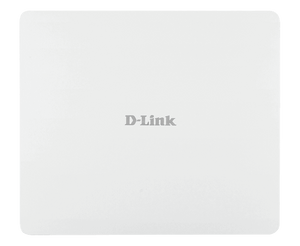


D-Link DAP-3666 AC1200 Outdoor PoE Access Point
Bring Managed Dual-Band Wi-Fi to Outdoor Spaces The D-Link DAP-3666 provides simultaneous 2.4 GHz and 5 GHz Wi-Fi in an IP68-rated outdoor enclosure. Its Wi-Fi 5 Wave 2 design combines two Gigabit Ethernet ports, internal antennas and IEEE 802.3af PoE input for installations that need manageable wireless access beyond an indoor room. Use standalone administration for an individual access point or a compatible Nuclias Connect installation to organise supported access points centrally. Careful placement, channel planning, appropriate cabling and correct weatherproof installation remain essential. This access point provides the wireless access layer; the router, firewall and internet service are separate parts of the network. Highlights Outdoor Dual-Band Wireless Wi-Fi 5 Wave 2 with up to 300 Mbps on 2.4 GHz and 866 Mbps on 5 GHz MU-MIMO, beamforming and band steering Internal 6 dBi and 7 dBi antennas Manageable Business Access Standalone or compatible Nuclias Connect management Guest-access and network-segmentation functions IEEE 802.11k/v/r roaming support Power and Installation 2 × Gigabit Ethernet ports; one accepts 802.3af PoE IP68-rated housing when correctly installed Wall and pole mounting options Key Features Plan Wireless Access for Outdoor Users Simultaneous dual-band radios allow compatible devices to use 2.4 GHz or 5 GHz according to their capabilities and the radio environment. The published rates of 300 Mbps and 866 Mbps describe wireless signal rates. They are not a guaranteed internet speed or the connection speed of one device across both bands. Assess the area, client equipment and interference before choosing access-point positions. Use Power and Data over the Network Cable IEEE 802.3af PoE lets a compatible power source supply the access point through one Ethernet connection. A second Gigabit Ethernet port provides an additional wired interface. Plan the correct cabling, power budget and network configuration; the second port is not advertised as a PoE output and should not be assumed to power another device. Choose Local or Central Administration Manage the access point through its administrative interface or bring supported units into Nuclias Connect using compatible firmware and a suitable host or controller. Nuclias Connect software is free to download, while hosting, controller hardware and network services remain separate requirements. It is distinct from D-Lite Cloud management and should not be treated as enrolment in the D-Lite platform. Separate Guest and Business Access SSID, VLAN and authentication features support a network design with appropriate separation for staff, guests or other users. Captive-portal and RADIUS integration can help manage access where configured. Actual functions depend on the firmware and chosen management mode; security also requires a suitable gateway, maintained software and a correctly planned network. Install the Weather-Resistant Housing Correctly The IP68 enclosure is intended for outdoor installation, with manufacturer-rated operation from −30 to 60 °C. Use the correct mounting hardware and seal the cable entries as instructed. Appropriate outdoor cable, drainage, earthing and surge protection remain important; a housing rating does not make exposed plugs, an unsuitable power supply or every installation weatherproof. Summary The DAP-3666 combines dual-band Wi-Fi 5, Gigabit Ethernet and standard 802.3af PoE in an outdoor enclosure. It suits a planned wireless access network that needs standalone administration or compatible Nuclias Connect management, with installation and protection selected for the actual site. Frequently Asked Questions Is the DAP-3666 an Outdoor Wi-Fi Access Point or a Long-Range Bridge?ExpandCollapse Its main role is providing managed dual-band outdoor Wi-Fi access. It also supports WDS and wireless-client modes, but it is different from a directional dish bridge designed around a long building-to-building link. Choose the hardware around the coverage area or link path required. Which PoE Standard Does It Use?ExpandCollapse The manufacturer specifies IEEE 802.3af PoE input. Use a compatible power source and appropriate Ethernet cabling. The second Gigabit port is an additional data interface, not a promised PoE output. Confirm the power accessories included with your particular order rather than assuming an injector is supplied. Does It Work with D-Lite Cloud?ExpandCollapse This model is documented for standalone administration and compatible Nuclias Connect management. It is not listed here as a D-Lite Cloud access point. Nuclias Connect software is free to download, but a suitable host or separately purchased controller is required for central management. Does IP68 Mean I Can Leave the Cable Connections Exposed?ExpandCollapse No. Correctly install and seal the cable entries, use suitable outdoor cabling and follow the manufacturer’s mounting instructions. The enclosure rating does not protect an open connector or unsuitable external power equipment. Site-appropriate earthing and surge protection should form part of the installation. Will Every Device Connect at 1200 Mbps?ExpandCollapse No. AC1200 describes the combined wireless class of the two radios. The published maxima are 300 Mbps on 2.4 GHz and 866 Mbps on 5 GHz. Each client uses the band and radio capabilities it supports; actual throughput depends on signal conditions, interference, traffic and the upstream network. Can It Provide Roaming and Guest Access?ExpandCollapse The manufacturer documents IEEE 802.11k/v/r roaming support and guest-access functions such as captive portal and network segmentation. A complete design still needs compatible clients, matching firmware, appropriate controller settings where used, and correct VLAN and gateway configuration. No access point alone guarantees seamless roaming for every device.
3005, Ubi Avenue 3, #01-88에서 픽업 가능
일반적으로 2~4일 후 준비 완료
D-Link DAP-3666 AC1200 Outdoor PoE Access Point
제품 설명
Bring Managed Dual-Band Wi-Fi to Outdoor Spaces
The D-Link DAP-3666 provides simultaneous 2.4 GHz and 5 GHz Wi-Fi in an IP68-rated outdoor enclosure. Its Wi-Fi 5 Wave 2 design combines two Gigabit Ethernet ports, internal antennas and IEEE 802.3af PoE input for installations that need manageable wireless access beyond an indoor room.
Use standalone administration for an individual access point or a compatible Nuclias Connect installation to organise supported access points centrally. Careful placement, channel planning, appropriate cabling and correct weatherproof installation remain essential. This access point provides the wireless access layer; the router, firewall and internet service are separate parts of the network.
Highlights
Outdoor Dual-Band Wireless
- Wi-Fi 5 Wave 2 with up to 300 Mbps on 2.4 GHz and 866 Mbps on 5 GHz
- MU-MIMO, beamforming and band steering
- Internal 6 dBi and 7 dBi antennas
Manageable Business Access
- Standalone or compatible Nuclias Connect management
- Guest-access and network-segmentation functions
- IEEE 802.11k/v/r roaming support
Power and Installation
- 2 × Gigabit Ethernet ports; one accepts 802.3af PoE
- IP68-rated housing when correctly installed
- Wall and pole mounting options
Key Features
Plan Wireless Access for Outdoor Users
Simultaneous dual-band radios allow compatible devices to use 2.4 GHz or 5 GHz according to their capabilities and the radio environment. The published rates of 300 Mbps and 866 Mbps describe wireless signal rates. They are not a guaranteed internet speed or the connection speed of one device across both bands. Assess the area, client equipment and interference before choosing access-point positions.
Use Power and Data over the Network Cable
IEEE 802.3af PoE lets a compatible power source supply the access point through one Ethernet connection. A second Gigabit Ethernet port provides an additional wired interface. Plan the correct cabling, power budget and network configuration; the second port is not advertised as a PoE output and should not be assumed to power another device.
Choose Local or Central Administration
Manage the access point through its administrative interface or bring supported units into Nuclias Connect using compatible firmware and a suitable host or controller. Nuclias Connect software is free to download, while hosting, controller hardware and network services remain separate requirements. It is distinct from D-Lite Cloud management and should not be treated as enrolment in the D-Lite platform.
Separate Guest and Business Access
SSID, VLAN and authentication features support a network design with appropriate separation for staff, guests or other users. Captive-portal and RADIUS integration can help manage access where configured. Actual functions depend on the firmware and chosen management mode; security also requires a suitable gateway, maintained software and a correctly planned network.
Install the Weather-Resistant Housing Correctly
The IP68 enclosure is intended for outdoor installation, with manufacturer-rated operation from −30 to 60 °C. Use the correct mounting hardware and seal the cable entries as instructed. Appropriate outdoor cable, drainage, earthing and surge protection remain important; a housing rating does not make exposed plugs, an unsuitable power supply or every installation weatherproof.
Summary
The DAP-3666 combines dual-band Wi-Fi 5, Gigabit Ethernet and standard 802.3af PoE in an outdoor enclosure. It suits a planned wireless access network that needs standalone administration or compatible Nuclias Connect management, with installation and protection selected for the actual site.
Frequently Asked Questions
Is the DAP-3666 an Outdoor Wi-Fi Access Point or a Long-Range Bridge?
Its main role is providing managed dual-band outdoor Wi-Fi access. It also supports WDS and wireless-client modes, but it is different from a directional dish bridge designed around a long building-to-building link. Choose the hardware around the coverage area or link path required.
Which PoE Standard Does It Use?
The manufacturer specifies IEEE 802.3af PoE input. Use a compatible power source and appropriate Ethernet cabling. The second Gigabit port is an additional data interface, not a promised PoE output. Confirm the power accessories included with your particular order rather than assuming an injector is supplied.
Does It Work with D-Lite Cloud?
This model is documented for standalone administration and compatible Nuclias Connect management. It is not listed here as a D-Lite Cloud access point. Nuclias Connect software is free to download, but a suitable host or separately purchased controller is required for central management.
Does IP68 Mean I Can Leave the Cable Connections Exposed?
No. Correctly install and seal the cable entries, use suitable outdoor cabling and follow the manufacturer’s mounting instructions. The enclosure rating does not protect an open connector or unsuitable external power equipment. Site-appropriate earthing and surge protection should form part of the installation.
Will Every Device Connect at 1200 Mbps?
No. AC1200 describes the combined wireless class of the two radios. The published maxima are 300 Mbps on 2.4 GHz and 866 Mbps on 5 GHz. Each client uses the band and radio capabilities it supports; actual throughput depends on signal conditions, interference, traffic and the upstream network.
Can It Provide Roaming and Guest Access?
The manufacturer documents IEEE 802.11k/v/r roaming support and guest-access functions such as captive portal and network segmentation. A complete design still needs compatible clients, matching firmware, appropriate controller settings where used, and correct VLAN and gateway configuration. No access point alone guarantees seamless roaming for every device.
사양
D-Link DAP-3666 AC1200 Outdoor PoE Access Point
The DAP-3666 is a simultaneous dual-band Wi-Fi 5 Wave 2 access point for outdoor installations. It combines 300 Mbps and 866 Mbps maximum radio rates with two Gigabit Ethernet interfaces and IEEE 802.3af PoE input. The IP68 housing supports wall or pole installation with correctly sealed cable entries. Management can be standalone or through a compatible Nuclias Connect deployment, with the required host, firmware and wider network configuration planned separately.
| Specification | Details |
|---|---|
| Wireless and Antennas | |
| Wireless Standards | IEEE 802.11a/b/g/n/ac Wave 2; simultaneous 2.4 GHz and 5 GHz |
| Maximum Signal Rates | 2.4 GHz: up to 300 Mbps; 5 GHz: up to 866 Mbps |
| Antennas | Four internal antennas; manufacturer-listed gains 6 dBi at 2.4 GHz and 7 dBi at 5 GHz |
| Radio Functions | MU-MIMO, beamforming, band steering and wireless scheduling |
| Operating Frequencies | 2.4–2.4835 GHz and regional 5 GHz ranges; permitted bands/channels depend on the country configuration |
| Maximum Output Power | Up to 26 dBm per band; regional regulations apply |
| Network Interfaces and Modes | |
| Ethernet | 2 × Gigabit LAN; one supports IEEE 802.3af PoE input |
| Ethernet Standards | IEEE 802.3i/u/ab; IEEE 802.3az Energy-Efficient Ethernet |
| Operating Modes | Access Point, WDS, WDS with Access Point and Wireless Client |
| Roaming | IEEE 802.11k/v/r support; compatible clients and configuration required |
| Hotspot | Passpoint Hotspot 2.0 support |
| Management and Access Controls | |
| Management Platform | Standalone administration or compatible D-Link Nuclias Connect |
| Administration Interfaces | Web administration; HTTP/SSL and SSH/Telnet as documented for the installed firmware |
| Central Management Requirements | Compatible firmware and a suitable Nuclias Connect software host or separate controller |
| SSID and Network Segmentation | Up to eight SSIDs per radio; VLAN and wireless scheduling support |
| Access Security | Personal and enterprise wireless encryption; MAC access control, SSID broadcast control and internal RADIUS support |
| Guest Access | Captive portal with authentication integration; actual functions depend on firmware and management mode |
| Traffic Controls | WMM QoS, load balancing and traffic control |
| Power and Installation | |
| Power Input | IEEE 802.3af PoE; use compatible power equipment |
| Maximum Consumption | 10.5 W |
| Outdoor Housing | IP68; cable entries must be correctly sealed |
| Mounting | Wall and pole mounting kits documented by the manufacturer |
| PoE Output | Not specified; do not treat the second Ethernet port as a powered output |
| Physical and Environment | |
| Dimensions | 277 × 240 × 50 mm |
| Device Weight | 895 g without mounting base |
| Operating Temperature | −30 to 60 °C |
| Storage Temperature | −30 to 65 °C |
| Operating Humidity | 10–90% RH, non-condensing |
| Storage Humidity | 5–95% RH, non-condensing |
| Certifications | Manufacturer lists FCC, IC, CE, C-Tick, UL and IP68; regional compliance applies |
| Performance Conditions | Signal rates are maximum physical rates. Client capabilities, interference, materials, loading and network capacity affect actual results |