







Antigravity A1 Follow Me Accessory Kit
Put A1 Follow Me Control on Your Wrist Give your existing Antigravity A1 a different way to capture the day. The Antigravity A1 Follow Me Accessory Kit brings together the Watch Remote, Ring Remote and supporting accessories for wearable tracking and intuitive framing. Check the live view on your wrist, start capturing and adjust the aircraft position without holding a conventional controller. The kit is designed for A1 owners who want to move from immersive goggles flight to a wearable filming experience. It includes the wearable remotes and accessories; the A1 aircraft and flight battery are sold separately. Highlights Watch Remote with a live preview and essential A1 flight and capture controls. GPS-assisted tracking combined with the aircraft visual tracking system. Ring Remote for intuitive Drag-to-Fly positioning. Access to supported Sky Genie templates from the Watch Remote. Full-Coverage Propeller Guards, Lens Guard and Crossbody Bag included. Compatible with an existing Antigravity A1; Vision Goggles are not required for Follow Me operation. Key Features Keep the Action Within Reach The Watch Remote puts the live preview, framing and recording status on a 1.72-inch display. Its built-in positioning works alongside visual tracking to help A1 follow the wearer, while touchscreen controls allow you to refine the drone position. It is a practical alternative when you want to remain part of the scene rather than keep both hands on sticks. Shape the Shot with a Gesture Wear the Ring Remote to use supported Drag-to-Fly movements and bring the camera position into your composition. Switch to supported Sky Genie templates such as Orbit and Fly Away from the watch for a different viewpoint. The aircraft records the panoramic scene, leaving room to choose your final framing in the Antigravity app or Studio after the flight. A Coordinated Accessory Set Four Full-Coverage Propeller Guards form one complete set around the A1 propellers. A Lens Guard and Crossbody Bag support preparation and transport, while the wrist strap, watch base, ring charging clip and USB-C cable complete the wearable setup. Follow the installation sequence before starting a flight. Plan for the Guarded Configuration Installing the guards takes the aircraft above 249 g and changes its operating configuration. Check local flying requirements and the current A1 instructions before use. Tracking, propeller guards and obstacle sensing assist the operator within their limits; suitable conditions, a clear route and active supervision remain essential. Summary Antigravity A1 Follow Me Accessory Kit extends an existing A1 with wrist-based control, a live preview and gesture positioning. Choose it to add the wearable experience to your current aircraft, with the key protection, carrying and charging accessories supplied together. Frequently Asked Questions Does the Follow Me Accessory Kit Include an A1 Drone?ExpandCollapse No. This kit adds wearable controls and supporting accessories to an existing Antigravity A1. It does not include a drone, flight battery, Vision Goggles, Charging Hub or Quick Reader. The complete A1 Follow Me Bundle is a separate drone bundle. Can I Use It with an A1 I Already Own?ExpandCollapse Yes. Antigravity confirms that the Watch Remote and Ring Remote can pair with an existing A1, including an aircraft purchased in a Standard or Explorer Bundle. Follow the current setup instructions and use compatible firmware. These remotes are designed for A1, not other drone models. Do I Need to Wear Vision Goggles?ExpandCollapse No. Follow Me operation uses the Watch Remote for the live preview, tracking and essential controls, with the Ring Remote for supported gestures. The Watch Remote is a drone accessory with its own interface; it is not an app for your existing smartwatch. What Does the Ring Remote Do?ExpandCollapse The Ring Remote enables Drag-to-Fly gestures to adjust the A1 position and framing. Antigravity states gesture control from up to 10 m in suitable conditions. Obstructions and wireless interference reduce the effective range. Keep the aircraft under the supervision required where you fly. What Changes When the Propeller Guards Are Installed?ExpandCollapse The Full-Coverage Propeller Guards enclose the propellers and increase takeoff weight above 249 g. Weight, endurance and flying requirements change with the installed equipment. Check the requirements for your location and follow the current flight instructions. Guards and obstacle sensing do not make the aircraft collision-proof.
Pickup available at 3005, Ubi Avenue 3, #01-88
일반적으로 2~4일 후 준비 완료
Antigravity A1 Follow Me Accessory Kit
제품 설명
Put A1 Follow Me Control on Your Wrist
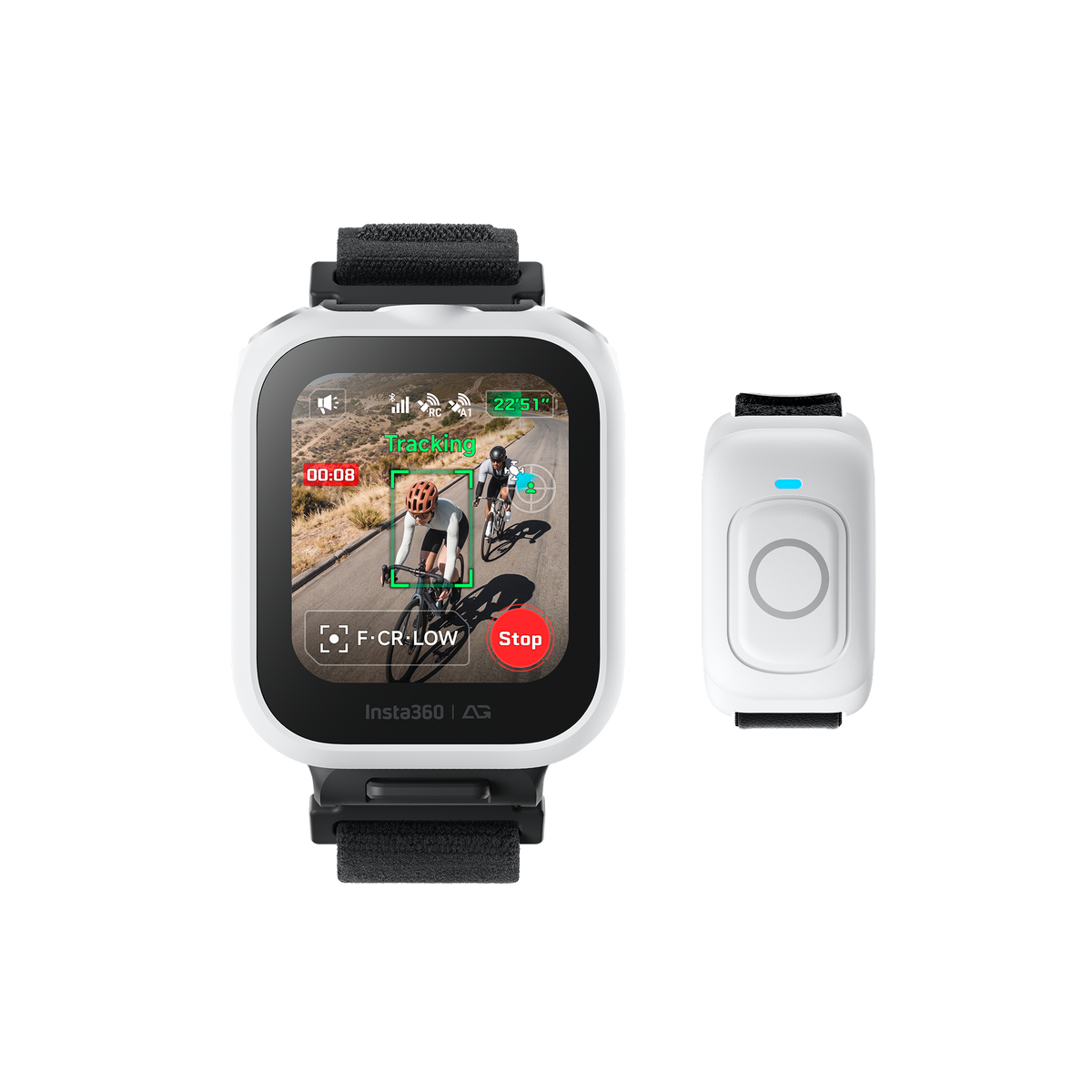
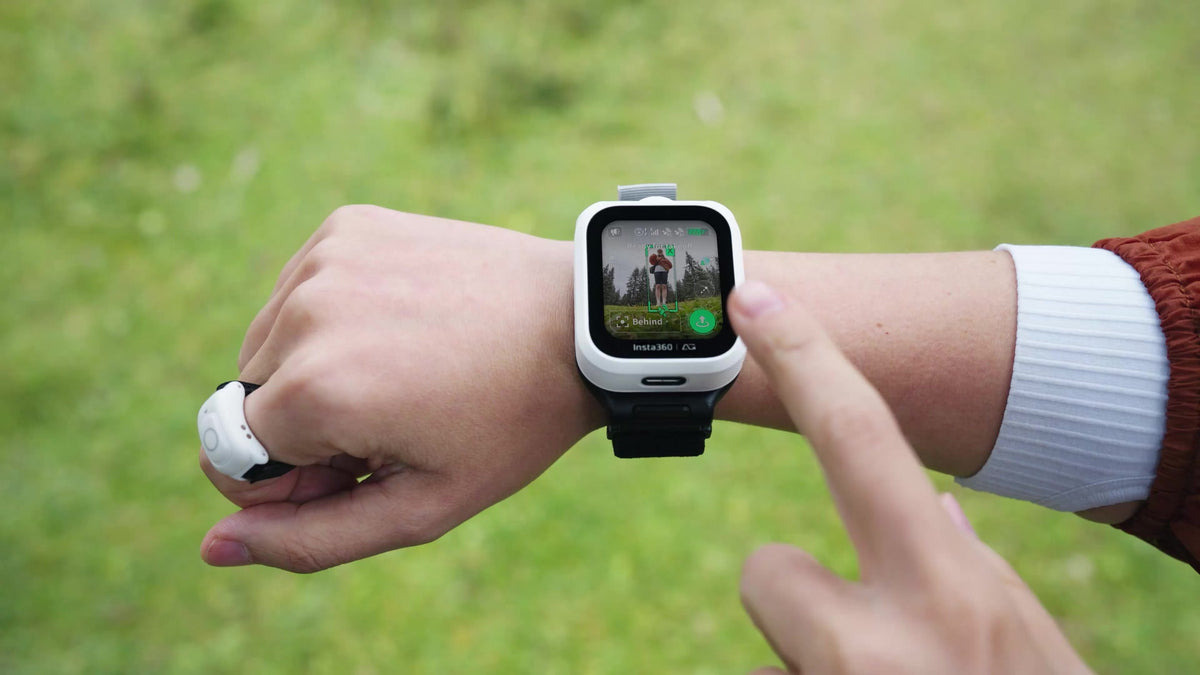
Give your existing Antigravity A1 a different way to capture the day. The Antigravity A1 Follow Me Accessory Kit brings together the Watch Remote, Ring Remote and supporting accessories for wearable tracking and intuitive framing. Check the live view on your wrist, start capturing and adjust the aircraft position without holding a conventional controller.
The kit is designed for A1 owners who want to move from immersive goggles flight to a wearable filming experience. It includes the wearable remotes and accessories; the A1 aircraft and flight battery are sold separately.
Highlights
- Watch Remote with a live preview and essential A1 flight and capture controls.
- GPS-assisted tracking combined with the aircraft visual tracking system.
- Ring Remote for intuitive Drag-to-Fly positioning.
- Access to supported Sky Genie templates from the Watch Remote.
- Full-Coverage Propeller Guards, Lens Guard and Crossbody Bag included.
- Compatible with an existing Antigravity A1; Vision Goggles are not required for Follow Me operation.
Key Features
Keep the Action Within Reach
The Watch Remote puts the live preview, framing and recording status on a 1.72-inch display. Its built-in positioning works alongside visual tracking to help A1 follow the wearer, while touchscreen controls allow you to refine the drone position. It is a practical alternative when you want to remain part of the scene rather than keep both hands on sticks.
Shape the Shot with a Gesture
Wear the Ring Remote to use supported Drag-to-Fly movements and bring the camera position into your composition. Switch to supported Sky Genie templates such as Orbit and Fly Away from the watch for a different viewpoint. The aircraft records the panoramic scene, leaving room to choose your final framing in the Antigravity app or Studio after the flight.
A Coordinated Accessory Set
Four Full-Coverage Propeller Guards form one complete set around the A1 propellers. A Lens Guard and Crossbody Bag support preparation and transport, while the wrist strap, watch base, ring charging clip and USB-C cable complete the wearable setup. Follow the installation sequence before starting a flight.
Plan for the Guarded Configuration
Installing the guards takes the aircraft above 249 g and changes its operating configuration. Check local flying requirements and the current A1 instructions before use. Tracking, propeller guards and obstacle sensing assist the operator within their limits; suitable conditions, a clear route and active supervision remain essential.
Summary
Antigravity A1 Follow Me Accessory Kit extends an existing A1 with wrist-based control, a live preview and gesture positioning. Choose it to add the wearable experience to your current aircraft, with the key protection, carrying and charging accessories supplied together.
Frequently Asked Questions
Does the Follow Me Accessory Kit Include an A1 Drone?
No. This kit adds wearable controls and supporting accessories to an existing Antigravity A1. It does not include a drone, flight battery, Vision Goggles, Charging Hub or Quick Reader. The complete A1 Follow Me Bundle is a separate drone bundle.
Can I Use It with an A1 I Already Own?
Yes. Antigravity confirms that the Watch Remote and Ring Remote can pair with an existing A1, including an aircraft purchased in a Standard or Explorer Bundle. Follow the current setup instructions and use compatible firmware. These remotes are designed for A1, not other drone models.
Do I Need to Wear Vision Goggles?
No. Follow Me operation uses the Watch Remote for the live preview, tracking and essential controls, with the Ring Remote for supported gestures. The Watch Remote is a drone accessory with its own interface; it is not an app for your existing smartwatch.
What Does the Ring Remote Do?
The Ring Remote enables Drag-to-Fly gestures to adjust the A1 position and framing. Antigravity states gesture control from up to 10 m in suitable conditions. Obstructions and wireless interference reduce the effective range. Keep the aircraft under the supervision required where you fly.
What Changes When the Propeller Guards Are Installed?
The Full-Coverage Propeller Guards enclose the propellers and increase takeoff weight above 249 g. Weight, endurance and flying requirements change with the installed equipment. Check the requirements for your location and follow the current flight instructions. Guards and obstacle sensing do not make the aircraft collision-proof.
사양
Antigravity A1 Follow Me Accessory Kit
Antigravity A1 Follow Me Accessory Kit adds wearable controls to an existing A1 aircraft. The Watch Remote provides a live preview and essential controls, while the Ring Remote enables supported gesture positioning. The package also includes the full-coverage guard set, carrying accessories and charging fittings. These specifications describe the wearable remotes and kit contents. An A1 aircraft and flight battery are required separately, and the guarded flight configuration has its own weight, endurance and operating limits.
| Compatibility and Operation | |
|---|---|
| Supported Aircraft | Antigravity A1; compatible with an existing A1 aircraft |
| Equipment Required | A1 aircraft and flight battery sold separately; Vision Goggles not required for Follow Me operation |
| Wearable Controls | Watch Remote with live preview, touchscreen controls, GPS-assisted tracking and supported Sky Genie templates; Ring Remote with Drag-to-Fly gestures |
| Gesture Control Distance | Up to 10 m in an open area without obstruction or interference; actual range varies |
| Guarded Configuration | Install and use the Full-Coverage Propeller Guards as directed; takeoff weight increases above 249 g |
| Watch Remote Display and Hardware | |
| Display | 1.72-inch LCD; 356 × 400 pixels; 550 nits; 30 Hz |
| Dimensions and Net Weight | 42 × 49 × 16 mm (L × W × H); 44.7 g |
| Storage | Approximately 8 GB total; approximately 5.27 GB available after system storage |
| Positioning and Sensors | GPS, BeiDou and Galileo; six-axis gyroscope and compass |
| Connectivity and Audio | Bluetooth 5.4 / BLE; one speaker; microphone sensitivity −39 dBV, maximum SPL 130 dB, SNR 70 dB, frequency response 100 Hz–20 kHz |
| Watch Remote Power and Environment | |
| Battery and Charging | 950 mAh; USB-C; 5 V / 1 A |
| Battery Life | More than 5 hours in tracking mode; more than 3 days in standby |
| Temperature | Operating −20–40°C; charging 0–45°C |
| Water Resistance | IP67 |
| Ring Remote | |
| Fit and Net Weight | Finger circumference 46–70 mm; approximately 8.2 g |
| Battery | 10 mAh; 0.037 Wh; more than 5 hours of operation |
| Charging | Included charging clip; 5 V / 1 A; charging temperature 0–45°C |
| Wireless | BLE 5.3; 2400–2483.5 MHz; transmitter power below 0 dBm EIRP |
| Water Resistance | IP67 |
| Package and Warranty | |
| Remotes and Protection | 1 × Watch Remote; 1 × Ring Remote; 4 × Full-Coverage Propeller Guards (one set); 1 × Lens Guard |
| Carrying and Charging Accessories | 1 × Crossbody Bag; 1 × Wrist Strap; 1 × Remote Watch Base; 1 × Ring Charging Clip; 1 × USB-C Charge Cable; manuals |
| Sold Separately | A1 drone, flight battery, Vision Goggles, Charging Hub and Quick Reader |
| Warranty | Watch Remote 1 year; Ring Remote 6 months; Full-Coverage Propeller Guards 3 months |
Battery life and wireless distance vary with use, conditions and interference. Water resistance applies to the wearable remotes, not the aircraft or the entire kit. Guard installation changes takeoff weight and flight performance. Follow the current manual and requirements for your flying location.