


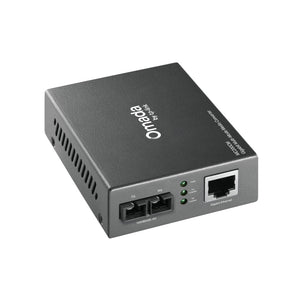


TP-Link MC200CM Gigabit Multi-Mode Media Converter
Connect Gigabit Ethernet to the multimode backbone The MC200CM brings copper Gigabit Ethernet onto a compatible multimode fibre link through integrated 850nm optics. It suits links within a building or between nearby network locations where the installed fibre and distance meet the optical specification. Separate transmit and receive strands use duplex SC connections, helping you match the converter to an existing structured fibre installation. Highlights The correct optical connection 50/125µm or 62.5/125µm multimode fibre; duplex sc/upc over two fibre strands. Up to 550m on 50/125µm fibre or 220m on 62.5/125µm fibre. Optical wavelengths: 850nm. Ethernet with a defined purpose One 10/100/1000Mbps RJ45 port with auto MDI/MDIX; copper Ethernet up to 100m with suitable cabling. Unmanaged media conversion without an Omada controller. Ready for a planned installation External power adapter included. Choose matching optics, fibre and suitable power at both ends. Key Features Choose the optical connection first The manufacturer specifies up to 550m with suitable 50/125µm multimode fibre or up to 220m with suitable 62.5/125µm fibre. The installed cable, connector condition and compatible far-end optics must meet the link requirements; these figures are not a guarantee for every existing fibre run. Match the fibre route to the specification 50/125µm or 62.5/125µm multimode fibre; duplex sc/upc over two fibre strands. Up to 550m on 50/125µm fibre or 220m on 62.5/125µm fibre. Optical wavelengths: 850nm. Check the installed fibre, patch leads, connectors and optical loss before choosing the final connection. Published distance limits assume a suitable optical path; damaged or poorly terminated fibre can prevent a link within that distance. Connect the copper equipment locally One 10/100/1000Mbps RJ45 port with auto MDI/MDIX; copper Ethernet up to 100m with suitable cabling. The Gigabit fibre rate remains the optical link limit. The converter does not increase the speed of an internet service or a slower attached device. Keep a straightforward Ethernet connection Plug-and-play media conversion does not require a local configuration account. This is an unmanaged converter: it is not an Omada controller, managed switch or device adopted for Omada SDN configuration. Apply VLAN, security and network policy through the appropriate connected network equipment. Plan power at both ends Use the supplied external adapter and a suitable power point for each converter. The RJ45 interface carries Ethernet data; this model does not supply PoE to an IP camera or access point. If a powered device is required at the far end, provide an appropriate PoE switch, injector or its specified local power supply. Install and maintain the complete link Label the transmit and receive paths or the selected optical modules clearly. Keep connectors clean, protect the fibre bend radius and allow ventilation around the enclosure. Link/activity indicators help identify a connection fault; suitable backup power for the network equipment can support a planned continuity arrangement. Summary Choose the MC200CM when its Gigabit multimode connection matches the network design. Check the matching far-end equipment and fibre route. With the correct optical standard, clean connections and power available at each end, it provides a compact way to extend Ethernet beyond the local copper run. Frequently Asked Questions How far can the multimode link run?ExpandCollapse The manufacturer specifies up to 550m with suitable 50/125µm multimode fibre or up to 220m with suitable 62.5/125µm fibre. The installed cable, connector condition and compatible far-end optics must meet the link requirements; these figures are not a guarantee for every existing fibre run. Does the RJ45 port power a camera or access point?ExpandCollapse No. This converter does not provide PoE. Use an appropriate PoE switch or injector for a compatible powered device, or provide the device’s specified local power supply. Do I need an Omada controller?ExpandCollapse No. This is an unmanaged plug-and-play media converter. It does not adopt into Omada SDN for configuration; manage the wider network through the appropriate gateway and managed switching. What is supplied with each converter?ExpandCollapse The converter, external power adapter and installation guide are included. A matching far-end converter or optical endpoint and suitable fibre cables are selected separately. What should I check before connecting the fibre?ExpandCollapse Match the optical Ethernet speed, fibre type, wavelengths and connector format at both ends. For a duplex link, connect transmit to receive and receive to transmit. Clean the connectors and verify the installed cable is suitable for the required distance.
追加商品 (1)
3005, Ubi Avenue 3, #01-88で受け取り可能
通常2〜4日で準備が完了します
TP-Link MC200CM Gigabit Multi-Mode Media Converter
商品説明
Connect Gigabit Ethernet to the multimode backbone
The MC200CM brings copper Gigabit Ethernet onto a compatible multimode fibre link through integrated 850nm optics. It suits links within a building or between nearby network locations where the installed fibre and distance meet the optical specification. Separate transmit and receive strands use duplex SC connections, helping you match the converter to an existing structured fibre installation.
Highlights
The correct optical connection
- 50/125µm or 62.5/125µm multimode fibre; duplex sc/upc over two fibre strands. Up to 550m on 50/125µm fibre or 220m on 62.5/125µm fibre. Optical wavelengths: 850nm.
Ethernet with a defined purpose
- One 10/100/1000Mbps RJ45 port with auto MDI/MDIX; copper Ethernet up to 100m with suitable cabling.
- Unmanaged media conversion without an Omada controller.
Ready for a planned installation
- External power adapter included.
- Choose matching optics, fibre and suitable power at both ends.
Key Features
Choose the optical connection first
The manufacturer specifies up to 550m with suitable 50/125µm multimode fibre or up to 220m with suitable 62.5/125µm fibre. The installed cable, connector condition and compatible far-end optics must meet the link requirements; these figures are not a guarantee for every existing fibre run.
Match the fibre route to the specification
50/125µm or 62.5/125µm multimode fibre; duplex sc/upc over two fibre strands. Up to 550m on 50/125µm fibre or 220m on 62.5/125µm fibre. Optical wavelengths: 850nm. Check the installed fibre, patch leads, connectors and optical loss before choosing the final connection. Published distance limits assume a suitable optical path; damaged or poorly terminated fibre can prevent a link within that distance.
Connect the copper equipment locally
One 10/100/1000Mbps RJ45 port with auto MDI/MDIX; copper Ethernet up to 100m with suitable cabling. The Gigabit fibre rate remains the optical link limit. The converter does not increase the speed of an internet service or a slower attached device.
Keep a straightforward Ethernet connection
Plug-and-play media conversion does not require a local configuration account. This is an unmanaged converter: it is not an Omada controller, managed switch or device adopted for Omada SDN configuration. Apply VLAN, security and network policy through the appropriate connected network equipment.
Plan power at both ends
Use the supplied external adapter and a suitable power point for each converter. The RJ45 interface carries Ethernet data; this model does not supply PoE to an IP camera or access point. If a powered device is required at the far end, provide an appropriate PoE switch, injector or its specified local power supply.
Install and maintain the complete link
Label the transmit and receive paths or the selected optical modules clearly. Keep connectors clean, protect the fibre bend radius and allow ventilation around the enclosure. Link/activity indicators help identify a connection fault; suitable backup power for the network equipment can support a planned continuity arrangement.
Summary
Choose the MC200CM when its Gigabit multimode connection matches the network design. Check the matching far-end equipment and fibre route. With the correct optical standard, clean connections and power available at each end, it provides a compact way to extend Ethernet beyond the local copper run.
Frequently Asked Questions
How far can the multimode link run?
The manufacturer specifies up to 550m with suitable 50/125µm multimode fibre or up to 220m with suitable 62.5/125µm fibre. The installed cable, connector condition and compatible far-end optics must meet the link requirements; these figures are not a guarantee for every existing fibre run.
Does the RJ45 port power a camera or access point?
No. This converter does not provide PoE. Use an appropriate PoE switch or injector for a compatible powered device, or provide the device’s specified local power supply.
Do I need an Omada controller?
No. This is an unmanaged plug-and-play media converter. It does not adopt into Omada SDN for configuration; manage the wider network through the appropriate gateway and managed switching.
What is supplied with each converter?
The converter, external power adapter and installation guide are included. A matching far-end converter or optical endpoint and suitable fibre cables are selected separately.
What should I check before connecting the fibre?
Match the optical Ethernet speed, fibre type, wavelengths and connector format at both ends. For a duplex link, connect transmit to receive and receive to transmit. Clean the connectors and verify the installed cable is suitable for the required distance.
仕様
TP-Link MC200CM Gigabit Multi-Mode Media Converter
The TP-Link MC200CM provides copper Ethernet to optical Ethernet conversion for a defined fibre connection. The integrated optics use 850nm with duplex sc/upc over two fibre strands. The table separates the copper connection, optical requirements and installation conditions so that the equipment at both ends can be matched correctly. Check the cable type, optical standard, available power and required distance before installation. Link performance depends on the complete connection.
| Specification | Details |
|---|---|
| Connections | |
| Copper Ethernet | One 10/100/1000Mbps RJ45 port with auto MDI/MDIX; copper Ethernet up to 100m with suitable cabling. |
| Fibre interface | One transmit and one receive SC/UPC connection forming a single Gigabit fibre link. |
| Optical rate | 1000Mbps. |
| PoE | No PoE input or output; external DC adapter required. |
| Optical Requirements | |
| Fibre type | 50/125µm or 62.5/125µm multimode fibre. |
| Optical wavelengths | 850nm. |
| Maximum fibre distance | Up to 550m on 50/125µm fibre or 220m on 62.5/125µm fibre. |
| Link arrangement | Duplex fibre link with separate transmit and receive strands; match the far-end optical standard. |
| Operation | |
| Management | Unmanaged plug-and-play media converter; no Omada SDN adoption. |
| Ethernet functions | Auto MDI/MDIX and supported Ethernet flow control. |
| Indicators | Power and link/activity indicators. |
| Power and Installation | |
| Power supply | External power adapter included; use the input rating marked on the supplied unit. |
| Maximum power consumption | 1.66W manufacturer figure; actual consumption depends on operation. |
| Dimensions | 94.5 × 73 × 27 mm (W × D × H). |
| Operating conditions | 0°C to 50°C; 10% to 90% RH, non-condensing. |
| Storage conditions | −40°C to 70°C; 5% to 90% RH, non-condensing. |
| Chassis option | Compatible TL-MC1400 chassis for a planned rack installation; chassis sold separately. |
| Package and Warranty | |
| Included equipment | Media converter, power adapter and installation guide; fibre cables separate. |
| Warranty | 5 years. |
追加商品

