



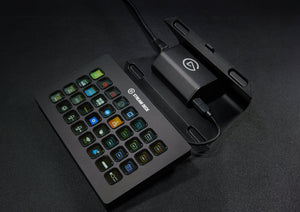
Elgato Stream Deck Network Dock
Place your Stream Deck where the operators need it Elgato Stream Deck Network Dock connects a compatible Stream Deck to a wired Ethernet network. It is useful at a standing position, in a rack or on the other side of a studio when a short direct USB run to the host computer is impractical. A compatible PoE switch or injector can provide power over the Ethernet cable. Highlights Wired deployment Wired Ethernet deployment for supported Stream Deck models Power over Ethernet IEEE 802.3af Power over Ethernet Alternative power and mounting USB-C power option for standard Ethernet networks Includes mounting hardware and short USB-C cable Key Features Place the controller away from the host Network Dock gives supported Stream Deck controllers a wired Ethernet connection, so the operator position need not sit beside the host computer. This is useful at a production desk, training room or control point where you want a clean installation. Check that the host and dock can reach each other across the intended network. Use PoE where the network supports it An IEEE 802.3af PoE connection can carry network and power over the same Ethernet cable. On a non-PoE network, use the supported USB-C power arrangement alongside the Ethernet connection. Check the switch or injector's power budget before planning multiple operator positions. Check the exact controller and port The dock works with selected Stream Deck models, including supported Module sizes and Stream Deck XL. An approved controller with an attached USB-A cable needs a suitable USB-A to USB-C data adapter. Check the exact revision and any hub or XLR Dock in the installation against Elgato's compatibility list. Give the installation a tidy cable route The included mounting parts and short USB-C cable help keep the dock near the controller. Pick a location with space for the Ethernet and USB leads without bending or pulling at the ports. Mounting the dock close to the controller makes later service easier while the main cable heads back to the network. Plan the software connection too The dock extends where a compatible controller can sit. Use the supported Stream Deck software or production integration for the actions you intend to run. Check how that software connects over your network and test the operator workflow before mounting the hardware in its final position. Summary Choose Network Dock when the supported Stream Deck belongs at an operator position and the host belongs elsewhere. It is particularly useful when a single Ethernet run can carry power as well as data. Check the exact controller revision, cable and supported software first so the installed dock serves the controls you actually use. Frequently Asked Questions Is this a Stream Deck or an accessory?ExpandCollapse It is the dock for a separate compatible Stream Deck. Choose the control surface and host software for your workflow. Do I need a PoE switch?ExpandCollapse PoE is optional. You can use a compatible 802.3af switch or injector, or standard Ethernet with a separate suitable USB-C PD supply. Can I use Stream Deck Studio with it?ExpandCollapse Stream Deck Studio has its own network interface and is excluded from Network Dock compatibility. Can I use the dock on Wi-Fi?ExpandCollapse The dock uses wired Ethernet. Use the host software and network configuration appropriate for your setup. Does the included USB-C cable go to the computer?ExpandCollapse The short included cable connects the Stream Deck to the dock. The control system communicates with the dock over Ethernet.
Produk Tambahan (1)
Pengambilan tersedia di 3005, Ubi Avenue 3, #01-88
Biasanya siap dalam 2-4 hari kerja (tidak termasuk hari libur)
Elgato Stream Deck Network Dock
Deskripsi
Place your Stream Deck where the operators need it
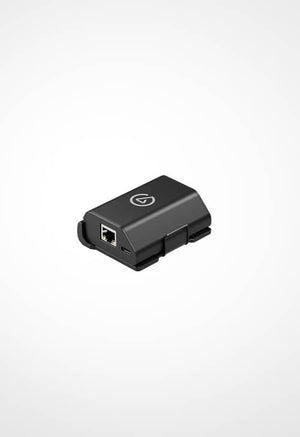
Elgato Stream Deck Network Dock connects a compatible Stream Deck to a wired Ethernet network. It is useful at a standing position, in a rack or on the other side of a studio when a short direct USB run to the host computer is impractical. A compatible PoE switch or injector can provide power over the Ethernet cable.
Highlights
Wired deployment
- Wired Ethernet deployment for supported Stream Deck models
Power over Ethernet
- IEEE 802.3af Power over Ethernet
Alternative power and mounting
- USB-C power option for standard Ethernet networks
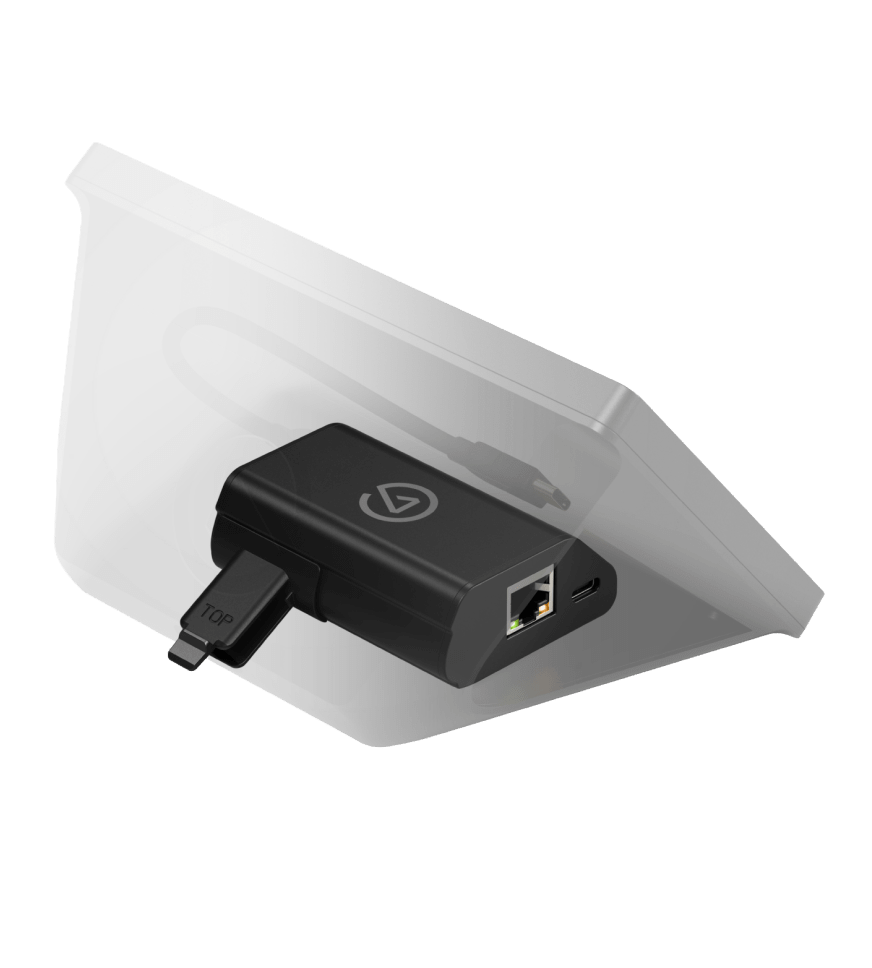
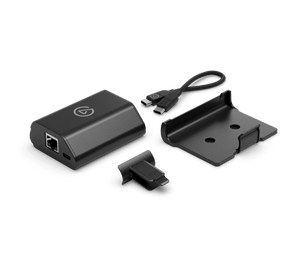
- Includes mounting hardware and short USB-C cable
Key Features
Place the controller away from the host
Network Dock gives supported Stream Deck controllers a wired Ethernet connection, so the operator position need not sit beside the host computer. This is useful at a production desk, training room or control point where you want a clean installation. Check that the host and dock can reach each other across the intended network.
Use PoE where the network supports it
An IEEE 802.3af PoE connection can carry network and power over the same Ethernet cable. On a non-PoE network, use the supported USB-C power arrangement alongside the Ethernet connection. Check the switch or injector's power budget before planning multiple operator positions.
Check the exact controller and port
The dock works with selected Stream Deck models, including supported Module sizes and Stream Deck XL. An approved controller with an attached USB-A cable needs a suitable USB-A to USB-C data adapter. Check the exact revision and any hub or XLR Dock in the installation against Elgato's compatibility list.
Give the installation a tidy cable route
The included mounting parts and short USB-C cable help keep the dock near the controller. Pick a location with space for the Ethernet and USB leads without bending or pulling at the ports. Mounting the dock close to the controller makes later service easier while the main cable heads back to the network.
Plan the software connection too
The dock extends where a compatible controller can sit. Use the supported Stream Deck software or production integration for the actions you intend to run. Check how that software connects over your network and test the operator workflow before mounting the hardware in its final position.
Summary
Choose Network Dock when the supported Stream Deck belongs at an operator position and the host belongs elsewhere. It is particularly useful when a single Ethernet run can carry power as well as data. Check the exact controller revision, cable and supported software first so the installed dock serves the controls you actually use.
Frequently Asked Questions
Is this a Stream Deck or an accessory?
It is the dock for a separate compatible Stream Deck. Choose the control surface and host software for your workflow.
Do I need a PoE switch?
PoE is optional. You can use a compatible 802.3af switch or injector, or standard Ethernet with a separate suitable USB-C PD supply.
Can I use Stream Deck Studio with it?
Stream Deck Studio has its own network interface and is excluded from Network Dock compatibility.
Can I use the dock on Wi-Fi?
The dock uses wired Ethernet. Use the host software and network configuration appropriate for your setup.
Does the included USB-C cable go to the computer?
The short included cable connects the Stream Deck to the dock. The control system communicates with the dock over Ethernet.
Spesifikasi
Elgato Stream Deck Network Dock
Stream Deck Network Dock connects compatible controllers to a wired network and provides either PoE or supported USB-C power. Confirm the exact controller model before choosing the dock. Supported hardware, cable placement and the host software depend on the intended deployment, and the table below gives the corresponding network and power requirements.
| Specification | Details |
|---|---|
| Network and Power | |
| Network port | RJ45 Ethernet |
| PoE | IEEE 802.3af using a compatible switch or injector |
| Non-PoE power | Separate USB-C PD 3.0 or newer supply. Elgato's product specification recommends 5 V, at least 1.1 A. |
| Controller interface | USB-C with USB 2.0 data |
| USB-C output to controller | 5 V over the controller connection. Allow for up to 0.7 A per the technical support specification. |
| Compatibility | |
| Supported hardware | Selected Stream Deck models including Mini, MK.2, XL, +, Neo and the Module family. Stream Deck Pedal requires a DHCP network. |
| Hardware exceptions | Check the controller revision. First-generation Stream Deck and Studio, and the Stream Deck + USB Hub and XLR Dock accessories are excluded. |
| Control software | Stream Deck software, Bitfocus Companion or Bitfocus Buttons for compatible setups |
| Host operating systems | Windows 11 64-bit or later or macOS 13 or later, for supported host workflows |
| Attached USB-A connection | Use a suitable USB-A to USB-C data adapter when the supported controller has an integrated USB-A lead. |
| Mounting and Box Contents | |
| Dimensions | 59 x 79 x 27 mm (L x W x H) |
| Mounting | Supplied bracket and Stream Deck XL mount |
| Box contents | Network Dock, mounting bracket, Stream Deck XL mount, 15 cm USB-C cable and quick start guide |
| Computer connection | The computer communicates over Ethernet. The supplied 15 cm USB-C cable connects the dock to the controller. |
Produk Tambahan

