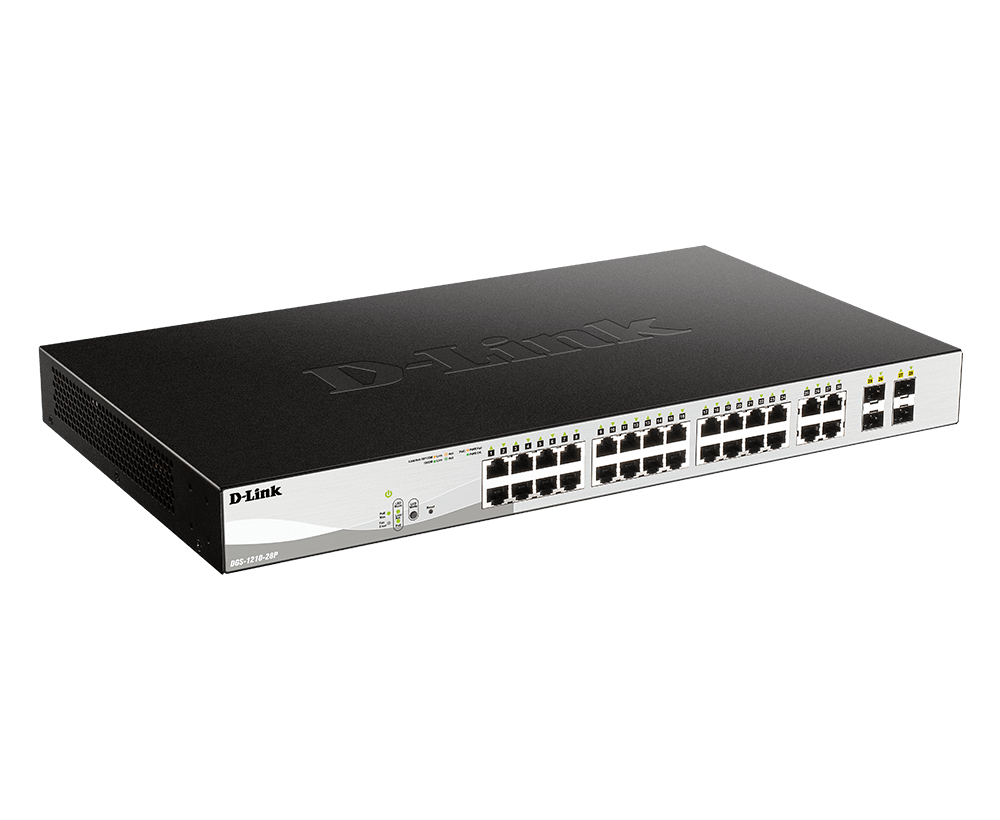



D-Link DGS-1210-28P 28-Port Gigabit PoE+ Smart Managed Switch
Connect and Power the Office With Clear Traffic Control The D-Link DGS-1210-28P brings 24 Gigabit RJ45 PoE ports and 4 Gigabit RJ45/SFP combo ports together with a 193W shared PoE budget. It suits a business access layer with phones, cameras, access points and wired users. Centralising compatible device power at the switch helps reduce the need for separate power outlets at each installation point. VLANs, QoS and static-routing functions provide control beyond an unmanaged switch. Use the web interface for everyday configuration, and plan the network and power budget together so the connected devices, optical links and security policy work as one system. Highlights Connectivity 24 × Gigabit RJ45 PoE access ports 4 Gigabit RJ45/SFP combo ports 56Gbps switching capacity Device Power 193W shared PoE budget IEEE 802.3af/at support Two fans Network Control Tagged, voice and surveillance VLAN features Traffic priority, access controls and static routing Local smart management with diagnostic tools Key Features Put Device Power Where the Network Is Compatible IP cameras, wireless access points and phones can receive data and power through the Ethernet cable. The 193W budget is shared across the connected loads, so allow for each device’s operating requirement and any higher start-up demand. A maximum port rating does not mean every port can supply that maximum simultaneously. Choose Copper or Fibre for Each Combo Link Four logical uplink ports offer a choice of copper RJ45 or compatible SFP fibre. Each copper/SFP pair shares one port, so both connectors in that pair cannot operate as independent links at the same time. This gives the installation a practical media choice without overstating the number of simultaneous connections. Separate Business, Voice and Camera Traffic 802.1Q VLANs help divide the access network into planned segments. Auto Voice VLAN and surveillance functions can assist compatible phone and camera deployments, while QoS gives important traffic an appropriate priority. The design still needs matching VLANs and policies across the relevant uplinks, routers and connected systems. Use Static Routing for Defined Internal Networks Static-routing functions allow configured IP networks to communicate within a suitable design. This can reduce unnecessary journeys to a separate router for some internal traffic. A smart managed switch does not replace the Internet firewall, dynamic-routing requirements or the broader security policy; choose those functions separately. Keep Access and Fault-Finding Under Control Access controls, 802.1X authentication and traffic-protection functions help administrators apply a consistent network policy. Loop detection, spanning tree, link aggregation, port mirroring and cable diagnostics support practical fault isolation. Keep management access restricted and use supported firmware with a saved configuration. Plan a Tidy, Serviceable Installation Allow clear airflow around the fan-cooled enclosure and avoid blocking the ventilation openings. The internal AC supply gives the switch a direct mains power connection. Check the mounting position, cable routes and UPS capacity against the switch plus its connected PoE loads. Gigabit optical modules are separate connection accessories. Summary The D-Link DGS-1210-28P suits a managed office or surveillance access layer that needs 24 powered Gigabit connections, 4 Gigabit RJ45/SFP combo ports and a 193W shared PoE budget. Match the connected loads and uplink media to the deployment, then use its VLAN, traffic-priority and diagnostic tools to keep the network organised. Frequently Asked Questions Which Connections Are Available?ExpandCollapse It provides 24 Gigabit RJ45 PoE ports and 4 Gigabit RJ45/SFP combo ports. Each RJ45/SFP combo pair is one logical port with a choice of media, not two independent simultaneous connections. How Much PoE Power Can It Supply?ExpandCollapse The total shared PoE budget is 193W. The PoE ports support IEEE 802.3af/at, with up to 30W per port within that shared budget. Add the actual requirements of all connected devices; multiplying every port by its maximum rating can exceed the available power. Does It Have 10GbE or 10G SFP+?ExpandCollapse No. Its copper and optical data connections are Gigabit interfaces. The 4 Gigabit RJ45/SFP combo ports must use compatible modules and connections at the supported speed. Choose a different switch when the design specifically requires 10GbE uplinks. Is This a D-Lite Cloud Switch?ExpandCollapse No. This is a DGS-1210 smart managed switch with local management and supported network-management tools. It is not a D-Lite model and should not be selected on the assumption of D-Lite cloud enrolment. Check controller support against the exact model and installed firmware when central management is required. Can It Replace the Internet Router or Firewall?ExpandCollapse It supports static routing for configured internal networks. Internet access, firewall inspection, VPNs and any required dynamic-routing functions need suitable equipment of their own. Plan the switch, network edge and access policies together. How Should I Plan Installation and Warranty?ExpandCollapse Provide a suitable mounting position, clear ventilation and a power source sized for the switch and its connected loads. This model uses an internal mains supply. Optical transceivers and fibre are selected separately. The warranty is five years.
Add-ons (1)
Pickup available at 3005, Ubi Avenue 3, #01-88
Usually ready in 2-4 Business Day (Excluding Public Holiday)
D-Link DGS-1210-28P 28-Port Gigabit PoE+ Smart Managed Switch
Paglalarawan
Connect and Power the Office With Clear Traffic Control
The D-Link DGS-1210-28P brings 24 Gigabit RJ45 PoE ports and 4 Gigabit RJ45/SFP combo ports together with a 193W shared PoE budget. It suits a business access layer with phones, cameras, access points and wired users. Centralising compatible device power at the switch helps reduce the need for separate power outlets at each installation point.
VLANs, QoS and static-routing functions provide control beyond an unmanaged switch. Use the web interface for everyday configuration, and plan the network and power budget together so the connected devices, optical links and security policy work as one system.
Highlights
Connectivity
- 24 × Gigabit RJ45 PoE access ports
- 4 Gigabit RJ45/SFP combo ports
- 56Gbps switching capacity
Device Power
- 193W shared PoE budget
- IEEE 802.3af/at support
- Two fans
Network Control
- Tagged, voice and surveillance VLAN features
- Traffic priority, access controls and static routing
- Local smart management with diagnostic tools
Key Features
Put Device Power Where the Network Is
Compatible IP cameras, wireless access points and phones can receive data and power through the Ethernet cable. The 193W budget is shared across the connected loads, so allow for each device’s operating requirement and any higher start-up demand. A maximum port rating does not mean every port can supply that maximum simultaneously.
Choose Copper or Fibre for Each Combo Link
Four logical uplink ports offer a choice of copper RJ45 or compatible SFP fibre. Each copper/SFP pair shares one port, so both connectors in that pair cannot operate as independent links at the same time. This gives the installation a practical media choice without overstating the number of simultaneous connections.
Separate Business, Voice and Camera Traffic
802.1Q VLANs help divide the access network into planned segments. Auto Voice VLAN and surveillance functions can assist compatible phone and camera deployments, while QoS gives important traffic an appropriate priority. The design still needs matching VLANs and policies across the relevant uplinks, routers and connected systems.
Use Static Routing for Defined Internal Networks
Static-routing functions allow configured IP networks to communicate within a suitable design. This can reduce unnecessary journeys to a separate router for some internal traffic. A smart managed switch does not replace the Internet firewall, dynamic-routing requirements or the broader security policy; choose those functions separately.
Keep Access and Fault-Finding Under Control
Access controls, 802.1X authentication and traffic-protection functions help administrators apply a consistent network policy. Loop detection, spanning tree, link aggregation, port mirroring and cable diagnostics support practical fault isolation. Keep management access restricted and use supported firmware with a saved configuration.
Plan a Tidy, Serviceable Installation
Allow clear airflow around the fan-cooled enclosure and avoid blocking the ventilation openings. The internal AC supply gives the switch a direct mains power connection. Check the mounting position, cable routes and UPS capacity against the switch plus its connected PoE loads. Gigabit optical modules are separate connection accessories.
Summary
The D-Link DGS-1210-28P suits a managed office or surveillance access layer that needs 24 powered Gigabit connections, 4 Gigabit RJ45/SFP combo ports and a 193W shared PoE budget. Match the connected loads and uplink media to the deployment, then use its VLAN, traffic-priority and diagnostic tools to keep the network organised.
Frequently Asked Questions
Which Connections Are Available?
It provides 24 Gigabit RJ45 PoE ports and 4 Gigabit RJ45/SFP combo ports. Each RJ45/SFP combo pair is one logical port with a choice of media, not two independent simultaneous connections.
How Much PoE Power Can It Supply?
The total shared PoE budget is 193W. The PoE ports support IEEE 802.3af/at, with up to 30W per port within that shared budget. Add the actual requirements of all connected devices; multiplying every port by its maximum rating can exceed the available power.
Does It Have 10GbE or 10G SFP+?
No. Its copper and optical data connections are Gigabit interfaces. The 4 Gigabit RJ45/SFP combo ports must use compatible modules and connections at the supported speed. Choose a different switch when the design specifically requires 10GbE uplinks.
Is This a D-Lite Cloud Switch?
No. This is a DGS-1210 smart managed switch with local management and supported network-management tools. It is not a D-Lite model and should not be selected on the assumption of D-Lite cloud enrolment. Check controller support against the exact model and installed firmware when central management is required.
Can It Replace the Internet Router or Firewall?
It supports static routing for configured internal networks. Internet access, firewall inspection, VPNs and any required dynamic-routing functions need suitable equipment of their own. Plan the switch, network edge and access policies together.
How Should I Plan Installation and Warranty?
Provide a suitable mounting position, clear ventilation and a power source sized for the switch and its connected loads. This model uses an internal mains supply. Optical transceivers and fibre are selected separately. The warranty is five years.
Mga detalye
D-Link DGS-1210-28P 28-Port Gigabit PoE+ Smart Managed Switch
The DGS-1210-28P combines 24 Gigabit PoE access ports with 4 Gigabit RJ45/SFP combo ports for a managed business network. Its 193W shared power budget needs to cover the actual requirements of connected devices. VLANs, traffic priorities and static-routing functions help organise office, voice and surveillance traffic. Plan compatible optical modules, cable connections, ventilation and the power source before installation. Published switching figures describe the switch fabric, while application performance also depends on the endpoints and the wider network.
| Specification | Details |
|---|---|
| Interfaces and Switching | |
| PoE Copper Ports | 24 × 10/100/1000Mbps RJ45 |
| Combo Uplink Ports | 4 × 100/1000Mbps RJ45/SFP combo pairs; one media connection active per pair |
| Simultaneous Logical Ports | 28; all data interfaces are Gigabit-class, not 10GbE |
| Switching and Forwarding | 56Gbps switching capacity; up to 41.7Mpps packet forwarding |
| Forwarding Method | Store-and-forward |
| Packet Buffer | 4.1Mbits |
| MAC Address Table | 8K entries; up to 256 static addresses |
| System Memory | 128MB DDR3; 32MB flash |
| Power and PoE | |
| PoE Standards and Per-Port Planning | IEEE 802.3af/at, up to 30W per PoE port within the shared budget |
| Shared PoE Budget | 193W total across the PoE access ports |
| Power Input | 100–240V AC, 50/60Hz; internal universal supply |
| Maximum Published Power Consumption | 263.9W at 100V; 247.4W at 240V, with PoE enabled |
| Published Consumption Without PoE | 30.6W at 100V; 28.1W at 240V |
| Published Standby Consumption | 19.6W at 100V; 16.6W at 240V |
| PoE Scheduling | Time-based PoE supported; connected loads must fit the shared available budget |
| Network Organisation and Resilience | |
| VLANs | 802.1Q; up to 256 static VLAN groups with VLAN IDs 1–4094; asymmetric, voice and surveillance VLAN functions |
| Static Routing | Up to four IP interfaces; up to 124 IPv4 and 50 IPv6 static route entries |
| Spanning Tree | IEEE 802.1D STP, 802.1w RSTP and 802.1s MSTP |
| Link Aggregation | IEEE 802.3ad; up to 8 groups with up to eight ports per group |
| Multicast | IGMP v1/v2 snooping with v3 awareness; querier and up to 256 groups; MLD v1/v2 snooping |
| Traffic Priority | Eight queues per port; strict priority and weighted round robin; 802.1p/DSCP classification |
| Jumbo Frames | Up to 10,000 bytes |
| Bandwidth Control | Ingress/egress port-based control; minimum 16Kb/s granularity |
| Security and Management | |
| Access Protection | 802.1X authentication, access-control lists, port security and D-Link Safeguard Engine |
| Address and Traffic Protection | ARP-spoofing prevention, DHCP-server screening and traffic-flood protection |
| Administration | Web-based management, compact command-line interface and SNMP |
| Diagnostics | Cable diagnostics, loopback detection, port mirroring and system logs |
| Management Modes | Standard and surveillance management interfaces |
| Central Management Planning | Verify exact model and firmware support for the intended management platform; this is not a D-Lite cloud model |
| Physical and Environmental | |
| Installation | Desktop or 19-inch rack mounting; brackets included |
| Dimensions W × D × H | 440 × 250 × 44mm |
| Device Weight | 3.75kg |
| Cooling | Two fans |
| Published Acoustics | 51.7dB(A) high speed; 44.9dB(A) low speed |
| Maximum Published Heat Dissipation | Up to 900.36BTU/hr |
| Operating Conditions | −5–50°C; 0–95% relative humidity |
| Storage Conditions | −20–70°C; 0–95% relative humidity |
| Published MTBF | 469,262 hours; statistical reliability reference, not a guaranteed service life |
| Deployment and Warranty | |
| Connection Accessories | Select suitable copper cabling, compatible SFP transceivers and fibre as required |
| Deployment Checks | Confirm device power, uplink media, network policy, mounting space and ventilation |
| Warranty | 5 years |
Add-ons