

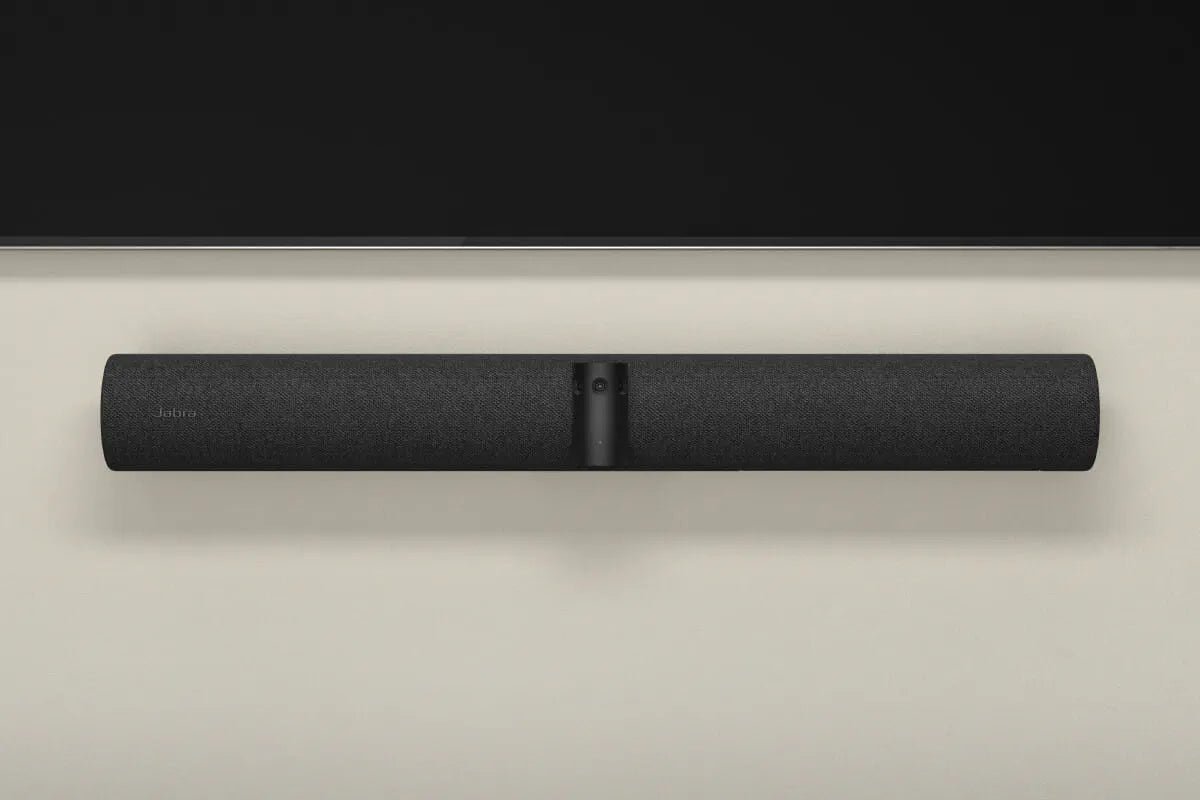


Jabra PanaCast 50 Wall Mount
Restore a considered wall-mounted setup The Jabra PanaCast 50 Wall Mount provides the camera-specific bracket for a fixed installation near the meeting-room display. This separate mount is intended as a replacement or spare: a wall mount is already supplied with the standard PanaCast 50 video bar. Highlights For a fixed room installation Positions the compatible video bar on the wall. Replacement or spare A mount is included with the standard PanaCast 50 package. Matched to the USB bar For Jabra PanaCast 50 and Room System arrangements using that video bar. Key Features Compatible models Compatible models are Jabra PanaCast 50 and Jabra PanaCast 50 Room System configurations that use the PanaCast 50 USB video bar. The Android PanaCast 50 Video Bar System uses different wall-mount hardware. Do not select a mount from the family name alone. Place the camera around eye level Jabra recommends placing the video bar at participant eye level, with a clear view of the seating area. Check the screen position and camera sight line before mounting; avoid a camera aimed into direct sunlight. Replace only what the room needs If the original bracket has been misplaced or you are preparing another fixed location, the spare lets you keep using the compatible video bar. A second wall mount is not required for an ordinary new PanaCast 50 installation when its supplied mount is available. Plan the fixing and cables together Use mounting fixings appropriate to the wall and follow the Jabra installation instructions. Keep access for the USB and power cables so the mounted position does not place strain on the connections. This accessory supplies neither the video bar nor its power supply. Summary This wall mount is a straightforward replacement accessory for a compatible PanaCast 50 installation. Confirm the video-bar family and the wall position, then retain the room layout that works for your users. Frequently asked questions Is a wall mount already included with PanaCast 50?Yes. The standard PanaCast 50 USB video bar includes a wall mount. Buy this separate accessory when you need a replacement or spare. Which models is it intended for?Jabra PanaCast 50 and PanaCast 50 Room System configurations using the PanaCast 50 USB video bar. Confirm the exact bar before ordering. Does it fit the PanaCast 50 Video Bar System?Do not use this listing as a match for the Android Video Bar System. Jabra specifies a different wall-mount accessory for that product. Where should the bar be positioned?Plan for participant eye level near the display, with a clear view of the seats. Follow Jabra installation guidance and check the actual room before fixing the bracket. Are the video bar and power supply included?No. This is the separate wall-mount accessory, not a video bar or power-supply bundle. Can I use it instead of a table stand?Choose it for a fixed wall installation. A freestanding table setup uses the appropriate PanaCast 50 table stand instead.
Pickup available at 3005, Ubi Avenue 3, #01-88
Usually ready in 2-4 Business Day (Excluding Public Holiday)
Jabra PanaCast 50 Wall Mount
Description
Restore a considered wall-mounted setup
The Jabra PanaCast 50 Wall Mount provides the camera-specific bracket for a fixed installation near the meeting-room display. This separate mount is intended as a replacement or spare: a wall mount is already supplied with the standard PanaCast 50 video bar.
Highlights
For a fixed room installation
- Positions the compatible video bar on the wall.
Replacement or spare
- A mount is included with the standard PanaCast 50 package.
Matched to the USB bar
- For Jabra PanaCast 50 and Room System arrangements using that video bar.
Key Features
Compatible models
Compatible models are Jabra PanaCast 50 and Jabra PanaCast 50 Room System configurations that use the PanaCast 50 USB video bar. The Android PanaCast 50 Video Bar System uses different wall-mount hardware. Do not select a mount from the family name alone.
Place the camera around eye level
Jabra recommends placing the video bar at participant eye level, with a clear view of the seating area. Check the screen position and camera sight line before mounting; avoid a camera aimed into direct sunlight.
Replace only what the room needs
If the original bracket has been misplaced or you are preparing another fixed location, the spare lets you keep using the compatible video bar. A second wall mount is not required for an ordinary new PanaCast 50 installation when its supplied mount is available.
Plan the fixing and cables together
Use mounting fixings appropriate to the wall and follow the Jabra installation instructions. Keep access for the USB and power cables so the mounted position does not place strain on the connections. This accessory supplies neither the video bar nor its power supply.
Summary
This wall mount is a straightforward replacement accessory for a compatible PanaCast 50 installation. Confirm the video-bar family and the wall position, then retain the room layout that works for your users.
Frequently asked questions
Is a wall mount already included with PanaCast 50?
Yes. The standard PanaCast 50 USB video bar includes a wall mount. Buy this separate accessory when you need a replacement or spare.
Which models is it intended for?
Jabra PanaCast 50 and PanaCast 50 Room System configurations using the PanaCast 50 USB video bar. Confirm the exact bar before ordering.
Does it fit the PanaCast 50 Video Bar System?
Do not use this listing as a match for the Android Video Bar System. Jabra specifies a different wall-mount accessory for that product.
Where should the bar be positioned?
Plan for participant eye level near the display, with a clear view of the seats. Follow Jabra installation guidance and check the actual room before fixing the bracket.
Are the video bar and power supply included?
No. This is the separate wall-mount accessory, not a video bar or power-supply bundle.
Can I use it instead of a table stand?
Choose it for a fixed wall installation. A freestanding table setup uses the appropriate PanaCast 50 table stand instead.
Specs
Jabra PanaCast 50 Wall Mount
A wall-mount replacement accessory for the Jabra PanaCast 50 USB video bar, also used in compatible PanaCast 50 Room System configurations. It is separate from the wall mount for the Android Video Bar System. A standard PanaCast 50 package already contains its wall mount, so this accessory is normally needed only as a spare or replacement.
| Specification | Details |
|---|---|
| Compatibility | |
| Compatible video bar | Jabra PanaCast 50 USB video bar |
| Room system compatibility | PanaCast 50 Room System configurations using that USB video bar |
| Product family restriction | Not the separate wall mount specified for PanaCast 50 Video Bar System |
| Installation and Purchase Scope | |
| Mounting position | Fixed wall installation; plan around participant eye level |
| Placement considerations | Clear camera view, suitable wall fixings and cable access |
| Standard package relationship | Wall mount included with a new standard PanaCast 50; separate accessory is for replacement or spare use |
| Included item | Wall-mount accessory only; video bar and power supply separate |