


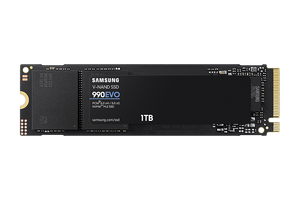

Samsung 990 EVO PCIe 4.0 NVMe M.2 SSD
Responsive storage for everyday PC work and play The Samsung 990 EVO gives a compatible desktop or laptop fast NVMe storage for applications, games, working documents and creative projects. Samsung V-NAND TLC, an in-house controller and Intelligent TurboWrite combine responsive everyday access with high-speed file transfers. Its compact M.2 format fits inside the computer, while support for two PCIe connection modes gives you useful flexibility when checking an upgrade against your system. Highlights Everyday responsiveness Sequential read speeds up to 5,000MB/s and write speeds up to 4,200MB/s under Samsung's test conditions. Host Memory Buffer and Intelligent TurboWrite support efficient access and accelerated write bursts. Practical PC integration M.2 2280 NVMe design with PCIe 4.0 x4 or PCIe 5.0 x2 connectivity. Backward compatibility with PCIe 3.0 x4 systems, subject to the host connection's performance limits. Useful drive management Samsung Magician provides supported drive-health, firmware and migration tools. Heat-spreader label and Dynamic Thermal Guard help manage temperature during demanding work. Key Features Keep everyday work moving Fast sequential access helps when opening substantial project files, transferring installed content or moving a working folder between suitable drives. The 990 EVO reaches up to 5,000MB/s read and 4,200MB/s write in Samsung's benchmark environment. Those figures describe storage performance rather than a guaranteed application speed: the processor, source drive, software and workload also affect the time a task takes. Random-access capability supports the smaller requests common in everyday PC use. Match the connection to your computer The drive supports PCIe 4.0 x4 and PCIe 5.0 x2, using the NVMe 2.0 protocol. A PCIe 5.0 connection here uses two lanes; it does not turn the drive into a PCIe 5.0 x4 model. Check that the computer's M.2 slot supports NVMe and the 2280 length. A slot intended only for an M.2 SATA drive is not sufficient. A compatible PCIe 3.0 x4 host can operate the SSD at its lower interface limit. Understand fast write bursts Intelligent TurboWrite accelerates writes within a limited data-transfer region. It is useful for bursts of activity such as saving an edited project or copying a batch of files, but the advertised write speed is not an unlimited sustained-transfer guarantee. A long write can slow once the TurboWrite region is exhausted. Available space, drive state and system configuration matter, so leave working room and consider the full workload when planning regular large transfers. Efficient operation inside the PC Samsung V-NAND TLC and the in-house controller work with Host Memory Buffer, which uses supported host memory for drive-management information. The low-power idle and sleep states help the SSD reduce consumption between tasks when the computer supports those states. Modern Standby support is relevant to compatible systems, but the SSD alone does not determine notebook battery life. Active consumption depends on capacity, activity and the host rather than one constant power figure. Thermal control with sensible airflow The heat-spreader label assists thermal control of the NAND, while Samsung's thermal-management algorithm and Dynamic Thermal Guard manage operation as temperature rises. These features work alongside the computer's cooling. Maintain the airflow and clearances recommended by the system manufacturer, especially during long transfers. Thermal protection can reduce speed when necessary, so it should not be read as a promise that the SSD cannot throttle or overheat in an unsuitable enclosure. Plan a straightforward installation The slim M.2 module installs directly into a suitable internal slot without a separate SATA data cable or power lead. Check the computer's service instructions, mounting position and boot-drive support before fitting it. The retail package contains the SSD and warranty statement; an installation kit is not included. Back up important files before an upgrade, then either install the operating system afresh or use an appropriate migration workflow for the existing system. Manage the drive with Samsung Magician On a supported Windows setup, Samsung Magician can check drive health, provide firmware updates and offer compatible data-migration features. Availability varies by operating system, connection and feature; Samsung's internal SSD management is not supported by the macOS or Android editions. BIOS RAID and software RAID configurations also have limitations. Keep a separate backup before migration or firmware work, because a management utility and a healthy status reading do not replace data protection. Security and endurance with clear conditions The SSD supports AES 256-bit encryption, TCG Opal 2.0 and IEEE 1667 encrypted-drive functionality with a compatible configuration. These capabilities require suitable setup and do not mean files are automatically protected by simply fitting the drive. Samsung's limited warranty runs for five years or the capacity-specific terabytes-written limit, whichever occurs first. Check the endurance rating against sustained write-heavy use, and retain a separate backup regardless of the remaining warranty. Summary The Samsung 990 EVO suits a compatible PC needing responsive internal storage for work, gaming and creative activity. Its useful balance is fast burst performance, flexible PCIe connectivity and practical drive-management tools, supported by clear thermal, installation and endurance requirements. Match the host slot and workload carefully to get the benefit of the drive's capabilities.
제품 설명
Responsive storage for everyday PC work and play
The Samsung 990 EVO gives a compatible desktop or laptop fast NVMe storage for applications, games, working documents and creative projects. Samsung V-NAND TLC, an in-house controller and Intelligent TurboWrite combine responsive everyday access with high-speed file transfers. Its compact M.2 format fits inside the computer, while support for two PCIe connection modes gives you useful flexibility when checking an upgrade against your system.
Highlights
Everyday responsiveness
- Sequential read speeds up to 5,000MB/s and write speeds up to 4,200MB/s under Samsung's test conditions.
- Host Memory Buffer and Intelligent TurboWrite support efficient access and accelerated write bursts.
Practical PC integration
- M.2 2280 NVMe design with PCIe 4.0 x4 or PCIe 5.0 x2 connectivity.
- Backward compatibility with PCIe 3.0 x4 systems, subject to the host connection's performance limits.
Useful drive management
- Samsung Magician provides supported drive-health, firmware and migration tools.
- Heat-spreader label and Dynamic Thermal Guard help manage temperature during demanding work.
Key Features
Keep everyday work moving
Fast sequential access helps when opening substantial project files, transferring installed content or moving a working folder between suitable drives. The 990 EVO reaches up to 5,000MB/s read and 4,200MB/s write in Samsung's benchmark environment. Those figures describe storage performance rather than a guaranteed application speed: the processor, source drive, software and workload also affect the time a task takes. Random-access capability supports the smaller requests common in everyday PC use.
Match the connection to your computer
The drive supports PCIe 4.0 x4 and PCIe 5.0 x2, using the NVMe 2.0 protocol. A PCIe 5.0 connection here uses two lanes; it does not turn the drive into a PCIe 5.0 x4 model. Check that the computer's M.2 slot supports NVMe and the 2280 length. A slot intended only for an M.2 SATA drive is not sufficient. A compatible PCIe 3.0 x4 host can operate the SSD at its lower interface limit.
Understand fast write bursts
Intelligent TurboWrite accelerates writes within a limited data-transfer region. It is useful for bursts of activity such as saving an edited project or copying a batch of files, but the advertised write speed is not an unlimited sustained-transfer guarantee. A long write can slow once the TurboWrite region is exhausted. Available space, drive state and system configuration matter, so leave working room and consider the full workload when planning regular large transfers.
Efficient operation inside the PC
Samsung V-NAND TLC and the in-house controller work with Host Memory Buffer, which uses supported host memory for drive-management information. The low-power idle and sleep states help the SSD reduce consumption between tasks when the computer supports those states. Modern Standby support is relevant to compatible systems, but the SSD alone does not determine notebook battery life. Active consumption depends on capacity, activity and the host rather than one constant power figure.
Thermal control with sensible airflow
The heat-spreader label assists thermal control of the NAND, while Samsung's thermal-management algorithm and Dynamic Thermal Guard manage operation as temperature rises. These features work alongside the computer's cooling. Maintain the airflow and clearances recommended by the system manufacturer, especially during long transfers. Thermal protection can reduce speed when necessary, so it should not be read as a promise that the SSD cannot throttle or overheat in an unsuitable enclosure.
Plan a straightforward installation
The slim M.2 module installs directly into a suitable internal slot without a separate SATA data cable or power lead. Check the computer's service instructions, mounting position and boot-drive support before fitting it. The retail package contains the SSD and warranty statement; an installation kit is not included. Back up important files before an upgrade, then either install the operating system afresh or use an appropriate migration workflow for the existing system.
Manage the drive with Samsung Magician
On a supported Windows setup, Samsung Magician can check drive health, provide firmware updates and offer compatible data-migration features. Availability varies by operating system, connection and feature; Samsung's internal SSD management is not supported by the macOS or Android editions. BIOS RAID and software RAID configurations also have limitations. Keep a separate backup before migration or firmware work, because a management utility and a healthy status reading do not replace data protection.
Security and endurance with clear conditions
The SSD supports AES 256-bit encryption, TCG Opal 2.0 and IEEE 1667 encrypted-drive functionality with a compatible configuration. These capabilities require suitable setup and do not mean files are automatically protected by simply fitting the drive. Samsung's limited warranty runs for five years or the capacity-specific terabytes-written limit, whichever occurs first. Check the endurance rating against sustained write-heavy use, and retain a separate backup regardless of the remaining warranty.
Summary
The Samsung 990 EVO suits a compatible PC needing responsive internal storage for work, gaming and creative activity. Its useful balance is fast burst performance, flexible PCIe connectivity and practical drive-management tools, supported by clear thermal, installation and endurance requirements. Match the host slot and workload carefully to get the benefit of the drive's capabilities.
사양
Samsung 990 EVO PCIe 4.0 NVMe M.2 SSD
The Samsung 990 EVO is an M.2 2280 NVMe SSD for compatible client PCs. It combines Samsung V-NAND TLC, an in-house controller and Host Memory Buffer with PCIe 4.0 x4 or PCIe 5.0 x2 connectivity. The grouped specifications below retain the differences that affect performance, write endurance and power, while summarising shared physical and environmental limits. Performance figures are manufacturer test maxima; sustained writes, host configuration, firmware and cooling affect actual results.
| Specification | Details |
|---|---|
| Storage and Performance | |
| Interface and memory | PCIe 4.0 x4 / PCIe 5.0 x2; NVMe 2.0; backward compatible with PCIe 3.0 x4. Samsung V-NAND TLC and Samsung in-house controller. |
| Buffer and write acceleration | Host Memory Buffer (HMB). Intelligent TurboWrite write acceleration. Rated writes apply within the acceleration region; sustained speed can fall after it is exhausted. |
| Sequential performance | Read up to 5,000MB/s; write up to 4,200MB/s. |
| Random performance | QD1, 1 thread: up to 20,000/90,000 read/write IOPS. QD32, 16 threads: read up to 680,000 IOPS (1TB) or 700,000 IOPS (2TB); write up to 800,000 IOPS. |
| Performance conditions | Manufacturer IOmeter 1.1.0 tests with the SSD as a secondary drive in a fan-cooled desktop. Firmware, host hardware, configuration and workload affect results; write measurements use TurboWrite. Usable formatted capacity is lower than the labelled decimal capacity. |
| Physical Specifications and Installation | |
| Form factor and dimensions | M.2 2280; maximum module dimensions 80.15 × 22.15 × 2.38mm (L × W × H). |
| Device weight | Up to 9g for the SSD module, excluding retail packaging. |
| Installation and box contents | Requires a compatible NVMe M.2 2280 host slot and suitable mounting provision; M.2 SATA-only slots are unsuitable. SSD and warranty statement included; installation kit not included. |
| Power and Thermal Control | |
| Supply and active power | 3.3V ±5%, supplied through the host slot. Capacity-dependent average active read/write consumption up to 5.5W/4.7W under Samsung test conditions; actual demand varies with the host and workload. |
| Idle and sleep | Typical 60mW in PS3 with APST enabled; 5mW in PS4 / PCIe L1.2. Requires corresponding host power-state support. |
| Thermal management | Heat-spreader label and Dynamic Thermal Guard assist thermal control; suitable system airflow remains necessary. Thermal protection can reduce performance. |
| Operating Conditions and Reliability | |
| Temperature and humidity | Operating 0–70°C, measured by S.M.A.R.T.; non-operating −40–85°C. Humidity 5–95% non-condensing. |
| Non-operating shock and vibration | Shock 1,500G for 0.5ms, 3 axes; vibration 20–2,000Hz at 20G. These are non-operating device test ratings. |
| Reliability | MTBF 1.5 million hours; a statistical reliability measure, not a guaranteed individual service life. |
| Management Security and Warranty | |
| Management and software | Samsung Magician for supported Windows drive-health, firmware and migration features. Internal SSD management is unsupported on macOS/Android; features vary by OS, connection and configuration. BIOS RAID and software RAID have support limitations. |
| Maintenance and security | TRIM requires OS support; automatic garbage collection and S.M.A.R.T. AES 256-bit full-disk encryption, TCG Opal 2.0 and IEEE 1667 encrypted-drive support require compatible configuration. WWN not supported. |
| Endurance and limited warranty | 600TBW (1TB); 1,200TBW (2TB). Five-year limited warranty or the applicable TBW limit, whichever occurs first; endurance testing follows JESD218. |