


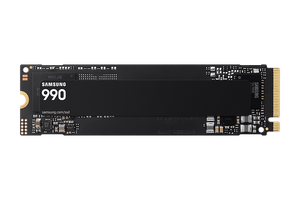

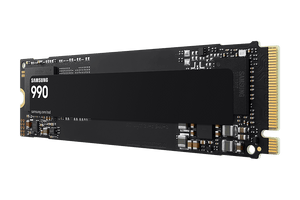

Samsung 990 PCIe 4.0 NVMe M.2 SSD
Give Your Everyday PC a Faster Home for Games and Projects Samsung 990 brings fast PCIe 4.0 NVMe storage to compatible desktop and laptop computers. Give your operating system, applications and frequently used files a dedicated internal workspace, with Samsung V-NAND flash, an in-house controller and Host Memory Buffer support working together in a compact M.2 module. From a new PC build to an upgrade of a suitable existing system, the 990 helps reduce waiting during storage-intensive tasks. Keep game libraries, high-resolution photos and project files within reach, while Samsung Magician provides supported tools for drive health, firmware and data migration. Check your computer's slot, mounting and cooling requirements before installation. Highlights Fast Storage for Everyday Work and Play PCIe 4.0 x4 with NVMe 2.0 for responsive internal PC storage. Family performance reaches up to 7,250MB/s read and 6,450MB/s write under Samsung test conditions; ratings and actual results vary. A Compact Module for Compatible Computers M.2 2280 format for a suitable PCIe NVMe slot. Backward compatibility with PCIe 3.0, subject to the host connection's performance limits. Useful Tools for Long-Term Ownership Samsung Magician supports drive-health monitoring, firmware updates and supported migration workflows. TRIM, S.M.A.R.T. and garbage collection support, with configurable encryption on compatible hosts. Key Features Keep Your Active Files Close at Hand A fast internal SSD is a useful home for the applications, games and documents you access regularly. Samsung 990 supports everyday computing, growing game libraries and content archives without an external cable or separate power supply. Moving high-resolution media or large project files can benefit from its NVMe connection, although the other drive, application and computer also influence the time a task takes. Use PCIe 4.0 Performance Where Your System Supports It The PCIe 4.0 x4 interface and NVMe 2.0 protocol provide a high-bandwidth connection between the SSD and a compatible computer. The drive can also operate with PCIe 3.0, allowing a suitable older system to use it within that interface's limits. Published speeds are maximum test results, rather than a promise for every transfer. Firmware, host hardware and workload affect performance; see the separate Specs table for the applicable ratings. Support File Transfers with Intelligent TurboWrite Samsung measures the advertised sequential and random write performance with Intelligent TurboWrite active. This feature supports write workloads within a specified transfer size, so a short benchmark and an extended file transfer may produce different results. Consider the whole workload when planning an upgrade, especially if you regularly move large media libraries or write substantial project data. Build Around Samsung Flash and Host Memory Buffer Samsung V-NAND and an in-house controller form the core of the 990 design. Host Memory Buffer support is listed alongside these components, with TRIM, garbage collection and S.M.A.R.T. providing supported storage-maintenance and monitoring functions. TRIM requires operating-system support. Together, these features give you useful tools for managing an everyday client-PC drive through its working life. Check the Slot and Mounting Before Installation The M.2 2280 module needs a compatible M-Key PCIe NVMe slot and suitable mounting space. An M.2 connector alone does not establish compatibility: a SATA-only connection is unsuitable. Check the computer or motherboard manual for the supported interface and module length. An installation kit is not supplied, so confirm that the host has the required fixing hardware before you begin. Plan Airflow for Sustained Work Samsung recommends proper airflow around the SSD. Adequate airflow helps the SSD operate within its specified temperature range, particularly during heavy transfers or when nearby components warm the drive. Check the host's cooling arrangement and available space rather than assuming every desktop or laptop enclosure has the same conditions. Drive temperature and operating limits are covered in the separate Specs table. Manage Health, Firmware and Supported Data Migration Samsung Magician brings supported monitoring and management functions into one application, including drive-health information, firmware updates and data migration. Available features depend on the operating system, connection and software requirements. Check the current installation guidance before moving an existing system, keep a separate copy of important files and verify the replacement drive before relying on it for everyday work. Set Up Security and Understand Warranty Coverage The 990 supports AES 256-bit full-disk encryption, TCG Opal and IEEE 1667 encrypted-drive functions. These require a compatible host and appropriate software configuration; supported encryption does not mean protection is automatically enabled. Manufacturer limited warranty coverage is subject to both a time limit and a rated writing allowance, whichever is reached first. See the Specs table for the applicable terms, and keep regular backups of important content. Summary Samsung 990 suits a compatible PC build or storage upgrade that needs fast internal NVMe access, compact installation and useful drive-management features. Check the host interface, mounting hardware and cooling, then use the supported software tools and a regular backup routine to keep your storage organised.
Pickup available at 3005, Ubi Avenue 3, #01-88
일반적으로 2~4일 후 준비 완료
Samsung 990 PCIe 4.0 NVMe M.2 SSD
제품 설명
Give Your Everyday PC a Faster Home for Games and Projects
Samsung 990 brings fast PCIe 4.0 NVMe storage to compatible desktop and laptop computers. Give your operating system, applications and frequently used files a dedicated internal workspace, with Samsung V-NAND flash, an in-house controller and Host Memory Buffer support working together in a compact M.2 module.
From a new PC build to an upgrade of a suitable existing system, the 990 helps reduce waiting during storage-intensive tasks. Keep game libraries, high-resolution photos and project files within reach, while Samsung Magician provides supported tools for drive health, firmware and data migration. Check your computer's slot, mounting and cooling requirements before installation.
Highlights
Fast Storage for Everyday Work and Play
- PCIe 4.0 x4 with NVMe 2.0 for responsive internal PC storage.
- Family performance reaches up to 7,250MB/s read and 6,450MB/s write under Samsung test conditions; ratings and actual results vary.
A Compact Module for Compatible Computers
- M.2 2280 format for a suitable PCIe NVMe slot.
- Backward compatibility with PCIe 3.0, subject to the host connection's performance limits.
Useful Tools for Long-Term Ownership
- Samsung Magician supports drive-health monitoring, firmware updates and supported migration workflows.
- TRIM, S.M.A.R.T. and garbage collection support, with configurable encryption on compatible hosts.
Key Features
Keep Your Active Files Close at Hand
A fast internal SSD is a useful home for the applications, games and documents you access regularly. Samsung 990 supports everyday computing, growing game libraries and content archives without an external cable or separate power supply. Moving high-resolution media or large project files can benefit from its NVMe connection, although the other drive, application and computer also influence the time a task takes.
Use PCIe 4.0 Performance Where Your System Supports It
The PCIe 4.0 x4 interface and NVMe 2.0 protocol provide a high-bandwidth connection between the SSD and a compatible computer. The drive can also operate with PCIe 3.0, allowing a suitable older system to use it within that interface's limits. Published speeds are maximum test results, rather than a promise for every transfer. Firmware, host hardware and workload affect performance; see the separate Specs table for the applicable ratings.
Support File Transfers with Intelligent TurboWrite
Samsung measures the advertised sequential and random write performance with Intelligent TurboWrite active. This feature supports write workloads within a specified transfer size, so a short benchmark and an extended file transfer may produce different results. Consider the whole workload when planning an upgrade, especially if you regularly move large media libraries or write substantial project data.
Build Around Samsung Flash and Host Memory Buffer
Samsung V-NAND and an in-house controller form the core of the 990 design. Host Memory Buffer support is listed alongside these components, with TRIM, garbage collection and S.M.A.R.T. providing supported storage-maintenance and monitoring functions. TRIM requires operating-system support. Together, these features give you useful tools for managing an everyday client-PC drive through its working life.
Check the Slot and Mounting Before Installation
The M.2 2280 module needs a compatible M-Key PCIe NVMe slot and suitable mounting space. An M.2 connector alone does not establish compatibility: a SATA-only connection is unsuitable. Check the computer or motherboard manual for the supported interface and module length. An installation kit is not supplied, so confirm that the host has the required fixing hardware before you begin.
Plan Airflow for Sustained Work
Samsung recommends proper airflow around the SSD. Adequate airflow helps the SSD operate within its specified temperature range, particularly during heavy transfers or when nearby components warm the drive. Check the host's cooling arrangement and available space rather than assuming every desktop or laptop enclosure has the same conditions. Drive temperature and operating limits are covered in the separate Specs table.
Manage Health, Firmware and Supported Data Migration
Samsung Magician brings supported monitoring and management functions into one application, including drive-health information, firmware updates and data migration. Available features depend on the operating system, connection and software requirements. Check the current installation guidance before moving an existing system, keep a separate copy of important files and verify the replacement drive before relying on it for everyday work.
Set Up Security and Understand Warranty Coverage
The 990 supports AES 256-bit full-disk encryption, TCG Opal and IEEE 1667 encrypted-drive functions. These require a compatible host and appropriate software configuration; supported encryption does not mean protection is automatically enabled. Manufacturer limited warranty coverage is subject to both a time limit and a rated writing allowance, whichever is reached first. See the Specs table for the applicable terms, and keep regular backups of important content.
Summary
Samsung 990 suits a compatible PC build or storage upgrade that needs fast internal NVMe access, compact installation and useful drive-management features. Check the host interface, mounting hardware and cooling, then use the supported software tools and a regular backup routine to keep your storage organised.
사양
Samsung 990 PCIe 4.0 NVMe M.2 SSD
Samsung 990 is an M.2 2280 SSD for client PCs, using PCIe 4.0 x4 and NVMe 2.0 with PCIe 3.0 backward compatibility. Samsung V-NAND, an in-house controller and Host Memory Buffer support form its storage platform. Read, random-performance and active-power ratings vary by capacity; write benchmarks use Intelligent TurboWrite within its supported transfer size. The figures below distinguish module measurements from shipping weight, and operating limits from non-operating tests. Installation requires a compatible PCIe NVMe slot and suitable mounting hardware; warranty cover ends at its time or writing limit, whichever occurs first.
| Specification | Details |
|---|---|
| Storage and Performance | |
| Application | Client PCs |
| Interface | PCIe 4.0 x4; NVMe 2.0 |
| Backward compatibility | PCIe 3.0; host interface limits apply |
| Flash / controller | Samsung V-NAND; Samsung in-house controller |
| Host memory | Host Memory Buffer, HMB |
| Sequential read | 1TB up to 7,150MB/s; 2TB up to 7,250MB/s |
| Sequential write | Up to 6,450MB/s |
| Random read / write, 1TB | Up to 700K / 1,100K IOPS |
| Random read / write, 2TB | Up to 850K / 1,200K IOPS |
| Compatibility and Management | |
| Host slot | M.2 2280 M-Key PCIe NVMe; SATA-only M.2 unsuitable |
| Installation requirements | Check motherboard or laptop support, module clearance, mounting and airflow |
| Management software | Samsung Magician; supported health, firmware and data-migration functions |
| Drive maintenance | TRIM with OS support; S.M.A.R.T.; garbage collection |
| Device Sleep / WWN | Supported / not supported |
| Encryption | AES 256-bit; TCG Opal 2.0; IEEE 1667 |
| Encryption configuration | Compatible host and software required; not automatically enabled |
| Physical Specifications | |
| Form factor | M.2 2280 bare module |
| Module dimensions | Maximum 80.15 × 22.15 × 2.38mm |
| Bare-module weight | Maximum 9g; fixing hardware and packaging excluded |
| In the box | Samsung 990 SSD; warranty statement |
| Installation kit | Not supplied; confirm host mounting hardware |
| Documentation / software | Installation guide and supported management software available by download |
| Power and Operating Conditions | |
| Supply voltage | 3.3V ±5% |
| Average active read / write, 1TB | 4.0W / 3.7W |
| Average active read / write, 2TB | 4.3W / 3.8W |
| Typical idle, PS3 / APST | 55mW |
| Typical low power, PS4 / L1.2 | 3mW |
| Operating temperature | 0–70°C; S.M.A.R.T. reading; proper airflow recommended |
| Non-operating temperature | −40–85°C |
| Humidity | 5–95%, non-condensing |
| Non-operating shock | 1,500G; 0.5ms; three axes |
| Non-operating vibration | 20G; 20–2,000Hz |
| Reliability and Warranty | |
| Rated write endurance | 1TB 400TBW; 2TB 800TBW |
| Limited warranty | Three years or rated TBW, whichever occurs first |
| Endurance test standard | JESD218 |
| MTBF | 1.5 million hours |
Performance uses Samsung IOmeter 1.1.0 with the SSD as a secondary drive in a fan-cooled desktop. Published writes use Intelligent TurboWrite within its supported transfer window. Firmware, host and workload affect results. Power consumption also depends on the host configuration and supported power states.
1GB means 1 billion bytes; formatted usable capacity is lower. MTBF is a statistical population rating, not a guaranteed individual lifespan. Samsung Magician internal-SSD health checks, firmware updates and data migration require supported Windows; other features vary by OS, connection and product. Country-of-purchase and manufacturer warranty terms apply.