

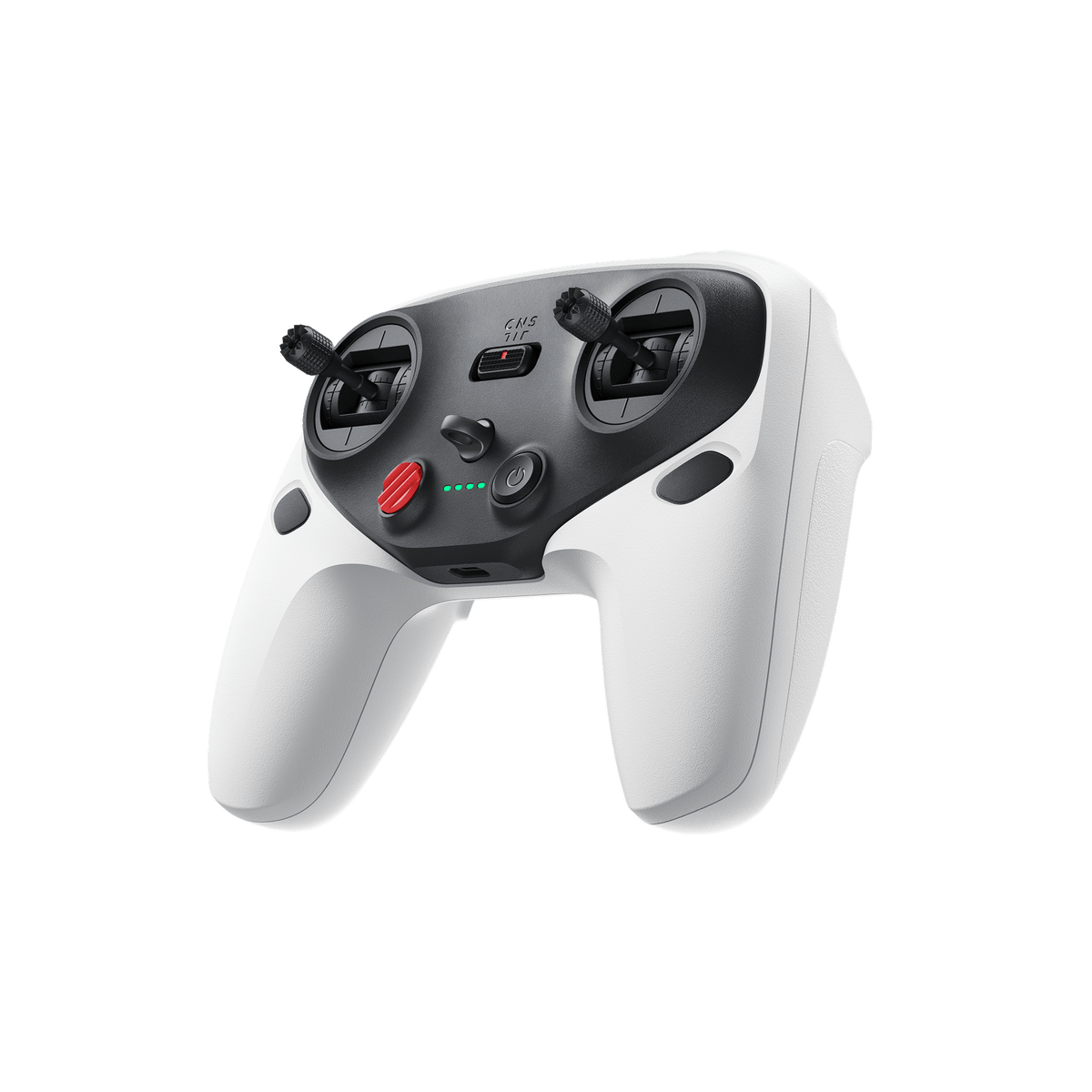



Antigravity A1 Remote Controller
Precise Dual-Stick Control for A1 Bring a familiar flying style to the Antigravity A1. The Antigravity A1 Remote Controller combines conventional twin-stick input with the Vision Goggles, giving experienced pilots a direct way to position the aircraft and shape a shot. Control the flight path with your hands while choosing how you see the surrounding 360 scene. It is an upgrade for A1 owners who prefer deliberate stick movements and dedicated camera controls. Pair it with your compatible aircraft and Vision Goggles to move between heading-aligned framing and a freely moving viewpoint. Highlights Classic dual-stick control for the Antigravity A1 drone. Fixed View with virtual gimbal adjustment for heading-aligned framing. Free View for looking around independently of the aircraft flight path. Mode 1, Mode 2 and Mode 3 with two customisable buttons. Dedicated photo, recording, menu and return-to-home controls. Approximately five hours of controller operation with USB-C charging. Key Features Keep the Heading in View Fixed View holds the live perspective in line with the drone heading. Use the scroll wheel to adjust the virtual gimbal pitch while the sticks manage the aircraft. This creates a familiar relationship between the direction of travel and the image in the goggles when planning a reveal, approach or change of altitude. Look Beyond the Flight Path Switch to Free View when the story extends beyond the aircraft heading. The Vision Goggles follow your head movements, letting you look around the panoramic live scene while continuing to steer with the sticks. The viewing mode changes your perspective; it does not remove the need to monitor the flight route. Make the Controls Yours Choose your preferred stick mode and assign the two custom buttons to supported functions. Dedicated shutter and recording buttons keep capture controls within reach. Normal, Cine and Sport selections let you match the aircraft response to your intended movement, while the emergency stop and return-to-home button provides quick access to those flight functions. Prepare for the Session The compact controller weighs approximately 256 g and has a built-in rechargeable battery. A USB-C connection handles charging and firmware updates. Keep the controller close to the Vision Goggles during use and pairing; their short-range wireless link is separate from the aircraft video transmission system. Summary Antigravity A1 Remote Controller is a focused addition for pilots who want familiar stick control, a choice of viewing modes and direct camera operation. This is the controller accessory only. An A1 drone and Vision Goggles are required and are sold separately. Frequently Asked Questions What Do I Need to Use This Controller?ExpandCollapse You need an Antigravity A1 drone and Antigravity Vision Goggles. The Remote Controller links with the goggles; it is not a standalone phone controller. The aircraft and goggles are sold separately. How Are Fixed View and Free View Different?ExpandCollapse Fixed View keeps the live view aligned with the aircraft heading and lets you adjust the virtual gimbal pitch with the scroll wheel. Free View follows your head movements so you can look around independently of the flight direction. Both modes require the Vision Goggles. Can I Choose My Preferred Stick Layout?ExpandCollapse Yes. The controller supports Mode 1, Mode 2 and Mode 3. It also has two customisable buttons. Select the control layout and button assignments through the compatible goggles settings. How Long Does the Battery Last and How Is It Charged?ExpandCollapse Antigravity specifies approximately five hours of controller operation and approximately two hours to charge. Use the USB-C port with a suitable 5 V / 2 A supply. These figures describe the controller battery, not aircraft flight time, and vary with use and charging conditions. Does This Include a Drone or Vision Goggles?ExpandCollapse No. This listing includes one Remote Controller. For a complete aircraft package, see the Antigravity A1 drone bundles and check the equipment included in your selected bundle.
Pickup available at 3005, Ubi Avenue 3, #01-88
일반적으로 2~4일 후 준비 완료
Antigravity A1 Remote Controller
제품 설명
Precise Dual-Stick Control for A1
Bring a familiar flying style to the Antigravity A1. The Antigravity A1 Remote Controller combines conventional twin-stick input with the Vision Goggles, giving experienced pilots a direct way to position the aircraft and shape a shot. Control the flight path with your hands while choosing how you see the surrounding 360 scene.
It is an upgrade for A1 owners who prefer deliberate stick movements and dedicated camera controls. Pair it with your compatible aircraft and Vision Goggles to move between heading-aligned framing and a freely moving viewpoint.
Highlights
- Classic dual-stick control for the Antigravity A1 drone.
- Fixed View with virtual gimbal adjustment for heading-aligned framing.
- Free View for looking around independently of the aircraft flight path.
- Mode 1, Mode 2 and Mode 3 with two customisable buttons.
- Dedicated photo, recording, menu and return-to-home controls.
- Approximately five hours of controller operation with USB-C charging.
Key Features
Keep the Heading in View
Fixed View holds the live perspective in line with the drone heading. Use the scroll wheel to adjust the virtual gimbal pitch while the sticks manage the aircraft. This creates a familiar relationship between the direction of travel and the image in the goggles when planning a reveal, approach or change of altitude.
Look Beyond the Flight Path
Switch to Free View when the story extends beyond the aircraft heading. The Vision Goggles follow your head movements, letting you look around the panoramic live scene while continuing to steer with the sticks. The viewing mode changes your perspective; it does not remove the need to monitor the flight route.
Make the Controls Yours
Choose your preferred stick mode and assign the two custom buttons to supported functions. Dedicated shutter and recording buttons keep capture controls within reach. Normal, Cine and Sport selections let you match the aircraft response to your intended movement, while the emergency stop and return-to-home button provides quick access to those flight functions.
Prepare for the Session
The compact controller weighs approximately 256 g and has a built-in rechargeable battery. A USB-C connection handles charging and firmware updates. Keep the controller close to the Vision Goggles during use and pairing; their short-range wireless link is separate from the aircraft video transmission system.
Summary
Antigravity A1 Remote Controller is a focused addition for pilots who want familiar stick control, a choice of viewing modes and direct camera operation. This is the controller accessory only. An A1 drone and Vision Goggles are required and are sold separately.
Frequently Asked Questions
What Do I Need to Use This Controller?
You need an Antigravity A1 drone and Antigravity Vision Goggles. The Remote Controller links with the goggles; it is not a standalone phone controller. The aircraft and goggles are sold separately.
How Are Fixed View and Free View Different?
Fixed View keeps the live view aligned with the aircraft heading and lets you adjust the virtual gimbal pitch with the scroll wheel. Free View follows your head movements so you can look around independently of the flight direction. Both modes require the Vision Goggles.
Can I Choose My Preferred Stick Layout?
Yes. The controller supports Mode 1, Mode 2 and Mode 3. It also has two customisable buttons. Select the control layout and button assignments through the compatible goggles settings.
How Long Does the Battery Last and How Is It Charged?
Antigravity specifies approximately five hours of controller operation and approximately two hours to charge. Use the USB-C port with a suitable 5 V / 2 A supply. These figures describe the controller battery, not aircraft flight time, and vary with use and charging conditions.
Does This Include a Drone or Vision Goggles?
No. This listing includes one Remote Controller. For a complete aircraft package, see the Antigravity A1 drone bundles and check the equipment included in your selected bundle.
사양
Antigravity A1 Remote Controller
Antigravity A1 Remote Controller adds conventional dual-stick operation to the A1 flight system. It works with the A1 aircraft and Vision Goggles, combining selectable stick layouts with Fixed View and Free View perspectives. Dedicated capture buttons and a virtual gimbal dial keep flight and framing controls close at hand. The specifications below describe the controller accessory, including its rechargeable battery, physical dimensions and local link to the goggles. Aircraft flight time and video transmission distance are separate specifications.
| Compatibility and Controls | |
|---|---|
| Supported Equipment | Antigravity A1 drone and Antigravity Vision Goggles required; both sold separately |
| Control Layout | Dual sticks; Mode 1, Mode 2 and Mode 3; two customisable buttons |
| Viewing Modes | Fixed View with virtual gimbal pitch adjustment; Free View with head tracking through Vision Goggles |
| Flight and Camera Controls | Normal, Cine and Sport selection; brake/hover and return-to-home button; shutter, record, menu and scroll-wheel controls |
| Stick and Wheel Movement | Stick length 17.5 mm; stick travel ±30°; scroll-wheel travel ±30° with push-button input |
| Battery and Charging | |
| Built-in Battery | 2300 mAh; 3.6 V; 8.28 Wh |
| Controller Operating Time | Approximately 5 hours |
| Charging | USB-C; 5 V / 2 A input; approximately 2 hours to charge |
| Wireless and Positioning | |
| Goggles Connection | 2.4 GHz; keep within 10 m of Vision Goggles under suitable conditions; not the aircraft transmission range |
| Radio | 2400–2483.5 MHz; transmitter power ≤12 dBm EIRP; 2 MHz channel bandwidth; 2 Mbps |
| Satellite Systems | GPS L1/L5; Galileo E1/E5a; BeiDou B1I/B2a |
| Physical and Environment | |
| Dimensions | 152 × 117 × 56.5 mm without control sticks; 152 × 117 × 64.5 mm with control sticks (L × W × H) |
| Net Weight | Approximately 256 g |
| Temperature | Operating −10–40°C; charging 5–45°C |
| Package and Warranty | |
| Included | 1 × Remote Controller |
| Warranty | 1 year |
Battery and charging figures are manufacturer estimates and vary with conditions. Radio availability and operating requirements vary by location. Keep the controller close to the Vision Goggles and follow the current user manual.