

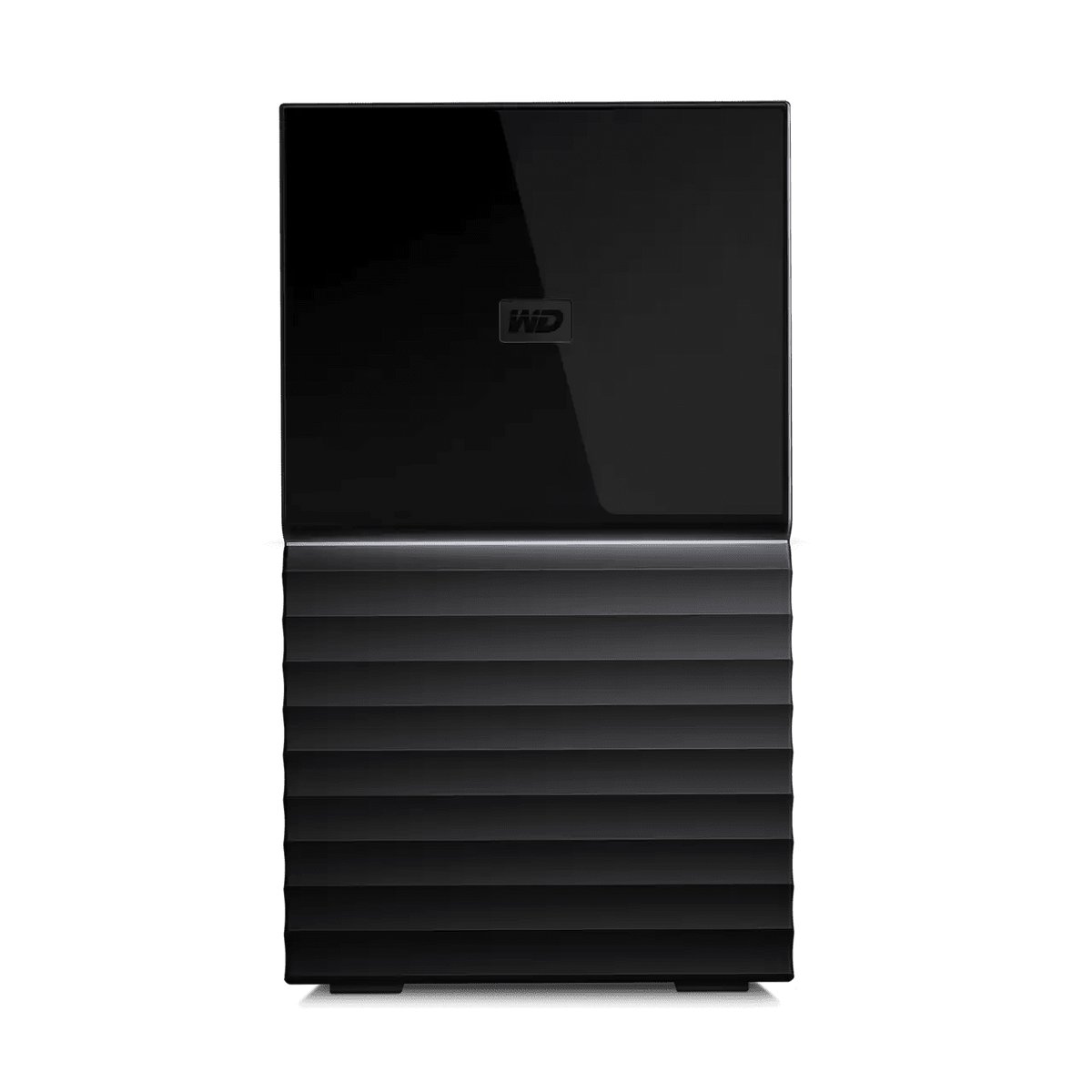
WD My Book Duo USB Desktop RAID Storage
Give your growing digital archive a dedicated desktop home Photos, video projects, music and important documents deserve more room than a crowded computer drive. WD My Book Duo USB Desktop RAID Storage brings two installed hard drives together in a desktop enclosure, with USB-C connectivity, configurable RAID and hardware encryption. Build a central archive beside your computer, choose the storage arrangement that suits your workflow and add a regular backup routine for the files you want to keep. Highlights A desktop archive built around your workflow Two installed hard drives provide a dedicated destination for growing file collections. Ready in RAID 0, with RAID 1 mirroring or individual-drive configuration available through supported software. Connect and organise your workspace USB-C host connection, with USB-C to USB-C and USB-C to USB-A cables included. Two USB-A hub ports connect compatible accessories or additional devices. Security and useful management tools Built-in 256-bit AES hardware encryption and password protection through supported WD software. Device management and Acronis backup software are available by download, subject to compatibility and offer terms. Key Features Reclaim space while keeping your files together My Book Duo gives a compatible computer a dedicated destination for photo libraries, completed video projects, music and documents. Its desktop design suits a stable position beside your workstation, connected to its included mains adapter. Moving older collections from your computer helps organise its local storage, while keeping another copy of irreplaceable material remains essential. Start with RAID 0 for combined capacity The factory RAID 0 configuration combines the two installed drives into a striped storage arrangement for maximum combined capacity and performance. This can suit a working archive or a large backup destination. RAID 0 provides no drive-failure redundancy, so the failure of either drive can affect the array's data. Plan a separate backup before relying on it for important files. Choose mirroring or separate drives when needed Supported WD Drive Utilities software can change the configuration to RAID 1 mirroring or JBOD, which presents the drives individually. RAID 1 keeps matching copies across the drives and provides approximately half the combined raw capacity. It still does not protect against every cause of data loss. Changing RAID mode reformats both drives, so make a verified copy of existing data before making that change. Connect through USB-C or USB-A The USB-C host connector and included cables accommodate compatible computers with USB-C or USB-A ports. USB 3.2 Gen 1 provides a connection up to 5Gb/s; that is the interface link rate rather than a guaranteed file-transfer speed. Actual results depend on the computer, connection, workload and selected RAID configuration. The unit requires its supplied mains adapter as well as its USB connection. Keep useful accessories close to your workstation Two rear USB-A hub ports provide connections for compatible additional devices and accessories, helping organise a desktop setup around one storage unit. Western Digital also identifies charging compatible mobile devices as a supported use. My Book Duo connects directly to a host computer over USB; it is not a standalone network storage server. Add password protection to hardware encryption Built-in 256-bit AES hardware encryption operates within the My Book Duo enclosure. Compatible WD Security software adds password protection to restrict access to stored files. Keep the password safely: losing it can prevent access to protected data. The encryption relies on the enclosure, so removing an internal drive and connecting it separately is not a normal way to read its files. Make backup and drive management part of the routine Downloadable WD Drive Utilities supports functions such as diagnostics and RAID management on compatible systems. Acronis True Image for Western Digital provides supported backup functions and protection against ransomware under its software terms. Check those requirements separately from basic USB storage compatibility: selective file-and-folder backup or restore is not supported, and backing up a Windows computer's internal RAID is restricted. These limitations do not describe My Book Duo's external RAID configuration. Prepare the file system for your computer Western Digital lists support for compatible Windows and macOS computers, with reformatting required for Mac use. Select a file system suitable for the intended computer and backup application before loading your archive. Formatting and configuration changes erase existing data. The included disk replacement tool and guides support maintenance, while drive replacement should follow Western Digital's instructions for compatible hardware. Summary WD My Book Duo combines a spacious desktop archive, configurable two-drive storage and a useful USB hub for a compatible workstation. Choose the RAID arrangement deliberately, prepare the format for your computer and maintain a separate backup of valuable files. Its hardware encryption, supported management tools and three-year limited warranty provide a practical foundation for a well-organised storage routine.
Add-ons (1)
Pickup available at 3005, Ubi Avenue 3, #01-88
Usually ready in 2-4 Business Day (Excluding Public Holiday)
WD My Book Duo USB Desktop RAID Storage
Umorder ng maraming opsyon
Itakda ang dami para sa bawat opsyon. Awtomatikong maa-update ang iyong cart.
Variant
Dami
Presyo
Variant total
Variants
Total items
Total items
Product subtotal
Paglalarawan
Give your growing digital archive a dedicated desktop home
Photos, video projects, music and important documents deserve more room than a crowded computer drive. WD My Book Duo USB Desktop RAID Storage brings two installed hard drives together in a desktop enclosure, with USB-C connectivity, configurable RAID and hardware encryption. Build a central archive beside your computer, choose the storage arrangement that suits your workflow and add a regular backup routine for the files you want to keep.
Highlights
A desktop archive built around your workflow
- Two installed hard drives provide a dedicated destination for growing file collections.
- Ready in RAID 0, with RAID 1 mirroring or individual-drive configuration available through supported software.
Connect and organise your workspace
- USB-C host connection, with USB-C to USB-C and USB-C to USB-A cables included.
- Two USB-A hub ports connect compatible accessories or additional devices.
Security and useful management tools
- Built-in 256-bit AES hardware encryption and password protection through supported WD software.
- Device management and Acronis backup software are available by download, subject to compatibility and offer terms.
Key Features
Reclaim space while keeping your files together
My Book Duo gives a compatible computer a dedicated destination for photo libraries, completed video projects, music and documents. Its desktop design suits a stable position beside your workstation, connected to its included mains adapter. Moving older collections from your computer helps organise its local storage, while keeping another copy of irreplaceable material remains essential.
Start with RAID 0 for combined capacity
The factory RAID 0 configuration combines the two installed drives into a striped storage arrangement for maximum combined capacity and performance. This can suit a working archive or a large backup destination. RAID 0 provides no drive-failure redundancy, so the failure of either drive can affect the array's data. Plan a separate backup before relying on it for important files.
Choose mirroring or separate drives when needed
Supported WD Drive Utilities software can change the configuration to RAID 1 mirroring or JBOD, which presents the drives individually. RAID 1 keeps matching copies across the drives and provides approximately half the combined raw capacity. It still does not protect against every cause of data loss. Changing RAID mode reformats both drives, so make a verified copy of existing data before making that change.
Connect through USB-C or USB-A
The USB-C host connector and included cables accommodate compatible computers with USB-C or USB-A ports. USB 3.2 Gen 1 provides a connection up to 5Gb/s; that is the interface link rate rather than a guaranteed file-transfer speed. Actual results depend on the computer, connection, workload and selected RAID configuration. The unit requires its supplied mains adapter as well as its USB connection.
Keep useful accessories close to your workstation
Two rear USB-A hub ports provide connections for compatible additional devices and accessories, helping organise a desktop setup around one storage unit. Western Digital also identifies charging compatible mobile devices as a supported use. My Book Duo connects directly to a host computer over USB; it is not a standalone network storage server.
Add password protection to hardware encryption
Built-in 256-bit AES hardware encryption operates within the My Book Duo enclosure. Compatible WD Security software adds password protection to restrict access to stored files. Keep the password safely: losing it can prevent access to protected data. The encryption relies on the enclosure, so removing an internal drive and connecting it separately is not a normal way to read its files.
Make backup and drive management part of the routine
Downloadable WD Drive Utilities supports functions such as diagnostics and RAID management on compatible systems. Acronis True Image for Western Digital provides supported backup functions and protection against ransomware under its software terms. Check those requirements separately from basic USB storage compatibility: selective file-and-folder backup or restore is not supported, and backing up a Windows computer's internal RAID is restricted. These limitations do not describe My Book Duo's external RAID configuration.
Prepare the file system for your computer
Western Digital lists support for compatible Windows and macOS computers, with reformatting required for Mac use. Select a file system suitable for the intended computer and backup application before loading your archive. Formatting and configuration changes erase existing data. The included disk replacement tool and guides support maintenance, while drive replacement should follow Western Digital's instructions for compatible hardware.
Summary
WD My Book Duo combines a spacious desktop archive, configurable two-drive storage and a useful USB hub for a compatible workstation. Choose the RAID arrangement deliberately, prepare the format for your computer and maintain a separate backup of valuable files. Its hardware encryption, supported management tools and three-year limited warranty provide a practical foundation for a well-organised storage routine.
Mga detalye
WD My Book Duo USB Desktop RAID Storage
WD My Book Duo is desktop USB direct-attached storage with two installed hard drives and a separate power supply. A connected computer accesses the storage through the upstream USB-C port; two downstream USB-A ports provide an accessory hub. Compatible WD software supports RAID management, password protection and backup functions. RAID configuration, file systems and software compatibility affect setup and usable space. Keep a separate backup before changing configuration or servicing the drives.
| Specification | Details |
|---|---|
| Storage and RAID | |
| System type | USB direct-attached desktop storage; two installed 3.5-inch HDDs; host required |
| RAID modes | Factory RAID 0 striping; optional RAID 1 mirroring / JBOD via WD Drive Utilities |
| Labelled capacity | Combined nominal capacity of both drives; 1TB = 1 trillion bytes |
| RAID 0 capacity / protection | Combined capacity; no drive-failure redundancy |
| RAID 1 usable capacity | Approximately half the combined capacity with equal-sized drives |
| JBOD presentation | Drives exposed separately |
| Drive serviceability | User-serviceable using supplied tool/guide; power off first; no hot-swap |
| Connectivity and Host Requirements | |
| Upstream host connection | One USB-C port; USB 3.2 Gen 1 up to 5Gbps |
| Equivalent interface names | USB 3.1 Gen 1 / USB 3.0; USB 2.0 compatible |
| Downstream accessory hub | Two USB-A ports; USB 3.2 Gen 1 / USB 3.0 |
| Hub uses | Compatible peripherals, storage and supported mobile sync/charging |
| Factory file system | NTFS |
| Storage operating systems | Windows 10+; macOS 11+ requires reformatting |
| Physical Specifications Power and Environment | |
| Dimensions L × W × H | 160 × 100 × 180mm |
| Device weight | Up to 2.63kg; installed-drive capacity/generation dependent; not packed shipping weight |
| Included adapter rated output | 12V DC, 4A / 48W; not measured operating consumption |
| DC barrel connector | 5.5mm outer connection; 2.5mm centre pin |
| Controls / indicators | Rear power button; front white/amber power, activity, RAID rebuild and attention LED |
| Physical security | Kensington slot; compatible lock cable sold separately |
| Temperature | Operating 5–35°C; non-operating/storage −20–65°C; maintain ventilation |
| Management Security and Backup | |
| Drive management | WD Drive Utilities: RAID, diagnostics, erase/format and sleep timer |
| Management operating systems | Windows 11; macOS 14, 15 and 26 |
| Hardware encryption | 256-bit AES; always enabled |
| Password protection | Optional; WD Security manages password and unlocking |
| WD Security operating systems | Windows 11; macOS 14, 15 and 26 |
| Apple silicon Macs | Rosetta 2 required for WD Security |
| Backup application / scope | Acronis True Image for Western Digital; image backup of locally stored data |
| Acronis operating systems | Windows 10/11; macOS 12, 13, 14, 15 and 26 |
| Acronis offer | Five-year licence; download, installation and activation required |
| Package Contents and Warranty | |
| Included system / service items | Duo unit, AC adapter, disk replacement tool, replacement guide and quick install guide |
| Included data cables | 5Gbps USB-C to USB-C and USB-C to USB-A cables |
| Software delivery | Device-management and backup software by download |
| Limited warranty | Three years; applicable regional terms apply |
Conditions and notes
- RAID and servicing: Changing RAID configuration erases the device and its password; back up first. RAID 1 is not a substitute for a separate backup. Use supported WD replacement drives of matching type and capacity, preserve bay order and follow WD instructions. Formatting and system overhead reduce usable capacity.
- Host and performance: Use the supplied AC adapter. Hub ports are downstream accessory connections, not additional host ports. Actual disk transfers depend on host, connection, workload and RAID mode; the link rate is not guaranteed disk throughput. Choose a host-supported file system; reformatting erases data. Management features depend on platform and compatible applications.
- Encryption and software: Hardware encryption depends on a compatible My Book Duo enclosure; direct computer connection or a different enclosure does not make the removed disks readable. Storage and app compatibility are separate. Acronis needs a compatible WD device and activation; cloud-only content and selective file/folder backup or restore are unsupported. Mac backup destinations cannot use NTFS.
- Software offer: Redeem within 90 days of purchase or by 31-Dec-29, whichever is earlier. Applicable compatibility checks and terms apply; account registration may be required.
Add-ons
