


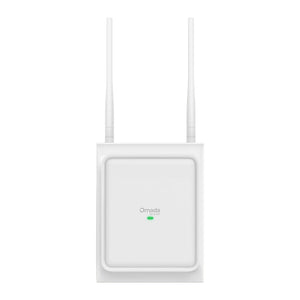
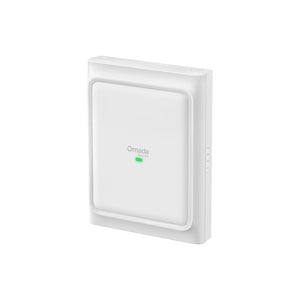


TP-Link EAP725-Outdoor BE5000 Wi-Fi 7 Access Point
Shape outdoor Wi-Fi around the space The TP-Link EAP725-Outdoor brings dual-band Wi-Fi 7 and a 2.5GbE connection to a planned outdoor network. Its directional and omnidirectional antenna arrangements help match coverage to a focused route or a wider open area. An IP66 enclosure and PoE+ installation support a discreet network extension, with standalone or compatible Omada management for configuration and monitoring. Highlights Wireless built for the location Dual-band Wi-Fi 7 for a planned outdoor installation. 2.5GbE uplink and compatible Omada management. A considered installation IP66 housing with directional or omnidirectional antenna options. Correct PoE source and mounting arrangement required. Practical network control Standalone setup or compatible controller management. Guest segmentation and supported coordinated network features. Key Features Choose an antenna pattern for the site The EAP725-Outdoor supports external omnidirectional and internal directional antenna arrangements. An open seating area and a focused approach need different coverage patterns. Choose the intended mode, mounting position and alignment around the people and devices using the network, then test coverage under actual conditions. Pair Wi-Fi 7 with an appropriate uplink Dual-band Wi-Fi 7 advertises up to 688Mbps on 2.4GHz and 4324Mbps on 5GHz. A 2.5GbE port gives the wired backhaul more headroom than a Gigabit-only connection when the switch and cable support it. This model does not add a 6GHz radio; the available Wi-Fi 7 functions depend on the client, region and firmware. Run power and data together The Ethernet uplink accepts IEEE 802.3at PoE+. Use a compatible source with sufficient per-port and total budget. Plan the cable route, surge protection and grounding as part of the installation. An outdoor-rated access point does not make an exposed indoor power adapter or an unsealed connector suitable for the weather. Protect the complete installation The housing is rated IP66 and the manufacturer documents surge and ESD protection. Correct cable entry, sealing and grounding remain essential. Wall and pole mounting options give useful placement choices, but the selected position must also respect safe access, structural support and antenna clearance. Organise guest access and network management Supported VLAN mapping, guest policies and wireless security modes help make the outdoor network part of the wider site. A compatible Omada controller provides supported central management and coordinated features. Match gateway and switching settings to the wireless policy rather than assuming that a separate guest SSID establishes isolation by itself. Test the finished network with real devices Buildings, foliage, rain, interference, mounting height and client radios affect usable coverage. Roaming also depends on the client and controller configuration. Test representative calls and transfers at the working locations, including busy periods, before treating a manufacturer reference area or client count as a deployment result. Summary Choose the EAP725-Outdoor when its installation format and radio capabilities fit the site. Match the power source, cabling, permitted radio settings and controller support to the deployment, then test the network with the client devices and traffic it will serve. Frequently Asked Questions Does this Wi-Fi 7 access point use 6GHz?ExpandCollapse No. The published radio bands are 2.4GHz and 5GHz. It is a dual-band Wi-Fi 7 model, with functions subject to region, firmware and client support. Can I select directional or omnidirectional coverage?ExpandCollapse The manufacturer documents internal directional and external omnidirectional antenna arrangements. Select and configure the appropriate mode for the site, then check alignment and coverage after installation. What powers the access point?ExpandCollapse Use a compatible IEEE 802.3at PoE+ source. Check its per-port and shared power budget, and protect all cabling and power equipment appropriately. Does IP66 make the whole connection waterproof?ExpandCollapse The rating applies to the correctly installed access-point enclosure. Cable joints, entries, grounding and the power-source location still need the required protection. Can it run without an Omada controller?ExpandCollapse Standalone operation is supported. Controller-dependent central management, roaming and mesh require compatible Omada hardware/software and firmware.
Mga Dagdag na Produkto (2)
Maaaring kunin sa 3005, Ubi Avenue 3, #01-88
Karaniwang handa sa loob ng 2-4 na araw ng negosyo (hindi kasama ang mga pampublikong pista opisyal)
TP-Link EAP725-Outdoor BE5000 Wi-Fi 7 Access Point
Paglalarawan
Shape outdoor Wi-Fi around the space
The TP-Link EAP725-Outdoor brings dual-band Wi-Fi 7 and a 2.5GbE connection to a planned outdoor network. Its directional and omnidirectional antenna arrangements help match coverage to a focused route or a wider open area. An IP66 enclosure and PoE+ installation support a discreet network extension, with standalone or compatible Omada management for configuration and monitoring.
Highlights
Wireless built for the location
- Dual-band Wi-Fi 7 for a planned outdoor installation.
- 2.5GbE uplink and compatible Omada management.
A considered installation
- IP66 housing with directional or omnidirectional antenna options.
- Correct PoE source and mounting arrangement required.
Practical network control
- Standalone setup or compatible controller management.
- Guest segmentation and supported coordinated network features.
Key Features
Choose an antenna pattern for the site
The EAP725-Outdoor supports external omnidirectional and internal directional antenna arrangements. An open seating area and a focused approach need different coverage patterns. Choose the intended mode, mounting position and alignment around the people and devices using the network, then test coverage under actual conditions.
Pair Wi-Fi 7 with an appropriate uplink
Dual-band Wi-Fi 7 advertises up to 688Mbps on 2.4GHz and 4324Mbps on 5GHz. A 2.5GbE port gives the wired backhaul more headroom than a Gigabit-only connection when the switch and cable support it. This model does not add a 6GHz radio; the available Wi-Fi 7 functions depend on the client, region and firmware.
Run power and data together
The Ethernet uplink accepts IEEE 802.3at PoE+. Use a compatible source with sufficient per-port and total budget. Plan the cable route, surge protection and grounding as part of the installation. An outdoor-rated access point does not make an exposed indoor power adapter or an unsealed connector suitable for the weather.
Protect the complete installation
The housing is rated IP66 and the manufacturer documents surge and ESD protection. Correct cable entry, sealing and grounding remain essential. Wall and pole mounting options give useful placement choices, but the selected position must also respect safe access, structural support and antenna clearance.
Organise guest access and network management
Supported VLAN mapping, guest policies and wireless security modes help make the outdoor network part of the wider site. A compatible Omada controller provides supported central management and coordinated features. Match gateway and switching settings to the wireless policy rather than assuming that a separate guest SSID establishes isolation by itself.
Test the finished network with real devices
Buildings, foliage, rain, interference, mounting height and client radios affect usable coverage. Roaming also depends on the client and controller configuration. Test representative calls and transfers at the working locations, including busy periods, before treating a manufacturer reference area or client count as a deployment result.
Summary
Choose the EAP725-Outdoor when its installation format and radio capabilities fit the site. Match the power source, cabling, permitted radio settings and controller support to the deployment, then test the network with the client devices and traffic it will serve.
Frequently Asked Questions
Does this Wi-Fi 7 access point use 6GHz?
No. The published radio bands are 2.4GHz and 5GHz. It is a dual-band Wi-Fi 7 model, with functions subject to region, firmware and client support.
Can I select directional or omnidirectional coverage?
The manufacturer documents internal directional and external omnidirectional antenna arrangements. Select and configure the appropriate mode for the site, then check alignment and coverage after installation.
What powers the access point?
Use a compatible IEEE 802.3at PoE+ source. Check its per-port and shared power budget, and protect all cabling and power equipment appropriately.
Does IP66 make the whole connection waterproof?
The rating applies to the correctly installed access-point enclosure. Cable joints, entries, grounding and the power-source location still need the required protection.
Can it run without an Omada controller?
Standalone operation is supported. Controller-dependent central management, roaming and mesh require compatible Omada hardware/software and firmware.
Mga detalye
TP-Link EAP725-Outdoor BE5000 Wi-Fi 7 Access Point
A business access point designed around its installation location, with Wi-Fi 7 radios, a faster wired uplink and supported Omada management. The grouped specifications distinguish the radio signal rates, network connections, power requirements and physical installation. Wireless rates are not guaranteed application throughput. Regional channel rules, hardware, firmware, controller support and client capabilities determine which advanced functions can be used in the finished network.
| Specification | Details |
|---|---|
| Wireless and Antennas | |
| Standard and bands | Dual-band Wi-Fi 7 on 2.4GHz and 5GHz; no 6GHz radio. |
| Signal rates | Up to 688Mbps on 2.4GHz and 4324Mbps on 5GHz; advertised PHY rates. |
| Antenna arrangements | Internal directional and external omnidirectional antenna arrangements; configure the mode for the deployment. |
| Published antenna gains | 2.4GHz: external 4.5dBi or internal 8.3dBi; 5GHz: external 5.3dBi or internal 13.2dBi. Manufacturer single-antenna peak figures. |
| Wireless functions | Supported Wi-Fi 7 efficiency features, guest policies and coordinated functions depend on client, controller and firmware. |
| Network and Management | |
| Ethernet | 1 × 2.5GbE RJ45 port with PoE+ input. |
| Administration | Standalone web/app or compatible Omada controller. |
| Network policy | Supported SSIDs, VLAN mapping, client isolation and authentication; configure switching/gateway policy consistently. |
| Power and Physical Design | |
| Power input | IEEE 802.3at PoE+; select an appropriate source separately. |
| Consumption | Published maximum 18.4W with PoE+. |
| Protection | IP66 enclosure; manufacturer-listed Ethernet surge/lightning protection requires correct sealing and grounding. |
| Mounting | Pole or wall mounting with included kit. |
| Dimensions and device weight | 208 × 160 × 55 mm (W × D × H); main unit 1.33kg. |
| Environment and Package | |
| Temperature | Operating −30°C to 70°C; storage −40°C to 70°C. |
| Humidity | Operating 10–90% RH; storage 5–90% RH, non-condensing. |
| Included equipment | Access point, mounting kit and Installation Guide; verify antenna and regional pack contents. |
| Warranty | 5 years |
Mga Dagdag na Produkto


TP-Link OC200 Omada Hardware Controller

