


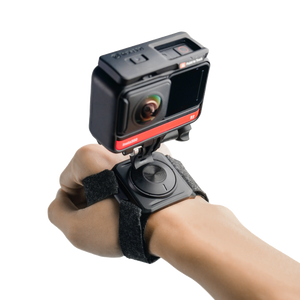


Insta360 Hand Mount Kit
Follow the Action from a Different Point of View Put the camera where a handheld grip would change the way you move. Insta360 Hand Mount Kit provides hand and wrist strap arrangements with an adjustable camera mount, giving you a different point of view for supported activities. Choose the wearing arrangement, set the direction and secure the camera before starting. The kit supplies the straps and mounting parts; the camera and any required camera-specific adapter or dive case are separate. Highlights Hand and wrist strap arrangements in one kit. Rotating camera mount with upward and downward adjustment. Adjustable hook-and-loop strap fit. Supplied 1/4-inch thumb screw and camera mount adapter. Maximum mounted-camera weight of 250 g. Key Features Choose Between Hand and Wrist Positions The kit provides a wrist strap and a separate hand strap, allowing you to select the arrangement that suits the intended camera position and movement. Follow the assembly diagram for the chosen strap rather than combining straps with unrelated accessories. Check comfort, security and freedom of movement before recording the activity. Direct the View Before the Activity The camera mount rotates through 360° and allows upward or downward adjustment, making it possible to set a viewpoint without removing the strap each time. Prepare the angle while stationary and secure the connection. The result depends on how the camera is framed and how the hand moves; the mount does not stabilise the body or guarantee a level horizon by itself. Fit the Strap to the Wearer Adjustable hook-and-loop fastenings provide a practical way to fit the strap and improve stability. The main strap materials are flannel and hook-and-loop fabric. Start with a comfortable, secure fit and check it with the complete camera setup attached. Do not overtighten the strap or position the hardware where it interferes with the activity. Match the Camera Interface and Weight The supplied 1/4-inch thumb screw and camera mount adapter provide the kit’s camera connection. Some cameras require a separate camera-specific interface: GO 3 needs its appropriate Quick Release Mount, and GO 2 needs a Mount Adapter. The mounted-camera limit is 250 g; check the camera and required attached equipment before choosing the setup. Prepare Correctly for Water Use For underwater use, the camera must be inside its applicable dive case as required by the mounting instructions. A camera’s own waterproof specification does not replace that condition for this strap arrangement. Confirm that the case, camera and connection are suitable, and recheck the resulting mounted weight before entering the water. Care for the Kit Between Sessions Dry the straps after use and keep them in a cool, dry, well-ventilated place. Avoid prolonged high temperatures, oven drying or ironing, which can damage or deform the strap materials. Check the fastenings, adapter and screw before the next session so that the kit remains ready to assemble correctly. Summary Insta360 Hand Mount Kit offers two wearable camera positions with adjustable straps and a rotating connection. Choose the hand or wrist arrangement, fit the correct camera interface and respect the mounted-weight limit. With the appropriate camera and any required dive case, it provides a considered alternative to holding the camera on a grip. Frequently Asked Questions What Is Included in the Kit?ExpandCollapse It includes a wrist strap, hand strap, mount, 1/4-inch thumb screw and 1/4-inch camera mount adapter. The camera, camera-specific adapters and dive case shown in application photographs are separate unless explicitly listed. Can I Use It on Either the Hand or Wrist?ExpandCollapse The two supplied straps provide separate hand and wrist arrangements. Follow the assembly diagram, adjust the strap for a comfortable secure fit and check the completed setup before the activity. What Is the Maximum Camera Weight?ExpandCollapse The specified maximum mounted-camera weight is 250 g. Check the camera together with the required attached case and connection parts when planning the complete setup. Do not exceed the stated limit. Can I Use It Underwater?ExpandCollapse Only with the camera inside its applicable dive case, as required by the strap instructions, and with a suitable camera connection. Check the resulting weight and fit; do not assume the camera’s own waterproof rating removes the dive-case requirement. How Should I Clean and Store the Straps?ExpandCollapse Dry them after use and store in a cool, dry, well-ventilated place. Do not oven-dry or iron the straps. Avoid prolonged high temperatures, and inspect the hook-and-loop fastenings and mounting parts before using them again.
Pickup available at 3005, Ubi Avenue 3, #01-88
Usually ready in 2-4 Business Day (Excluding Public Holiday)
Insta360 Hand Mount Kit
Paglalarawan
Follow the Action from a Different Point of View
Put the camera where a handheld grip would change the way you move. Insta360 Hand Mount Kit provides hand and wrist strap arrangements with an adjustable camera mount, giving you a different point of view for supported activities. Choose the wearing arrangement, set the direction and secure the camera before starting. The kit supplies the straps and mounting parts; the camera and any required camera-specific adapter or dive case are separate.
Highlights
- Hand and wrist strap arrangements in one kit.
- Rotating camera mount with upward and downward adjustment.
- Adjustable hook-and-loop strap fit.
- Supplied 1/4-inch thumb screw and camera mount adapter.
- Maximum mounted-camera weight of 250 g.
Key Features
Choose Between Hand and Wrist Positions
The kit provides a wrist strap and a separate hand strap, allowing you to select the arrangement that suits the intended camera position and movement. Follow the assembly diagram for the chosen strap rather than combining straps with unrelated accessories. Check comfort, security and freedom of movement before recording the activity.
Direct the View Before the Activity
The camera mount rotates through 360° and allows upward or downward adjustment, making it possible to set a viewpoint without removing the strap each time. Prepare the angle while stationary and secure the connection. The result depends on how the camera is framed and how the hand moves; the mount does not stabilise the body or guarantee a level horizon by itself.
Fit the Strap to the Wearer
Adjustable hook-and-loop fastenings provide a practical way to fit the strap and improve stability. The main strap materials are flannel and hook-and-loop fabric. Start with a comfortable, secure fit and check it with the complete camera setup attached. Do not overtighten the strap or position the hardware where it interferes with the activity.
Match the Camera Interface and Weight
The supplied 1/4-inch thumb screw and camera mount adapter provide the kit’s camera connection. Some cameras require a separate camera-specific interface: GO 3 needs its appropriate Quick Release Mount, and GO 2 needs a Mount Adapter. The mounted-camera limit is 250 g; check the camera and required attached equipment before choosing the setup.
Prepare Correctly for Water Use
For underwater use, the camera must be inside its applicable dive case as required by the mounting instructions. A camera’s own waterproof specification does not replace that condition for this strap arrangement. Confirm that the case, camera and connection are suitable, and recheck the resulting mounted weight before entering the water.
Care for the Kit Between Sessions
Dry the straps after use and keep them in a cool, dry, well-ventilated place. Avoid prolonged high temperatures, oven drying or ironing, which can damage or deform the strap materials. Check the fastenings, adapter and screw before the next session so that the kit remains ready to assemble correctly.
Summary
Insta360 Hand Mount Kit offers two wearable camera positions with adjustable straps and a rotating connection. Choose the hand or wrist arrangement, fit the correct camera interface and respect the mounted-weight limit. With the appropriate camera and any required dive case, it provides a considered alternative to holding the camera on a grip.
Frequently Asked Questions
What Is Included in the Kit?
It includes a wrist strap, hand strap, mount, 1/4-inch thumb screw and 1/4-inch camera mount adapter. The camera, camera-specific adapters and dive case shown in application photographs are separate unless explicitly listed.
Can I Use It on Either the Hand or Wrist?
The two supplied straps provide separate hand and wrist arrangements. Follow the assembly diagram, adjust the strap for a comfortable secure fit and check the completed setup before the activity.
What Is the Maximum Camera Weight?
The specified maximum mounted-camera weight is 250 g. Check the camera together with the required attached case and connection parts when planning the complete setup. Do not exceed the stated limit.
Can I Use It Underwater?
Only with the camera inside its applicable dive case, as required by the strap instructions, and with a suitable camera connection. Check the resulting weight and fit; do not assume the camera’s own waterproof rating removes the dive-case requirement.
How Should I Clean and Store the Straps?
Dry them after use and store in a cool, dry, well-ventilated place. Do not oven-dry or iron the straps. Avoid prolonged high temperatures, and inspect the hook-and-loop fastenings and mounting parts before using them again.
Mga detalye
Insta360 Hand Mount Kit
Insta360 Hand Mount Kit provides separate hand and wrist wearing arrangements with a rotating camera support. Its strap materials, supplied fittings and mounted-camera limit define the setup more usefully than a universal-camera claim. Choose the correct interface for the camera, assemble the selected strap as shown and confirm comfort and security before the activity. Underwater use requires the camera’s applicable dive case. The published kit weight excludes the separate camera and any additional case or camera-specific adapter.
| Specification | Details |
|---|---|
| Wearing Arrangement and Adjustment | |
| Strap Arrangements | Hand strap or wrist strap, assembled as instructed |
| Mount Rotation | 360° with upward and downward adjustment |
| Fit Adjustment | Adjustable hook-and-loop strap closure |
| Camera Connection | Supplied 1/4-inch thumb screw and 1/4-inch camera mount adapter |
| Physical Design and Load | |
| Published Kit Weight | Approximately 131 g |
| Main Strap Materials | Flannel and hook-and-loop fabric |
| Maximum Mounted-Camera Weight | 250 g |
| Camera Fit and Care | |
| Camera-Specific Adapters | GO 3 requires its appropriate Quick Release Mount; GO 2 requires a Mount Adapter; separate accessories |
| Underwater Use | Camera must be in its applicable dive case; confirm fit and mounted weight |
| After Use | Dry straps and store cool, dry and well ventilated |
| Drying Precautions | No oven drying or ironing; avoid prolonged high temperatures |
| Included Items | |
| In the Box | Wrist strap, hand strap, mount, 1/4-inch thumb screw and 1/4-inch camera mount adapter |
| Separate Equipment | Camera, applicable dive case and any camera-specific adapter |