


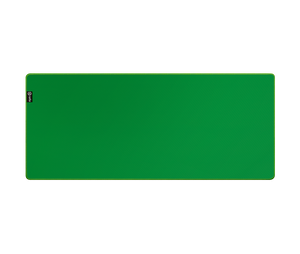


Elgato Green Screen Mouse Mat
Show hands and hardware against a background you can key out Use this extended green desk mat for overhead shots of a keyboard, controller or hands-on demonstration. Its green surface gives a compatible video app a consistent area to remove with a chroma-key filter. The mat also works as a broad everyday mouse surface between recordings. Highlights Desk coverage 940 × 400 mm surface for an overhead desk view Surface Smooth polyester mouse surface with stitched cotton edges Chroma key Anti-skid rubber base for desk placement Even green colour for a compatible chroma-key setup Key Features Show hands or products in an overhead shot Lay the green surface under an overhead camera to give your hands, keyboard or demonstration area a continuous background. Frame the scene so that the edges of the mat sit outside the visible area. The large work surface gives more room to move a mouse or lay out small items during a demonstration. Give the key an even colour to work with Use a software tool with chroma key support and light the mat as evenly as practical. Shadows, reflections and uneven colour can leave fragments in the keyed image. Test at the camera angle you will record from and keep green objects out of the shot when you want those objects to remain visible. Keep a usable desk surface between recordings The polyester surface also works as an extended mouse pad. The stitched edge is intended to protect the perimeter and the rubber base helps hold the mat on a desk. Flatten it before positioning the camera and use the same desk arrangement for recurring demonstrations when continuity matters. Plan the overhead setup as a separate workflow Choose a secure camera mount and an app that can replace the green background. Allow room for lights and cables outside the shot. Keep a copy of the original camera recording if you want to change the background or refine the key after the session. Summary Choose the Green Screen Mouse Mat for a repeatable overhead demonstration, hand camera or content creation desk. It gives you a usable mouse surface and a broad area to key in compatible software. A well-positioned camera and even lighting will make the finished shot easier to adjust and reuse. Frequently Asked Questions What is the mat for?ExpandCollapse Use its green surface with an overhead camera and chroma key to remove the visible desk background. Can it function as a regular mouse pad?ExpandCollapse Yes. It has a smooth polyester top and an anti-skid rubber underside. Does it remove the background by itself?ExpandCollapse Apply a chroma-key feature in compatible recording or streaming software. How big is it?ExpandCollapse The surface measures 940 × 400 mm and is about 2 mm thick. How do I reduce shadows in the key?ExpandCollapse Use broad, even light and test the filter with the objects you plan to show.
Maaaring kunin sa 3005, Ubi Avenue 3, #01-88
Karaniwang handa sa loob ng 2-4 na araw ng negosyo (hindi kasama ang mga pampublikong pista opisyal)
Elgato Green Screen Mouse Mat
Paglalarawan
Show hands and hardware against a background you can key out
Use this extended green desk mat for overhead shots of a keyboard, controller or hands-on demonstration. Its green surface gives a compatible video app a consistent area to remove with a chroma-key filter. The mat also works as a broad everyday mouse surface between recordings.
Highlights
Desk coverage
- 940 × 400 mm surface for an overhead desk view
Surface
- Smooth polyester mouse surface with stitched cotton edges
Chroma key
- Anti-skid rubber base for desk placement
- Even green colour for a compatible chroma-key setup
Key Features
Show hands or products in an overhead shot
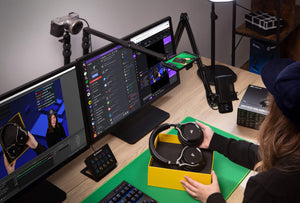
Lay the green surface under an overhead camera to give your hands, keyboard or demonstration area a continuous background. Frame the scene so that the edges of the mat sit outside the visible area. The large work surface gives more room to move a mouse or lay out small items during a demonstration.
Give the key an even colour to work with
Use a software tool with chroma key support and light the mat as evenly as practical. Shadows, reflections and uneven colour can leave fragments in the keyed image. Test at the camera angle you will record from and keep green objects out of the shot when you want those objects to remain visible.
Keep a usable desk surface between recordings
The polyester surface also works as an extended mouse pad. The stitched edge is intended to protect the perimeter and the rubber base helps hold the mat on a desk. Flatten it before positioning the camera and use the same desk arrangement for recurring demonstrations when continuity matters.
Plan the overhead setup as a separate workflow
Choose a secure camera mount and an app that can replace the green background. Allow room for lights and cables outside the shot. Keep a copy of the original camera recording if you want to change the background or refine the key after the session.
Summary
Choose the Green Screen Mouse Mat for a repeatable overhead demonstration, hand camera or content creation desk. It gives you a usable mouse surface and a broad area to key in compatible software. A well-positioned camera and even lighting will make the finished shot easier to adjust and reuse.
Frequently Asked Questions
What is the mat for?
Use its green surface with an overhead camera and chroma key to remove the visible desk background.
Can it function as a regular mouse pad?
Yes. It has a smooth polyester top and an anti-skid rubber underside.
Does it remove the background by itself?
Apply a chroma-key feature in compatible recording or streaming software.
How big is it?
The surface measures 940 × 400 mm and is about 2 mm thick.
How do I reduce shadows in the key?
Use broad, even light and test the filter with the objects you plan to show.
Mga detalye
Elgato Green Screen Mouse Mat
The Green Screen Mouse Mat is a large chroma-key desk surface with a polyester top, stitched edges and a rubber base. It can serve as a mouse mat between recordings. Use a compatible overhead camera and software with chroma-key controls. The dimensions below help determine how much of the desk can be covered in the shot.
| Specification | Details |
|---|---|
| Size and Materials | |
| Dimensions | 940 × 400 × 2 mm |
| Surface | Polyester with anti-fray cotton edges |
| Underside | Anti-skid rubber |
| Colour | Chroma-key green. |
| Recording Setup | |
| Usage | Overhead camera and compatible chroma-key software |
| Box contents | Green Screen Mouse Mat |
| Camera placement | Position a compatible camera above the work surface for the intended chroma-key framing |
| Software requirements | Chroma-key capable recording or editing application. |