




Ubiquiti EAV-Bridge Enterprise 4K60 HDMI and XLR Audio AV-over-IP PoE+ Transceiver
Bring HDMI Video and Professional Audio onto Your Network Connect presentation sources, displays and professional audio through a compact AV-over-IP endpoint. The Ubiquiti EAV-Bridge combines HDMI 2.0 video up to 4K at 60 fps with XLR analogue audio and AES67 networked audio support, making it a practical building block for meeting spaces, teaching environments, digital signage and multi-display installations. Configure each bridge as a source or destination and manage the installation through UniFi Network. A single Gigabit Ethernet connection carries network traffic and PoE+ power, helping keep equipment positions tidy. Start with a source-to-display link, then design a one-to-many distribution system or video wall around the same endpoint hardware. Highlights HDMI Video Distribution HDMI 2.0 input and output supporting video up to 4K60. One-to-one and one-to-many streaming, with video wall layouts up to 8 × 8. The same bridge model can be configured for the source or destination role. Professional Audio Connections Two female XLR inputs with 6.35 mm combo connections and two male XLR outputs. Mono or stereo PCM audio, with 48 V phantom power for suitable input devices. HDMI audio and AES67 support for networked AV system design. Compact, Flexible Installation Gigabit Ethernet with PoE+ input and a maximum device power consumption of 14 W. A 1.3-inch touchscreen provides information at the equipment position. Aluminium enclosure with included DIN rail, wall and pole mounting options. Key Features One Endpoint Design for Either End of the Link Use the same hardware model at the source and display positions, selecting the appropriate role in the AV installation. For an HDMI source-to-display network link, plan a bridge at the source and another at the destination. Additional displays require their own receiving endpoints; this listing is for one bridge. Scale from One Display to a Video Wall HDMI 2.0 input and output support up to 4K at 60 fps, alongside 1080p, 720p and 480p formats. One-to-many streaming lets a source serve multiple destinations, while supported video wall layouts extend up to 8 × 8. Plan the display arrangement, cabling and network capacity together before installation. Bring XLR Audio into the AV Workflow Connect professional analogue audio through the paired XLR inputs and outputs, with 6.35 mm combo connections on the input side. Mono or stereo PCM support and a 20 Hz to 20 kHz frequency response provide a clear specification for system planning. Enable 48 V phantom power only where the connected input equipment requires and supports it. Networked AV Managed through UniFi Bring bridge management into the UniFi Network environment alongside the supporting network infrastructure. The Gigabit Ethernet interface connects each endpoint to the AV network. A planned switching design, multicast handling and sufficient capacity across every link are important when distributing streams to multiple destinations. Power and Data through One Network Cable PoE+ supplies the bridge through its Ethernet port, reducing the need for a separate power socket at each endpoint. Allow up to 14 W for the device and provide a suitable PoE+ source with enough total power for all connected equipment. The touchscreen helps identify local device information during installation and servicing. Mount Where the Installation Needs It The compact aluminium enclosure can be fitted to a DIN rail, mounted to a wall or secured to a suitable pole using the included mounting hardware. Supported pole diameters are 38–50 mm. Position the unit within its operating temperature range and leave connections accessible for service. Summary The Ubiquiti EAV-Bridge brings 4K60 HDMI video, professional XLR audio and networked AV management into a compact PoE+ endpoint. Its selectable source or destination role and flexible mounting options suit installations that need a consistent hardware platform for single displays, distributed screens and video walls. Pair it with appropriate endpoints, cabling and a properly configured AV network for the intended layout. Frequently Asked Questions Do I Need More than One EAV-Bridge?ExpandCollapse For an HDMI source-to-display link over the network, use one bridge at the source and another at the display. Each additional receiving display position needs its own endpoint. This product includes one bridge, so choose the quantity for the complete source and destination layout. What Network and Power Connections Does It Need?ExpandCollapse Each bridge has a Gigabit Ethernet port with PoE+ input and consumes up to 14 W. Provide a suitable PoE+ switch or injector and plan the AV network for multicast traffic and the number of streams crossing each link. Confirm the switch configuration and capacity for the complete installation, especially where streams cross multiple switches. Can It Distribute 4K Video to Several Screens or a Video Wall?ExpandCollapse Yes. The HDMI 2.0 input and output support video up to 4K at 60 fps. The bridge supports one-to-one and one-to-many streaming, together with video wall layouts up to 8 × 8. Each display connection, source format and receiving endpoint must suit the intended layout. Can I Connect Microphones and Other Professional Audio Equipment?ExpandCollapse The bridge has two female XLR inputs with 6.35 mm combo connections and two male XLR outputs, with mono or stereo PCM audio. It supports 48 V phantom power for suitable input equipment. Check the connected microphone or audio device requirements before enabling phantom power. Does It Support IR Control and USB Peripherals?ExpandCollapse A 3.5 mm IR input/output connection and a USB-C port are provided. IR functionality is enabled on supported firmware, and compatible IR blaster or receiver accessories are purchased separately. USB-C and control options depend on the installed bridge firmware and UniFi Network version. Confirm the exact USB peripheral or control workflow before purchase if it is essential to your installation.
Mga Dagdag na Produkto (5)
Maaaring kunin sa 3005, Ubi Avenue 3, #01-88
Karaniwang handa sa loob ng 2-4 na araw ng negosyo (hindi kasama ang mga pampublikong pista opisyal)
Ubiquiti EAV-Bridge Enterprise 4K60 HDMI and XLR Audio AV-over-IP PoE+ Transceiver
Paglalarawan
Bring HDMI Video and Professional Audio onto Your Network
Connect presentation sources, displays and professional audio through a compact AV-over-IP endpoint. The Ubiquiti EAV-Bridge combines HDMI 2.0 video up to 4K at 60 fps with XLR analogue audio and AES67 networked audio support, making it a practical building block for meeting spaces, teaching environments, digital signage and multi-display installations.
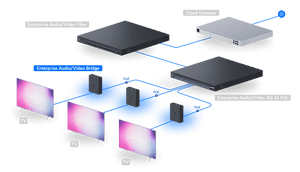
Configure each bridge as a source or destination and manage the installation through UniFi Network. A single Gigabit Ethernet connection carries network traffic and PoE+ power, helping keep equipment positions tidy. Start with a source-to-display link, then design a one-to-many distribution system or video wall around the same endpoint hardware.
Highlights
HDMI Video Distribution
- HDMI 2.0 input and output supporting video up to 4K60.
- One-to-one and one-to-many streaming, with video wall layouts up to 8 × 8.
- The same bridge model can be configured for the source or destination role.
Professional Audio Connections
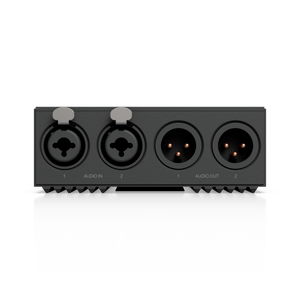
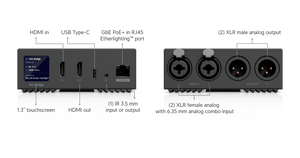
- Two female XLR inputs with 6.35 mm combo connections and two male XLR outputs.
- Mono or stereo PCM audio, with 48 V phantom power for suitable input devices.
- HDMI audio and AES67 support for networked AV system design.
Compact, Flexible Installation
- Gigabit Ethernet with PoE+ input and a maximum device power consumption of 14 W.
- A 1.3-inch touchscreen provides information at the equipment position.
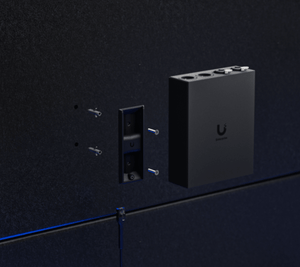
- Aluminium enclosure with included DIN rail, wall and pole mounting options.
Key Features
One Endpoint Design for Either End of the Link
Use the same hardware model at the source and display positions, selecting the appropriate role in the AV installation. For an HDMI source-to-display network link, plan a bridge at the source and another at the destination. Additional displays require their own receiving endpoints; this listing is for one bridge.
Scale from One Display to a Video Wall
HDMI 2.0 input and output support up to 4K at 60 fps, alongside 1080p, 720p and 480p formats. One-to-many streaming lets a source serve multiple destinations, while supported video wall layouts extend up to 8 × 8. Plan the display arrangement, cabling and network capacity together before installation.
Bring XLR Audio into the AV Workflow
Connect professional analogue audio through the paired XLR inputs and outputs, with 6.35 mm combo connections on the input side. Mono or stereo PCM support and a 20 Hz to 20 kHz frequency response provide a clear specification for system planning. Enable 48 V phantom power only where the connected input equipment requires and supports it.
Networked AV Managed through UniFi
Bring bridge management into the UniFi Network environment alongside the supporting network infrastructure. The Gigabit Ethernet interface connects each endpoint to the AV network. A planned switching design, multicast handling and sufficient capacity across every link are important when distributing streams to multiple destinations.
Power and Data through One Network Cable
PoE+ supplies the bridge through its Ethernet port, reducing the need for a separate power socket at each endpoint. Allow up to 14 W for the device and provide a suitable PoE+ source with enough total power for all connected equipment. The touchscreen helps identify local device information during installation and servicing.
Mount Where the Installation Needs It
The compact aluminium enclosure can be fitted to a DIN rail, mounted to a wall or secured to a suitable pole using the included mounting hardware. Supported pole diameters are 38–50 mm. Position the unit within its operating temperature range and leave connections accessible for service.
Summary
The Ubiquiti EAV-Bridge brings 4K60 HDMI video, professional XLR audio and networked AV management into a compact PoE+ endpoint. Its selectable source or destination role and flexible mounting options suit installations that need a consistent hardware platform for single displays, distributed screens and video walls. Pair it with appropriate endpoints, cabling and a properly configured AV network for the intended layout.
Frequently Asked Questions
Do I Need More than One EAV-Bridge?
For an HDMI source-to-display link over the network, use one bridge at the source and another at the display. Each additional receiving display position needs its own endpoint. This product includes one bridge, so choose the quantity for the complete source and destination layout.
What Network and Power Connections Does It Need?
Each bridge has a Gigabit Ethernet port with PoE+ input and consumes up to 14 W. Provide a suitable PoE+ switch or injector and plan the AV network for multicast traffic and the number of streams crossing each link. Confirm the switch configuration and capacity for the complete installation, especially where streams cross multiple switches.
Can It Distribute 4K Video to Several Screens or a Video Wall?
Yes. The HDMI 2.0 input and output support video up to 4K at 60 fps. The bridge supports one-to-one and one-to-many streaming, together with video wall layouts up to 8 × 8. Each display connection, source format and receiving endpoint must suit the intended layout.
Can I Connect Microphones and Other Professional Audio Equipment?
The bridge has two female XLR inputs with 6.35 mm combo connections and two male XLR outputs, with mono or stereo PCM audio. It supports 48 V phantom power for suitable input equipment. Check the connected microphone or audio device requirements before enabling phantom power.
Does It Support IR Control and USB Peripherals?
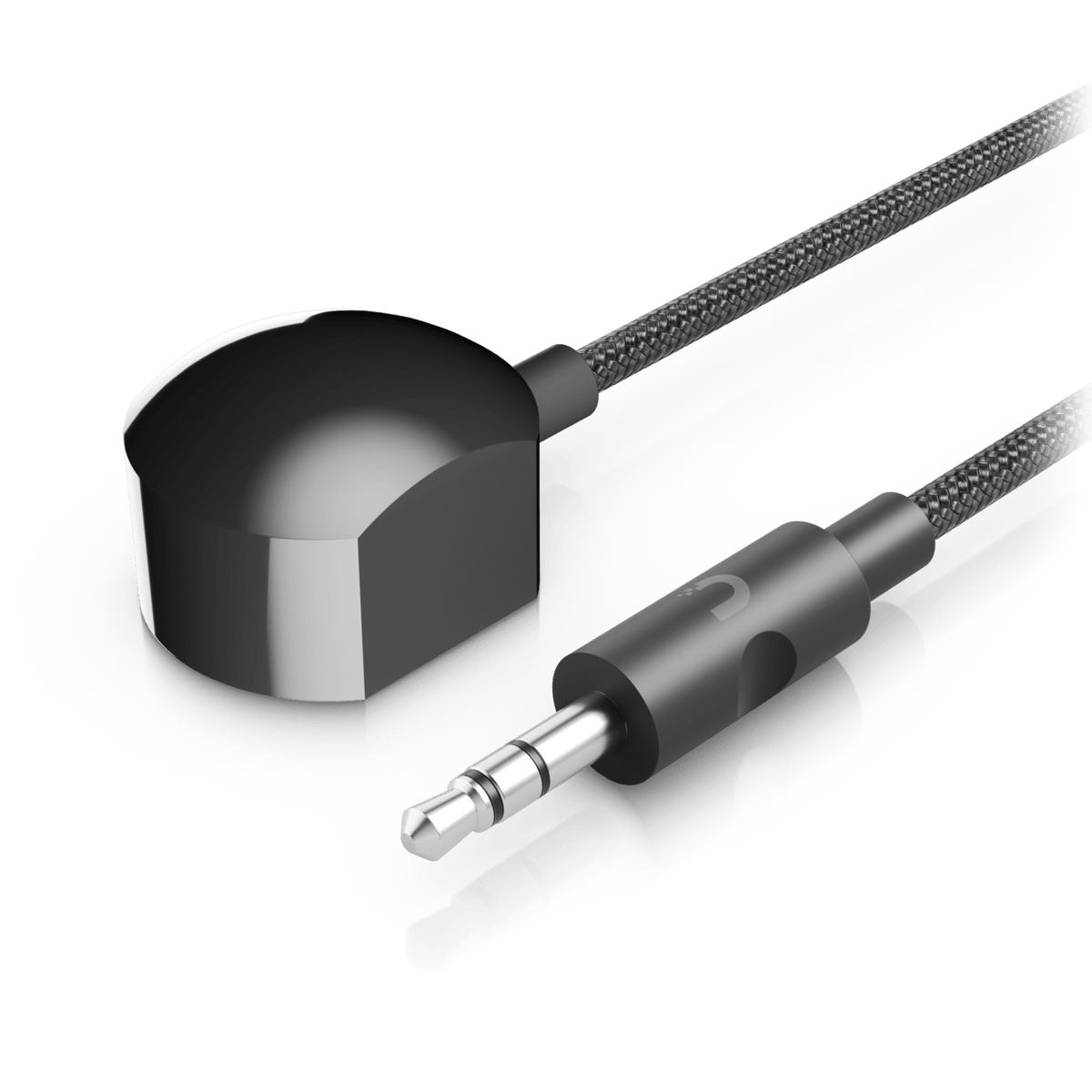
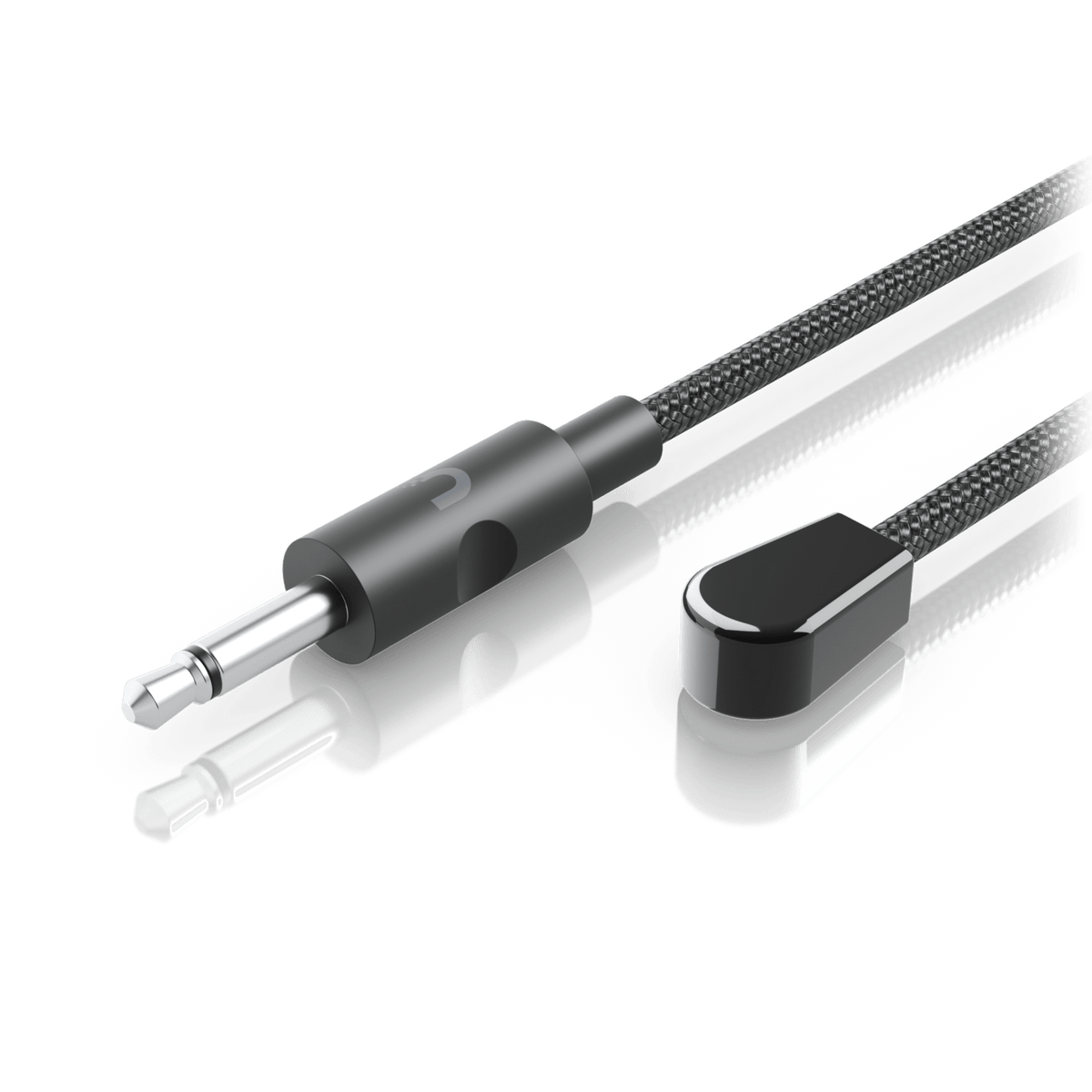
A 3.5 mm IR input/output connection and a USB-C port are provided. IR functionality is enabled on supported firmware, and compatible IR blaster or receiver accessories are purchased separately. USB-C and control options depend on the installed bridge firmware and UniFi Network version. Confirm the exact USB peripheral or control workflow before purchase if it is essential to your installation.
Mga detalye
Ubiquiti EAV-Bridge Enterprise 4K60 HDMI and XLR Audio AV-over-IP PoE+ Transceiver
The Ubiquiti EAV-Bridge is a PoE+ powered AV-over-IP endpoint combining HDMI 2.0 video, professional analogue audio and Gigabit Ethernet in an aluminium enclosure. It can serve as a source or destination for single-display, distributed-display and video wall installations. Each endpoint needs a suitable network connection and PoE+ supply, with mounting selected for its equipment position. Design the endpoint quantities, supporting network and compatible control accessories around the intended AV workflow, using supported UniFi Network software and current official device firmware.
| Specification | Details |
|---|---|
| Video Distribution | |
| HDMI Connections | 1 × HDMI 2.0 input and 1 × HDMI 2.0 output |
| Maximum Video Format | 4K at 60 fps |
| Supported Resolutions | 480p, 720p, 1080p and 4K |
| Distribution Modes | One-to-one and one-to-many streaming; video wall layouts up to 8 × 8 |
| Endpoint Role | Configurable as source or destination; one bridge supplied |
| Audio | |
| Analogue Inputs | 2 × female XLR with 6.35 mm combo inputs; supports 48 V DC phantom power for suitable equipment |
| Analogue Outputs | 2 × male XLR |
| Digital Audio | HDMI input/output audio; AES67 networked audio support |
| Audio Format | PCM, mono or stereo |
| Frequency Response | 20 Hz–20 kHz, ±0.5 dB |
| Network and Control | |
| Ethernet | 1 × GbE RJ45 with Etherlighting and PoE+ input |
| Management | UniFi Network; use a supported application version and current official bridge firmware |
| Display and Reset | 1.3-inch touchscreen; factory reset button |
| IR Connection | 1 × 3.5 mm IR input/output; compatible IR accessories sold separately; control options depend on software support |
| USB-C | 1 × USB-C port, 5 V / 1 A; available functions depend on device firmware and management software |
| Power | |
| Power Method | PoE+ |
| Maximum Power Consumption | 14 W |
| Physical and Installation | |
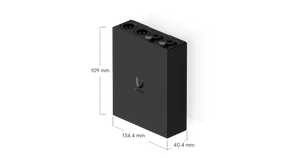
| Dimensions | 109 × 134.4 × 40.4 mm |
| Device Weight | 560 g |
| Enclosure | Aluminium |
| Mounting | DIN rail, wall and pole mounting hardware included; supported pole diameter 38–50 mm |
| Environment and Compliance | |
| Operating Conditions | −5 to 40°C; 5–90% relative humidity, non-condensing |
| Regulatory Certifications | FCC, IC and CE |
| NDAA Compliance | Manufacturer-declared compliant |
Mga Dagdag na Produkto


Ubiquiti UACC-Cable-Patch-EL UniFi Etherlighting Patch Cable


Ubiquiti UACC-Cable-UHS Thin HDMI 2.1b Cable, 1 m, 2 m and 5 m


Ubiquiti U-PoE+ 1GbE 30W PoE+ Adapter Injector

Ubiquiti UACC-Cable-IR-Blaster Infrared Transmitter Cable