

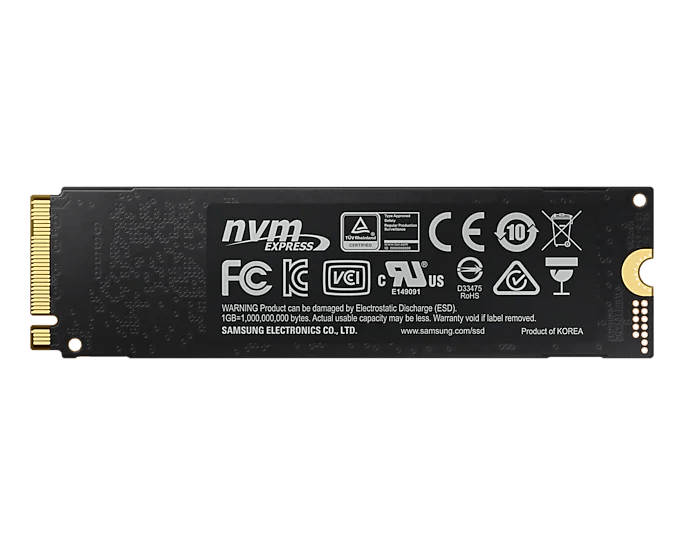


Samsung 970 EVO Plus NVMe M.2 SSD
Keep Games and Creative Files Close on PCIe NVMe Storage Samsung 970 EVO Plus is a compact internal M.2 SSD for compatible client PCs, combining PCIe 3.0 x4 and NVMe 1.3 with Samsung V-NAND flash and dedicated LPDDR4 memory. It gives operating systems, applications and active files a fast internal workspace without a separate data cable. The family reaches sequential reads up to 3,500MB/s and writes up to 3,300MB/s under Samsung test conditions, with applicable ratings varying between drives. Intelligent TurboWrite supports the advertised write results within a specified transfer region. Host compatibility, airflow, firmware and the workload influence performance in everyday use. Highlights A Compact NVMe Workspace M.2 2280 format with PCIe 3.0 x4 and NVMe 1.3. Designed for client-PC operating systems, applications and active file libraries. Samsung Flash and Dedicated Memory Samsung V-NAND TLC and an in-house controller. Dedicated LPDDR4 cache and Intelligent TurboWrite support. Useful Ownership Tools Supported Samsung Magician health, firmware and management functions. Five-year manufacturer limited warranty or rated writing allowance, whichever occurs first. Key Features Give Frequently Used Files a Fast Internal Home A suitable NVMe SSD is a practical place for an operating system, games and current creative projects. The 970 EVO Plus supports high sequential transfer rates for compatible PC workflows, while its random-access ratings describe a different part of storage behaviour. Application loading and file transfers also depend on the computer and the other storage involved, so judge the complete setup rather than a single benchmark. Match the Host to PCIe NVMe Storage The drive needs an appropriate PCIe NVMe host connection for its M.2 2280 module. A SATA-only M.2 slot is unsuitable, even if the connector looks similar. Check the motherboard or laptop manual for the interface, module length, boot support and fixing arrangement. PCIe-generation support and available lanes on the host affect the connection the drive can use. Understand Intelligent TurboWrite Measurements Samsung measures the advertised sequential and random write figures with Intelligent TurboWrite active. That feature operates within a specified transfer size, so a long sustained write can behave differently from a short test. Firmware, available system resources and the workload also influence the result. The separate Specs table provides the applicable ratings and benchmark conditions without treating a family maximum as every drive's performance. Use Samsung Flash with Dedicated LPDDR4 Samsung V-NAND three-bit flash, commonly called TLC, works alongside an in-house controller and dedicated LPDDR4 memory. These components form the storage platform behind the published performance and endurance ratings. TRIM, garbage collection and S.M.A.R.T. provide supported maintenance and monitoring functions on suitable systems. TRIM needs operating-system support, so check the host configuration when assessing an existing installation. Plan the Installation and Airflow The compact module mounts directly in a compatible M.2 slot. Check space around the slot, any host cooling arrangement and the availability of the correct fixing hardware before installation. Samsung lists no installation kit with the drive and recommends proper airflow. Keep an independent copy of important files before changing a system drive, then confirm that the replacement is recognised and the system operates correctly. Manage Health, Firmware and Supported Migration Samsung Magician provides supported management tools, including drive-health information and firmware functions. Migration options and other features depend on the current software, operating system and connection. Check those requirements before moving an installation, and verify the result after any migration. Drive-health information can help with routine monitoring, while a separate backup remains necessary for valuable content. Configure Security and Check the Endurance Limit The drive supports AES 256-bit encryption, TCG Opal and IEEE 1667 encrypted-drive functions on suitably configured hosts. These require compatible software and are not automatically enabled. Manufacturer warranty coverage is subject to a time limit and the applicable total-bytes-written rating, whichever comes first. Check the separate Specs table for the relevant endurance and environmental limits when assessing an existing installation. Summary Samsung 970 EVO Plus provides PCIe NVMe storage in a compact M.2 format for compatible PCs. Match the interface and installation requirements, distinguish headline TurboWrite performance from an extended workload, and use supported management tools alongside a regular backup routine.
Paglalarawan
Keep Games and Creative Files Close on PCIe NVMe Storage
Samsung 970 EVO Plus is a compact internal M.2 SSD for compatible client PCs, combining PCIe 3.0 x4 and NVMe 1.3 with Samsung V-NAND flash and dedicated LPDDR4 memory. It gives operating systems, applications and active files a fast internal workspace without a separate data cable.
The family reaches sequential reads up to 3,500MB/s and writes up to 3,300MB/s under Samsung test conditions, with applicable ratings varying between drives. Intelligent TurboWrite supports the advertised write results within a specified transfer region. Host compatibility, airflow, firmware and the workload influence performance in everyday use.
Highlights
A Compact NVMe Workspace
- M.2 2280 format with PCIe 3.0 x4 and NVMe 1.3.
- Designed for client-PC operating systems, applications and active file libraries.
Samsung Flash and Dedicated Memory
- Samsung V-NAND TLC and an in-house controller.
- Dedicated LPDDR4 cache and Intelligent TurboWrite support.
Useful Ownership Tools
- Supported Samsung Magician health, firmware and management functions.
- Five-year manufacturer limited warranty or rated writing allowance, whichever occurs first.
Key Features
Give Frequently Used Files a Fast Internal Home
A suitable NVMe SSD is a practical place for an operating system, games and current creative projects. The 970 EVO Plus supports high sequential transfer rates for compatible PC workflows, while its random-access ratings describe a different part of storage behaviour. Application loading and file transfers also depend on the computer and the other storage involved, so judge the complete setup rather than a single benchmark.
Match the Host to PCIe NVMe Storage
The drive needs an appropriate PCIe NVMe host connection for its M.2 2280 module. A SATA-only M.2 slot is unsuitable, even if the connector looks similar. Check the motherboard or laptop manual for the interface, module length, boot support and fixing arrangement. PCIe-generation support and available lanes on the host affect the connection the drive can use.
Understand Intelligent TurboWrite Measurements
Samsung measures the advertised sequential and random write figures with Intelligent TurboWrite active. That feature operates within a specified transfer size, so a long sustained write can behave differently from a short test. Firmware, available system resources and the workload also influence the result. The separate Specs table provides the applicable ratings and benchmark conditions without treating a family maximum as every drive's performance.
Use Samsung Flash with Dedicated LPDDR4
Samsung V-NAND three-bit flash, commonly called TLC, works alongside an in-house controller and dedicated LPDDR4 memory. These components form the storage platform behind the published performance and endurance ratings. TRIM, garbage collection and S.M.A.R.T. provide supported maintenance and monitoring functions on suitable systems. TRIM needs operating-system support, so check the host configuration when assessing an existing installation.
Plan the Installation and Airflow
The compact module mounts directly in a compatible M.2 slot. Check space around the slot, any host cooling arrangement and the availability of the correct fixing hardware before installation. Samsung lists no installation kit with the drive and recommends proper airflow. Keep an independent copy of important files before changing a system drive, then confirm that the replacement is recognised and the system operates correctly.
Manage Health, Firmware and Supported Migration
Samsung Magician provides supported management tools, including drive-health information and firmware functions. Migration options and other features depend on the current software, operating system and connection. Check those requirements before moving an installation, and verify the result after any migration. Drive-health information can help with routine monitoring, while a separate backup remains necessary for valuable content.
Configure Security and Check the Endurance Limit
The drive supports AES 256-bit encryption, TCG Opal and IEEE 1667 encrypted-drive functions on suitably configured hosts. These require compatible software and are not automatically enabled. Manufacturer warranty coverage is subject to a time limit and the applicable total-bytes-written rating, whichever comes first. Check the separate Specs table for the relevant endurance and environmental limits when assessing an existing installation.
Summary
Samsung 970 EVO Plus provides PCIe NVMe storage in a compact M.2 format for compatible PCs. Match the interface and installation requirements, distinguish headline TurboWrite performance from an extended workload, and use supported management tools alongside a regular backup routine.
Mga detalye
Samsung 970 EVO Plus NVMe M.2 SSD
Samsung 970 EVO Plus is an M.2 2280 client-PC SSD using PCIe 3.0 x4 and NVMe 1.3. Samsung V-NAND TLC, an in-house controller and dedicated LPDDR4 memory form its storage platform. Read, write, random-performance, cache, power and endurance ratings vary where specified below. Write benchmarks require Intelligent TurboWrite active within its supported transfer region. A compatible PCIe NVMe slot, suitable mounting and proper airflow are required. Module measurements exclude shipping packaging, and manufacturer warranty cover ends at the time or rated writing limit, whichever occurs first.
| Specification | Details |
|---|---|
| Storage and Performance | |
| Application / interface | Client PCs; PCIe 3.0 x4, NVMe 1.3; M.2 2280. Capacities up to 2TB. 1GB = 1 billion bytes; formatted usable capacity is lower. |
| Flash / controller / DRAM | Samsung V-NAND three-bit MLC (TLC), Samsung in-house controller and LPDDR4 cache up to 2GB; cache varies by capacity. |
| Sequential read / write | Read up to 3,500MB/s. Write up to 2,300MB/s at 250GB; 3,200MB/s at 500GB; 3,300MB/s at 1/2TB. Advertised writes require Intelligent TurboWrite active within its supported transfer size. |
| Random read / write | 4KB read/write: QD1 with one thread up to 19,000/62,000 IOPS; QD32 with four threads up to 620,000/560,000 IOPS. Applicable maxima vary by capacity; advertised writes require Intelligent TurboWrite active. |
| Performance test conditions | Manufacturer benchmarks with Intelligent TurboWrite active. Actual results depend on firmware, host hardware, connection and workload; peak write ratings apply within the supported TurboWrite region. |
| Compatibility and Security | |
| Host / installation / included items | Compatible PCIe NVMe M.2 2280 slot and mounting required; SATA-only M.2 is unsuitable. Proper airflow recommended. SSD and warranty statement supplied; installation kit not available. Confirm fixing hardware with the host. |
| Management / maintenance | Samsung Magician supported health, firmware and management tools; supported data-migration functions, subject to current software, OS and connection requirements. TRIM (requires OS support), garbage collection and S.M.A.R.T. Device Sleep supported; World Wide Name not supported. |
| Encryption | AES 256-bit full-disk encryption, TCG/Opal v2.0 and Encrypted Drive (IEEE 1667). Compatible host and software configuration required; encryption is not automatically enabled. |
| Physical Specifications | |
| Module dimensions / weight | Maximum 80.15 ×22.15 ×2.38mm (L ×W ×H); up to 8g. Module only, excluding fixing hardware, thermal accessories and packaging. |
| Power and Operating Conditions | |
| Supply / active average power | 3.3V ±5%. Average read up to 5.5W; average write up to 6W. Varies by capacity, host and workload under manufacturer test conditions. |
| Idle / low-power mode | 30mW idle with APST enabled; 5mW in L1.2 mode. Actual power depends on host and configuration. |
| Temperature / humidity | Operating: 0 to 70°C measured through S.M.A.R.T., with proper airflow recommended. Non-operating: -45 to 85°C. Humidity: 5 to 95% non-condensing. |
| Non-operating shock / vibration | Shock: 1,500G for 0.5ms on three axes. Vibration: 20 to 2,000Hz at 20G. These are non-operating test ratings. |
| Reliability and Warranty | |
| Endurance / limited warranty | Five years or rated TBW, whichever occurs first. 250GB: 150TBW; 500GB: 300TBW; 1TB: 600TBW; 2TB: 1,200TBW. Endurance testing complies with JESD218; manufacturer terms apply. |
| Reliability (MTBF) | 1.5 million hours; statistical reliability rating rather than a guaranteed individual lifespan. |