


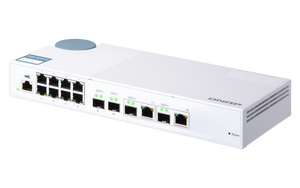


QNAP QSW-M408-2C 12-Port 1/10GbE Managed Switch
Choose the Right High-Speed Link for Each Device Connect everyday Gigabit devices to a faster storage and uplink layer. The QNAP QSW-M408-2C combines eight Gigabit RJ45 ports with two dedicated SFP+ connections and two flexible SFP+/RJ45 combo connections. Browser-based Layer 2 management gives a small office or creative workspace useful control over segmentation, traffic priority and redundant paths without requiring every device to move to 10GbE at once. Highlights Keep Everyday Connections Useful Eight Gigabit RJ45 ports connect existing network devices. Four high-speed logical ports provide the 10GbE connection layer. Two Combo Links and Two Dedicated SFP+ Links SFP+ supports compatible 10GbE and 1GbE connections. Combo copper supports five speeds, with one active connection per pair. Manage a Shared Network QSS presents switch and port settings through a browser. VLANs, LACP, QoS, ACLs and RSTP support a considered network design. Key Features Make the Port Layout Work for You Each of the 2 combo connections has an SFP+ socket and an RJ45 socket, but only one side of each pair is used at a time. The switch supports twelve simultaneous data connections, not an extra connection for every physical socket. Connect Storage and Uplinks at the Right Speed The RJ45 side of each combo supports 10GbE, 5GbE, 2.5GbE, Gigabit and 100Mbps. Its SFP+ side supports compatible 10GbE or 1GbE modules and cables. This allows a mix of copper and SFP+ storage or uplinks to share the same switching platform, with the chosen connection type matched to each link. Organise Workgroups with Layer 2 Controls VLANs help separate suitable device groups, while ACLs provide IP- or MAC-based access rules. QoS can prioritise selected traffic on shared connections. These controls work as part of the wider network design; routing between VLANs and Internet protection remain tasks for suitable routing and security equipment. Build Aggregation and Redundancy Deliberately LACP supports compatible aggregated links, and RSTP helps control redundant switching paths. The benefits depend on both endpoints and the configured topology. Aggregation improves total capacity across suitable traffic flows rather than automatically making one file copy exceed the speed of an individual link. See and Maintain the Network QSS provides a dashboard, port statistics and configuration tools. LLDP assists with device discovery, while IGMP snooping helps manage suitable multicast traffic. Firmware maintenance should use the exact model’s supported release and a planned service window because the switch restarts during an update. A Practical Desktop Installation The compact desktop enclosure uses an external power adapter and a temperature-controlled fan. Keep the ventilation clear and allow appropriate cable space. This is a data switch without PoE output, so cameras and access points that require PoE need a separate suitable power source. Summary Choose the QSW-M408-2C for a managed Gigabit access network with two dedicated SFP+ connections and two flexible SFP+/RJ45 combo connections. It provides useful traffic controls and a clear path for connecting a mix of copper and SFP+ storage or uplinks, while keeping existing Gigabit equipment in service. Are all twelve ports 10GbE?ExpandCollapse No. Eight RJ45 data ports are Gigabit connections. The remaining four logical data ports provide 10GbE through the specified dedicated or shared SFP+/RJ45 connections. The RJ45 console is for administration and is not another Ethernet data port. How do the shared combo ports work?ExpandCollapse Each of the 2 combo ports offers either an SFP+ connection or its paired RJ45 connection. Only one side of a pair is active at a time. There are twelve simultaneous data connections in total, including the eight Gigabit RJ45 ports. Does it power cameras or wireless access points?ExpandCollapse No. It provides Ethernet data without PoE output. Use the device’s own power supply or a compatible PoE injector when the connected equipment needs power over its Ethernet cable. Can it manage VLANs and link aggregation?ExpandCollapse Yes. QSS supports IEEE 802.1Q VLAN configuration, LACP, QoS, ACLs and RSTP. Configure compatible endpoints and the wider network correctly; LACP does not automatically multiply the speed of a single transfer. Is the switch fanless?ExpandCollapse No. It has one controlled double ball bearing fan. QNAP lists a sound level below 21dB(A), but actual perceived noise depends on conditions and installation. Keep the vents unobstructed. What is included and what warranty applies?ExpandCollapse The package includes the switch, power adapter, power cord and quick installation guide. Network cables, optics and direct attach cables are selected separately. The switch has a two-year warranty; bundled accessories have one year.
Maaaring kunin sa 3005, Ubi Avenue 3, #01-88
Usually ready in 2-4 Business Day (Excluding Public Holiday)
QNAP QSW-M408-2C 12-Port 1/10GbE Managed Switch
Paglalarawan
Choose the Right High-Speed Link for Each Device
Connect everyday Gigabit devices to a faster storage and uplink layer. The QNAP QSW-M408-2C combines eight Gigabit RJ45 ports with two dedicated SFP+ connections and two flexible SFP+/RJ45 combo connections. Browser-based Layer 2 management gives a small office or creative workspace useful control over segmentation, traffic priority and redundant paths without requiring every device to move to 10GbE at once.
Highlights
Keep Everyday Connections Useful
- Eight Gigabit RJ45 ports connect existing network devices.
- Four high-speed logical ports provide the 10GbE connection layer.
Two Combo Links and Two Dedicated SFP+ Links
- SFP+ supports compatible 10GbE and 1GbE connections.
- Combo copper supports five speeds, with one active connection per pair.
Manage a Shared Network
- QSS presents switch and port settings through a browser.
- VLANs, LACP, QoS, ACLs and RSTP support a considered network design.
Key Features
Make the Port Layout Work for You
Each of the 2 combo connections has an SFP+ socket and an RJ45 socket, but only one side of each pair is used at a time. The switch supports twelve simultaneous data connections, not an extra connection for every physical socket.
Connect Storage and Uplinks at the Right Speed
The RJ45 side of each combo supports 10GbE, 5GbE, 2.5GbE, Gigabit and 100Mbps. Its SFP+ side supports compatible 10GbE or 1GbE modules and cables. This allows a mix of copper and SFP+ storage or uplinks to share the same switching platform, with the chosen connection type matched to each link.
Organise Workgroups with Layer 2 Controls
VLANs help separate suitable device groups, while ACLs provide IP- or MAC-based access rules. QoS can prioritise selected traffic on shared connections. These controls work as part of the wider network design; routing between VLANs and Internet protection remain tasks for suitable routing and security equipment.
Build Aggregation and Redundancy Deliberately
LACP supports compatible aggregated links, and RSTP helps control redundant switching paths. The benefits depend on both endpoints and the configured topology. Aggregation improves total capacity across suitable traffic flows rather than automatically making one file copy exceed the speed of an individual link.
See and Maintain the Network
QSS provides a dashboard, port statistics and configuration tools. LLDP assists with device discovery, while IGMP snooping helps manage suitable multicast traffic. Firmware maintenance should use the exact model’s supported release and a planned service window because the switch restarts during an update.
A Practical Desktop Installation
The compact desktop enclosure uses an external power adapter and a temperature-controlled fan. Keep the ventilation clear and allow appropriate cable space. This is a data switch without PoE output, so cameras and access points that require PoE need a separate suitable power source.
Summary
Choose the QSW-M408-2C for a managed Gigabit access network with two dedicated SFP+ connections and two flexible SFP+/RJ45 combo connections. It provides useful traffic controls and a clear path for connecting a mix of copper and SFP+ storage or uplinks, while keeping existing Gigabit equipment in service.
Are all twelve ports 10GbE?
No. Eight RJ45 data ports are Gigabit connections. The remaining four logical data ports provide 10GbE through the specified dedicated or shared SFP+/RJ45 connections. The RJ45 console is for administration and is not another Ethernet data port.
How do the shared combo ports work?
Each of the 2 combo ports offers either an SFP+ connection or its paired RJ45 connection. Only one side of a pair is active at a time. There are twelve simultaneous data connections in total, including the eight Gigabit RJ45 ports.
Does it power cameras or wireless access points?
No. It provides Ethernet data without PoE output. Use the device’s own power supply or a compatible PoE injector when the connected equipment needs power over its Ethernet cable.
Can it manage VLANs and link aggregation?
Yes. QSS supports IEEE 802.1Q VLAN configuration, LACP, QoS, ACLs and RSTP. Configure compatible endpoints and the wider network correctly; LACP does not automatically multiply the speed of a single transfer.
Is the switch fanless?
No. It has one controlled double ball bearing fan. QNAP lists a sound level below 21dB(A), but actual perceived noise depends on conditions and installation. Keep the vents unobstructed.
What is included and what warranty applies?
The package includes the switch, power adapter, power cord and quick installation guide. Network cables, optics and direct attach cables are selected separately. The switch has a two-year warranty; bundled accessories have one year.
Mga detalye
QNAP QSW-M408-2C 12-Port 1/10GbE Managed Switch
The QSW-M408-2C combines eight Gigabit copper access ports with two dedicated SFP+ connections and two flexible SFP+/RJ45 combo connections. QSS provides browser-based Layer 2 configuration and monitoring. Its desktop enclosure uses an external power adapter and controlled fan cooling, supporting an indoor network linking everyday devices with capable shared storage, servers and uplinks.
| Specification | Details |
|---|---|
| Switching and Interfaces | |
| Management | Layer 2 web-managed switch with QSS |
| Simultaneous Data Ports | 12 |
| Data Connections | 2 × dedicated 10GbE SFP+; 2 × shared 10GbE SFP+/RJ45 combo; 8 × 1GbE RJ45 |
| SFP+ Link Speeds | 10Gbps and 1Gbps with compatible modules or cables |
| Combo Copper Speeds | 10/5/2.5/1Gbps and 100Mbps; one active interface per shared SFP+/RJ45 pair |
| Gigabit Access | 8 × RJ45 Gigabit data ports; separate RJ45 console |
| Switching Performance | 96Gbps switching capacity; 48Gbps non-blocking throughput |
| Forwarding Resources | 16K MAC addresses; 9K jumbo frames |
| PoE Output | Not supported |
| Network Management | |
| VLAN and Aggregation | IEEE 802.1Q VLAN; port trunking and LACP groups |
| Traffic Prioritisation | Port-based QoS; IEEE 802.1p CoS; IPv4 DSCP and ToS |
| Multicast and Resilience | IGMP snooping v1/v2; IEEE 802.1w RSTP |
| Security and Discovery | IP/MAC ACL; LLDP |
| Administration | Browser interface; port status, statistics and configuration; SNTP; DNS; DHCP client; firmware maintenance |
| Power and Cooling | |
| Power Supply | External adapter; AC supply input 100–240VAC at 50/60Hz |
| Maximum Consumption | 22.04W |
| Cooling | 1 × PWM double ball bearing fan |
| Sound Level | Below 21dB(A) manufacturer reference; installation conditions affect perceived noise |
| Physical and Environmental | |
| Installation | Desktop |
| Dimensions H × W × D | 42.5 × 290 × 127 mm |
| Weight | 1.15 kg net; 1.57 kg gross |
| Operating Environment | 0–40°C; 5–95% relative humidity non-condensing |
| Indicators and Controls | Port speed/link/activity; system power/status; reset button |
| Compliance | CE; FCC; VCCI; BSMI; Class A electromagnetic compliance |
| Standards and Package | |
| Ethernet Standards | IEEE 802.3/u/ab/z/ae/x; 802.1Q/w/p; 802.3ad; 802.1AB; 802.3bz/an on multi-gigabit combo copper |
| Included | Switch; power cord; power adapter; quick installation guide |
| Warranty | 2 years; bundled accessories 1 year |