

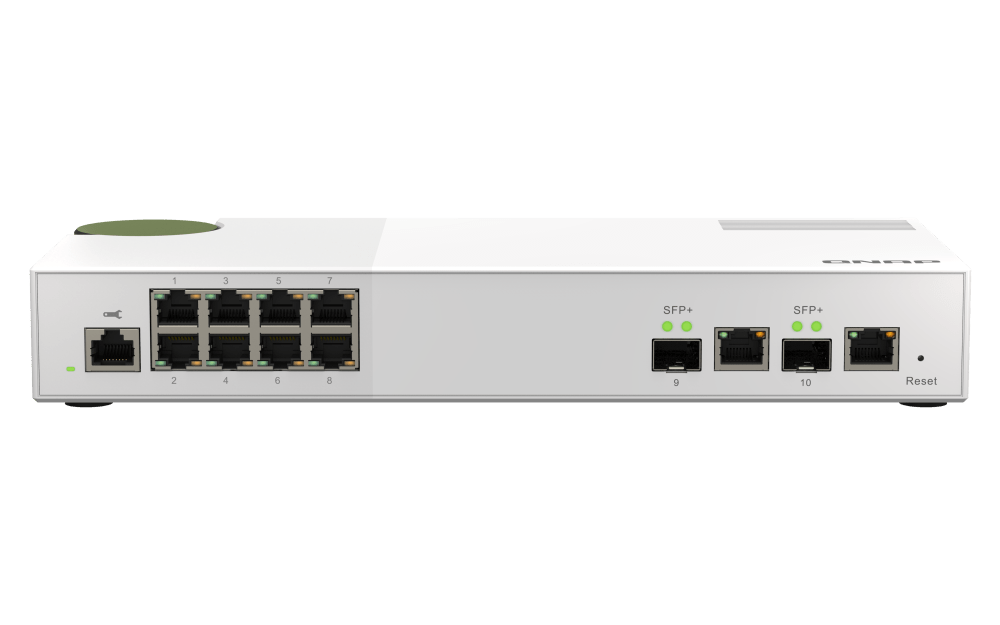




QNAP QSW-M2108-2C 10-Port 2.5GbE and 10GbE Managed Switch
Bring Flexible 10GbE to a Multi-Gigabit Desktop Network QNAP QSW-M2108-2C gives a growing network 8 2.5GbE copper connections and 2 flexible SFP+/RJ45 combo links for 10GbE equipment. Use it to connect workstations, NAS systems and upstream networking while keeping traffic organised through QNAP Switch System (QSS). The desktop format brings managed multi-gigabit networking close to the equipment that needs it. Highlights Connect at the Right Speed 8 × 2.5GbE RJ45 access ports 2 × 10GbE SFP+/RJ45 combo ports 80Gbps switching capacity Manage Shared Network Traffic QSS browser-based configuration VLANs, LACP, QoS and IGMP snooping RSTP, IP/MAC access controls and LLDP Plan the Installation Desktop chassis RJ45 console and status indicators 2-year switch warranty Key Features Choose the Correct High-Speed Connection Each of the 2 high-speed links gives you a choice of an SFP+ connection or a copper RJ45 connection. The two sockets in a combo pair share one logical port, so use one medium per pair. The switch supports ten simultaneous network links, rather than counting both sockets as extra independent ports. Upgrade Everyday Copper Connections The 8 RJ45 access ports negotiate 100Mbps, 1Gbps or 2.5Gbps to suit the attached equipment. Suitable Cat 5e or better cabling can carry 2.5GbE, making this a practical upgrade for compatible computers, NAS devices and access points. Actual transfer speed still depends on both endpoints, the installed cable and the storage workload. Keep Devices and Traffic Organised Use IEEE 802.1Q VLANs to separate network groups, then configure IP or MAC access controls and QoS for the installation. Port-based priority, IEEE 802.1p CoS and IPv4 DSCP/ToS options help prioritise selected traffic. These controls support a deliberate network design; they do not replace a router, firewall or secure endpoint configuration. Build and Monitor Managed Links QSS exposes port status, counters and configuration through a browser interface. LACP supports aggregation between compatible devices, while IGMP snooping v2 controls multicast forwarding. RSTP provides loop-management and redundant-path options for a correctly configured topology. Link aggregation can increase shared capacity across multiple flows; it does not make every single transfer run at the combined link speed. Match Devices and Media Before Installation The copper side of each combo port supports 100Mbps, 1Gbps, 2.5Gbps, 5Gbps and 10Gbps. Its SFP+ side supports suitable 1GbE SFP or 10GbE SFP+ connections. Use standards-compatible Ethernet equipment and check the exact transceiver or DAC against the switch and remote device. This is a network switch rather than a model-specific NAS spare part. It carries data and does not supply PoE power to access points or cameras. Fit the Switch to the Workspace The compact desktop enclosure fits a workstation area, small equipment shelf or network workspace. Place it on a stable surface with clear ventilation. An external power adapter is included, and the temperature-controlled fan helps regulate cooling as the workload changes; this is an actively cooled switch, not a fanless design. Maintain a Clear Configuration Use the RJ45 console where required for service access and keep a record of port assignments, VLANs and aggregation groups. QSS supports firmware checking and manual or online updates. Review the applicable release notes and plan a maintenance window before changing a production network; keep management access restricted to authorised users. Summary Choose QNAP QSW-M2108-2C for a managed desktop network that combines 8 2.5GbE access connections with flexible copper or SFP+ 10GbE links. QSS adds practical control over network groups, shared links and traffic priorities, with the correct cabling and media selected for the complete installation. Frequently Asked Questions How Many Network Devices Can I Connect?ExpandCollapse The switch provides ten simultaneous network links: 8 dedicated 2.5GbE RJ45 ports and 2 SFP+/RJ45 combo ports. Each combo pair counts as one port; its fibre and copper sockets cannot operate as two independent links. Does It Provide PoE Power?ExpandCollapse No. This model carries Ethernet data but does not supply PoE power. An access point, camera or other powered device needs its own compatible power supply or a separately selected PoE source. What Cabling or Modules Should I Use?ExpandCollapse Use suitable copper cabling for the required link speed, including Cat 6A for a properly installed 100 m 10GBASE-T channel. For SFP+ links, choose supported optical modules and matching fibre or a qualified DAC. Confirm speed, reach and compatibility at both ends; optics and network cables are separate. Do I Need a Separate Controller or NAS to Manage It?ExpandCollapse No. QSS provides browser-based Layer 2 switch management, and the device also has an RJ45 console. A NAS is one possible network endpoint, not a prerequisite for configuring the switch. A router or firewall is still needed for internet access and routed security policies. Is This Switch Fanless?ExpandCollapse No. It uses one PWM double-ball-bearing fan. Leave ventilation clear and place it where active cooling is suitable. The published sound figure is a manufacturer specification, not a promise that the switch will be inaudible in every room. What Warranty Is Included?ExpandCollapse The switch has a 2-year warranty. Bundled accessories have a 1-year warranty. Network design, installation, transceivers and cables are separate unless included in a specifically stated bundle.
Maaaring kunin sa 3005, Ubi Avenue 3, #01-88
Usually ready in 2-4 Business Day (Excluding Public Holiday)
QNAP QSW-M2108-2C 10-Port 2.5GbE and 10GbE Managed Switch
Paglalarawan
Bring Flexible 10GbE to a Multi-Gigabit Desktop Network
QNAP QSW-M2108-2C gives a growing network 8 2.5GbE copper connections and 2 flexible SFP+/RJ45 combo links for 10GbE equipment. Use it to connect workstations, NAS systems and upstream networking while keeping traffic organised through QNAP Switch System (QSS). The desktop format brings managed multi-gigabit networking close to the equipment that needs it.
Highlights
Connect at the Right Speed
- 8 × 2.5GbE RJ45 access ports
- 2 × 10GbE SFP+/RJ45 combo ports
- 80Gbps switching capacity
Manage Shared Network Traffic
- QSS browser-based configuration
- VLANs, LACP, QoS and IGMP snooping
- RSTP, IP/MAC access controls and LLDP
Plan the Installation
- Desktop chassis
- RJ45 console and status indicators
- 2-year switch warranty
Key Features
Choose the Correct High-Speed Connection
Each of the 2 high-speed links gives you a choice of an SFP+ connection or a copper RJ45 connection. The two sockets in a combo pair share one logical port, so use one medium per pair. The switch supports ten simultaneous network links, rather than counting both sockets as extra independent ports.
Upgrade Everyday Copper Connections
The 8 RJ45 access ports negotiate 100Mbps, 1Gbps or 2.5Gbps to suit the attached equipment. Suitable Cat 5e or better cabling can carry 2.5GbE, making this a practical upgrade for compatible computers, NAS devices and access points. Actual transfer speed still depends on both endpoints, the installed cable and the storage workload.
Keep Devices and Traffic Organised
Use IEEE 802.1Q VLANs to separate network groups, then configure IP or MAC access controls and QoS for the installation. Port-based priority, IEEE 802.1p CoS and IPv4 DSCP/ToS options help prioritise selected traffic. These controls support a deliberate network design; they do not replace a router, firewall or secure endpoint configuration.
Build and Monitor Managed Links
QSS exposes port status, counters and configuration through a browser interface. LACP supports aggregation between compatible devices, while IGMP snooping v2 controls multicast forwarding. RSTP provides loop-management and redundant-path options for a correctly configured topology. Link aggregation can increase shared capacity across multiple flows; it does not make every single transfer run at the combined link speed.
Match Devices and Media Before Installation
The copper side of each combo port supports 100Mbps, 1Gbps, 2.5Gbps, 5Gbps and 10Gbps. Its SFP+ side supports suitable 1GbE SFP or 10GbE SFP+ connections. Use standards-compatible Ethernet equipment and check the exact transceiver or DAC against the switch and remote device. This is a network switch rather than a model-specific NAS spare part. It carries data and does not supply PoE power to access points or cameras.
Fit the Switch to the Workspace
The compact desktop enclosure fits a workstation area, small equipment shelf or network workspace. Place it on a stable surface with clear ventilation. An external power adapter is included, and the temperature-controlled fan helps regulate cooling as the workload changes; this is an actively cooled switch, not a fanless design.
Maintain a Clear Configuration
Use the RJ45 console where required for service access and keep a record of port assignments, VLANs and aggregation groups. QSS supports firmware checking and manual or online updates. Review the applicable release notes and plan a maintenance window before changing a production network; keep management access restricted to authorised users.
Summary
Choose QNAP QSW-M2108-2C for a managed desktop network that combines 8 2.5GbE access connections with flexible copper or SFP+ 10GbE links. QSS adds practical control over network groups, shared links and traffic priorities, with the correct cabling and media selected for the complete installation.
Frequently Asked Questions
How Many Network Devices Can I Connect?
The switch provides ten simultaneous network links: 8 dedicated 2.5GbE RJ45 ports and 2 SFP+/RJ45 combo ports. Each combo pair counts as one port; its fibre and copper sockets cannot operate as two independent links.
Does It Provide PoE Power?
No. This model carries Ethernet data but does not supply PoE power. An access point, camera or other powered device needs its own compatible power supply or a separately selected PoE source.
What Cabling or Modules Should I Use?
Use suitable copper cabling for the required link speed, including Cat 6A for a properly installed 100 m 10GBASE-T channel. For SFP+ links, choose supported optical modules and matching fibre or a qualified DAC. Confirm speed, reach and compatibility at both ends; optics and network cables are separate.
Do I Need a Separate Controller or NAS to Manage It?
No. QSS provides browser-based Layer 2 switch management, and the device also has an RJ45 console. A NAS is one possible network endpoint, not a prerequisite for configuring the switch. A router or firewall is still needed for internet access and routed security policies.
Is This Switch Fanless?
No. It uses one PWM double-ball-bearing fan. Leave ventilation clear and place it where active cooling is suitable. The published sound figure is a manufacturer specification, not a promise that the switch will be inaudible in every room.
What Warranty Is Included?
The switch has a 2-year warranty. Bundled accessories have a 1-year warranty. Network design, installation, transceivers and cables are separate unless included in a specifically stated bundle.
Mga detalye
QNAP QSW-M2108-2C 10-Port 2.5GbE and 10GbE Managed Switch
The QNAP QSW-M2108-2C combines 8 2.5GbE RJ45 ports with 2 shared 10GbE SFP+/RJ45 combo ports. It provides ten network links, Layer 2 management through QSS, 80Gbps switching capacity and 40Gbps total non-blocking throughput. The two media sockets in each combo pair share one logical port. The desktop enclosure uses the supplied external DC power adapter.
| Specification | Details |
|---|---|
| Network Interfaces | |
| Total Network Links | 10 simultaneous links |
| Port Configuration | 8 × 2.5GbE RJ45; 2 × 10GbE SFP+/RJ45 combo |
| Copper Access Speeds | 100Mbps / 1Gbps / 2.5Gbps |
| High-Speed Media | Combo RJ45: 100Mbps / 1 / 2.5 / 5 / 10Gbps; SFP+: supported 1GbE SFP / 10GbE SFP+ |
| PoE Output | Not provided |
| Switching Performance | |
| Switching and Throughput | 80Gbps switching capacity; 40Gbps total non-blocking throughput |
| Addressing and Frames | 16K MAC address table; 9K jumbo frames; IEEE 802.3x flow control |
| Management and Traffic Control | |
| Management Interfaces | QSS web interface; RJ45 console |
| Segmentation and Access | IEEE 802.1Q VLANs; IP/MAC access control lists |
| Aggregation and Redundancy | IEEE 802.3ad LACP; IEEE 802.1w RSTP |
| Traffic Handling | Port-based QoS; IEEE 802.1p CoS; IPv4 DSCP/ToS; IGMP snooping v2 |
| Discovery and Administration | LLDP; port status/statistics/configuration; auto-negotiation; DHCP client, DNS and SNTP |
| Firmware Maintenance | Online firmware checking/updating and manual updates |
| Power and Physical Design | |
| Power Input | 12V DC via supplied external adapter |
| Maximum Power Consumption | 36W |
| Form Factor | Desktop |
| Dimensions and Weight | H × W × D: 42.5 × 290 × 127 mm; net 1.12 kg; manufacturer gross 1.54 kg |
| Cooling and Acoustics | 1 × PWM double-ball-bearing fan; specified sound level <21 dB(A) |
| Indicators and Controls | Per-port speed/link/activity LEDs; system power/status LEDs; reset button |
| Environment and Compliance | |
| Operating Conditions | 0°C to 40°C; 5–95% relative humidity, non-condensing |
| Certifications | CE, FCC, VCCI and BSMI; electromagnetic compliance Class B |
| Installation and Warranty | |
| Package Contents | Switch, power cord, power adapter and quick installation guide |
| Mounting | Desktop placement with clear ventilation |
| Separately Selected Items | Ethernet/fibre cables, supported optical modules or DAC; installation accessories as required |
| Warranty | 2 years for switch; 1 year for bundled accessories |