



Microsoft Surface Laptop Studio for Business
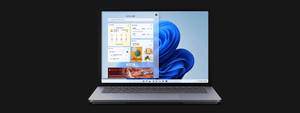
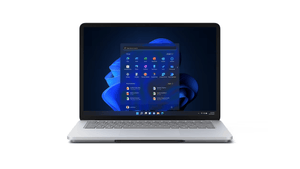
The Microsoft Surface Laptop Studio for Business is designed to meet the diverse needs of professionals by providing a versatile device that can adapt to different working modes. Here's a detailed look at its key features and benefits: Key Features: Multi-Mode Usage: Switch between various modes including laptop mode, stage mode for presenting, and studio mode for sketching, all thanks to the dynamic woven hinge. High-Performance Capabilities: Engineered for intensive tasks, it's the most powerful Surface yet, capable of running software like Adobe® Premiere® Pro, Photoshop®, Autodesk® AutoCAD®, and more. Precision Haptic Touchpad: Provides comfortable feedback as you navigate, enhancing your user experience. Surface Slim Pen 2 Integration: Enables you to draw, write, and sketch with a digital pen that magnetically attaches, stores, and recharges under the keyboard. 14.4-inch 120 Hz Touchscreen: The PixelSense™ Flow touchscreen offers uniform color, true-to-life contrast, and a high refresh rate for smooth scrolling and quick touch response. Video Call Enhancements: Equipped with Studio Mics with Voice Clarity and an HD camera that improves skin tone accuracy and low-light video, ensuring you look and sound great on video calls. Built for Business: Comes with features for streamlined deployment, modern device management, and cloud-powered security, making it a suitable choice for business environments. Next-Level Docking: Can be docked in stage mode and connected to up to two external monitors, transforming the Surface Laptop Studio into an interactive third monitor. Creative Canvas: Designed for artists and creators, offering a full-horsepower canvas for drawing and sketching, with the feeling of writing and drawing on paper brought to the screen by the Surface Slim Pen 2. Conclusion: The Microsoft Surface Laptop Studio for Business is an ideal choice for professionals seeking a device that offers the power of a high-performance laptop with the flexibility of a tablet. Whether you're coding, designing, presenting, or collaborating on video calls, this device adapts to your needs. Its innovative features, such as the dynamic woven hinge, haptic touchpad, and Surface Slim Pen 2 integration, create an intuitive and satisfying user experience. The built-in security and management features make it a reliable option for business use, providing peace of mind and convenience.
Paglalarawan
The Microsoft Surface Laptop Studio for Business is designed to meet the diverse needs of professionals by providing a versatile device that can adapt to different working modes. Here's a detailed look at its key features and benefits:
Key Features:
-
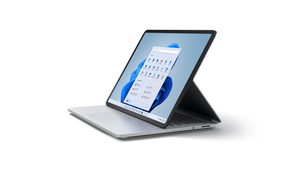
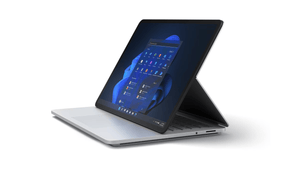
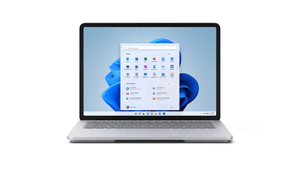
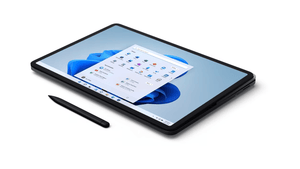
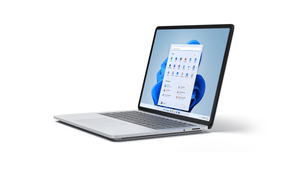
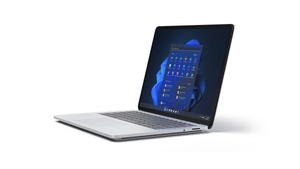
Multi-Mode Usage: Switch between various modes including laptop mode, stage mode for presenting, and studio mode for sketching, all thanks to the dynamic woven hinge.
-
High-Performance Capabilities: Engineered for intensive tasks, it's the most powerful Surface yet, capable of running software like Adobe® Premiere® Pro, Photoshop®, Autodesk® AutoCAD®, and more.
-
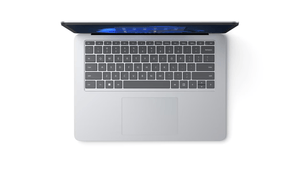
Precision Haptic Touchpad: Provides comfortable feedback as you navigate, enhancing your user experience.
-
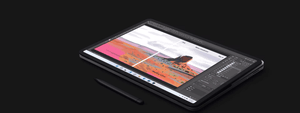
Surface Slim Pen 2 Integration: Enables you to draw, write, and sketch with a digital pen that magnetically attaches, stores, and recharges under the keyboard.
-
14.4-inch 120 Hz Touchscreen: The PixelSense™ Flow touchscreen offers uniform color, true-to-life contrast, and a high refresh rate for smooth scrolling and quick touch response.
-
Video Call Enhancements: Equipped with Studio Mics with Voice Clarity and an HD camera that improves skin tone accuracy and low-light video, ensuring you look and sound great on video calls.
-
Built for Business: Comes with features for streamlined deployment, modern device management, and cloud-powered security, making it a suitable choice for business environments.
-
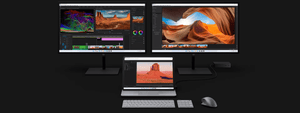
Next-Level Docking: Can be docked in stage mode and connected to up to two external monitors, transforming the Surface Laptop Studio into an interactive third monitor.
-
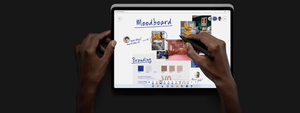
Creative Canvas: Designed for artists and creators, offering a full-horsepower canvas for drawing and sketching, with the feeling of writing and drawing on paper brought to the screen by the Surface Slim Pen 2.
Conclusion:
The Microsoft Surface Laptop Studio for Business is an ideal choice for professionals seeking a device that offers the power of a high-performance laptop with the flexibility of a tablet. Whether you're coding, designing, presenting, or collaborating on video calls, this device adapts to your needs. Its innovative features, such as the dynamic woven hinge, haptic touchpad, and Surface Slim Pen 2 integration, create an intuitive and satisfying user experience. The built-in security and management features make it a reliable option for business use, providing peace of mind and convenience.
Mga detalye
| Specification | Details |
|---|---|
| Dimensions | 323.28 mm x 228.32 mm x 18.94 mm (12.72” x 8.98” x 0.746”) |
| Storage | Removable solid-state drive (SSD) options: 256GB, 512GB, 1TB, 2TB SSD |
| Display | Screen: 14.4” PixelSense™ Flow Display; Refresh rate: up to 120Hz; Resolution: 2400 × 1600 (201 PPI); Aspect ratio: 3:2; Contrast ratio: 1500:1; Touch: 10-point multi-touch; Dolby Vision® support |
| Battery life | Intel® Core™ i5: Up to 19 hours of typical device usage; Intel® Core™ i7: Up to 18 hours of typical device usage |
| Memory | 16GB or 32GB LPDDR4x RAM |
| Graphics | Intel® Core™ i5 models: Intel® Iris® X Graphics; Intel® Core™ i7 models: NVIDIA® GeForce RTX™ 3050 Ti laptop GPU with 4GB GDDR6 GPU memory or NVIDIA® RTX™ A2000 laptop GPU with 4GB GDDR6 GPU memory |
| Processor | Quad-core 11th Gen Intel® Core™ H35 i5-11300H Processor; Quad-core 11th Gen Intel® Core™ H35 i7-11370H Processor |
| Connections | 2 x USB 4.0 with Thunderbolt™ 4 technologies support; Supports external dual 4k monitors each at 60Hz natively and up to four 4k monitors each at 30hz with display support for daisy-chaining or display adapters with support for multiple displays; 3.5mm headphone jack; 1 x Surface Connect port |
| Security | Hardware TPM 2.0 chip for enterprise security and BitLocker support; Enterprise-grade protection with Windows Hello face sign-in; Windows enhanced hardware security |
| Authentication, cameras, video, and audio | Windows Hello face authentication camera (front-facing); 1080p resolution front-facing camera; Dual far-field Studio Mics; Quad Omnisonic™ speakers with Dolby Atmos® |
| Software | Windows 11 Pro; Preloaded Microsoft 365 Apps; Microsoft 365 Business Standard, Microsoft 365 Business Premium or Microsoft 365 Apps 30-day trial |
| Wireless | WiFi 6: 802.11ax compatible; Bluetooth Wireless 5.1 technology |
| Sensors | Ambient light sensor; Accelerometer; Gyroscope; Magnetometer |
| Exterior | Casing: Magnesium and Aluminium; Colour: Platinum |
| What’s in the box | Surface Laptop Studio; Intel® Core™ i5: 65W Surface Power Supply; Intel® Core™ i7: 102W Surface Power Supply; Quick Start Guide; Safety and warranty documents |
| Warranty | 1-year limited hardware warranty |
| Weight | i5: 1,742.9 g (3.83 lb); i7: 1,820.2 g (4.00 lb) |
| Keyboard and Touchpad | Keyboard: Activation: Moving (mechanical) keys; Layout: QWERTY, full row of function keys (F1-F12); Windows key and dedicated buttons for media controls, screen brightness; Backlight; Touchpad: Precision Haptic touchpad |
| Accessories support | Integrated Surface Slim Pen 2 storage for charging; Compatible with Surface Dial off-screen interaction |
| Pen compatibility | Surface Laptop Studio supports Microsoft Pen Protocol (MPP); Surface Laptop Studio supports tactile signals with Surface Slim Pen 2 |
| Eco Labels and Ratings | Registered EPEAT® Gold in the US and Canada; Meets ENERGY STAR® requirements |
| Mics | Dual Studio Mics with Voice Clarity enabling super-wideband and natural full-duplex conversations |