


Insta360 Helmet Mount Kit
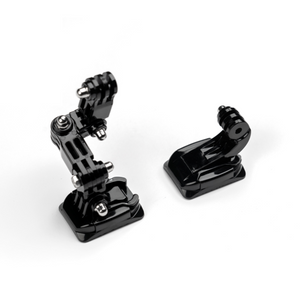
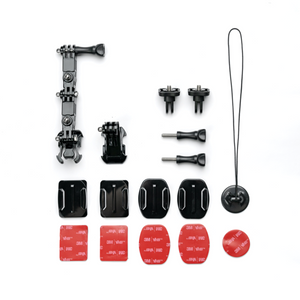
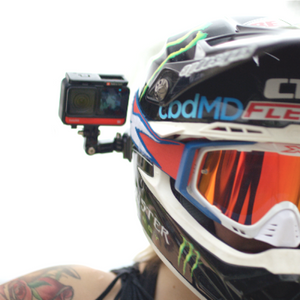
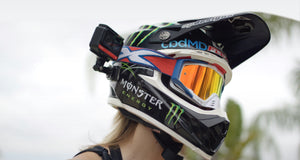
A New Perspective from the Helmet Put the viewer closer to the experience. Insta360 Helmet Mount Kit gives a compatible camera an elevated viewpoint that follows the direction of your head, whether you are recording a ride, a ski run or another suitable helmet-based activity. Straight and curved adhesive mounting bases provide different fitting options, while the extension and mounting pieces help you prepare the camera position. Choose a suitable surface, match the camera interface and check the complete installation before setting off. Highlights Helmet-mounted viewpoints for suitable riding and sporting activities. Straight and curved mounting bases for different helmet surfaces. Extension and mounting components for considered camera placement. Compatible 360 capture can conceal the correctly aligned extension. Camera-specific adapters are required for selected GO-series models. Key Features Bring the Viewpoint into the Experience A helmet-mounted camera can show the route, the surroundings and the direction you are looking without occupying a hand. Select an angle that communicates the activity clearly, then record a short test before the full session. The camera position should preserve visibility and remain clear of the helmet’s normal use. Match the Base to the Surface The kit provides straight and curved base options. Choose the fitting that makes proper contact with the intended helmet surface, and follow the manufacturer’s surface preparation and adhesive instructions. A flat area, a pronounced curve and a textured finish are different mounting situations; appearance alone does not establish a reliable bond. Prepare a Deliberate Camera Position Use the supplied extension and mounting pieces to establish the intended viewpoint. Tighten the camera connection and every intervening joint, then check the setup for movement. Keep the installation within the accessory instructions rather than adding an improvised chain of extensions that changes its loading. Use the Correct Camera Interface GO 3 and GO 3S require their compatible Quick Release Mount. GO Ultra requires the GO Ultra Quick Release Mount, supplied separately, while GO 2 uses the Action Mount Adapter. Match the fitting to the actual camera; a general compatibility list does not mean every camera connects without another component. Understand the Invisible Extension Effect With a compatible 360 camera, the correctly positioned extension can be removed through the camera’s stitching process. The effect depends on the camera, recording mode and alignment. A conventional wide-angle camera does not make mounting hardware disappear automatically, so compose and review the shot accordingly. Check the Complete Helmet Setup The camera and mounting arrangement should suit the helmet and activity. Follow the helmet manufacturer’s guidance, retain normal visibility and check all connections before use. The accessory instructions advise against strong-wind use on a matte helmet surface. Remove the camera when it is no longer needed and inspect the mounting parts before the next session. Summary Choose Helmet Mount Kit for a viewpoint that moves with the wearer. Select the appropriate base, use the correct camera adapter and prepare the angle before the activity begins. The result is a practical way to bring the viewer into a suitable helmet-based recording session without confusing physical mounting with the camera’s own imaging functions. Frequently Asked Questions Will It Fit Every Helmet?ExpandCollapse No. Check the available mounting surface, its curvature and finish, and the helmet manufacturer’s guidance. Select the appropriate straight or curved base and follow the adhesive instructions. Do not assume a textured or matte surface behaves like a smooth one. Do GO Ultra, GO 3 and GO 3S Need Another Mount?ExpandCollapse GO Ultra requires the dedicated GO Ultra Quick Release Mount. GO 3 and GO 3S require their compatible Quick Release Mount, while GO 2 uses the Action Mount Adapter. These camera-specific components are separate from this kit. Will the Extension Disappear from My Video?ExpandCollapse A compatible 360 camera can conceal a correctly aligned extension during stitching. The result depends on camera, recording mode and setup. Conventional wide-angle recording does not provide the same automatic effect. What Comes with the Kit?ExpandCollapse The kit contains the helmet mounting, extension, adhesive-base and tether components shown in the genuine product photographs. The camera, helmet and any required camera-specific adapter are supplied separately. What Should I Check Before Recording?ExpandCollapse Check helmet suitability, surface preparation, base attachment, joints, camera fastening and visibility. Review the accessory instructions for the intended activity and conditions. Avoid strong-wind use on a matte helmet surface, as specified by the manufacturer.
Pickup available at 3005, Ubi Avenue 3, #01-88
Usually ready in 2-4 Business Day (Excluding Public Holiday)
Insta360 Helmet Mount Kit
Paglalarawan
A New Perspective from the Helmet
Put the viewer closer to the experience. Insta360 Helmet Mount Kit gives a compatible camera an elevated viewpoint that follows the direction of your head, whether you are recording a ride, a ski run or another suitable helmet-based activity. Straight and curved adhesive mounting bases provide different fitting options, while the extension and mounting pieces help you prepare the camera position. Choose a suitable surface, match the camera interface and check the complete installation before setting off.
Highlights
- Helmet-mounted viewpoints for suitable riding and sporting activities.
- Straight and curved mounting bases for different helmet surfaces.
- Extension and mounting components for considered camera placement.
- Compatible 360 capture can conceal the correctly aligned extension.
- Camera-specific adapters are required for selected GO-series models.
Key Features
Bring the Viewpoint into the Experience
A helmet-mounted camera can show the route, the surroundings and the direction you are looking without occupying a hand. Select an angle that communicates the activity clearly, then record a short test before the full session. The camera position should preserve visibility and remain clear of the helmet’s normal use.
Match the Base to the Surface
The kit provides straight and curved base options. Choose the fitting that makes proper contact with the intended helmet surface, and follow the manufacturer’s surface preparation and adhesive instructions. A flat area, a pronounced curve and a textured finish are different mounting situations; appearance alone does not establish a reliable bond.
Prepare a Deliberate Camera Position
Use the supplied extension and mounting pieces to establish the intended viewpoint. Tighten the camera connection and every intervening joint, then check the setup for movement. Keep the installation within the accessory instructions rather than adding an improvised chain of extensions that changes its loading.
Use the Correct Camera Interface
GO 3 and GO 3S require their compatible Quick Release Mount. GO Ultra requires the GO Ultra Quick Release Mount, supplied separately, while GO 2 uses the Action Mount Adapter. Match the fitting to the actual camera; a general compatibility list does not mean every camera connects without another component.
Understand the Invisible Extension Effect
With a compatible 360 camera, the correctly positioned extension can be removed through the camera’s stitching process. The effect depends on the camera, recording mode and alignment. A conventional wide-angle camera does not make mounting hardware disappear automatically, so compose and review the shot accordingly.
Check the Complete Helmet Setup
The camera and mounting arrangement should suit the helmet and activity. Follow the helmet manufacturer’s guidance, retain normal visibility and check all connections before use. The accessory instructions advise against strong-wind use on a matte helmet surface. Remove the camera when it is no longer needed and inspect the mounting parts before the next session.
Summary
Choose Helmet Mount Kit for a viewpoint that moves with the wearer. Select the appropriate base, use the correct camera adapter and prepare the angle before the activity begins. The result is a practical way to bring the viewer into a suitable helmet-based recording session without confusing physical mounting with the camera’s own imaging functions.
Frequently Asked Questions
Will It Fit Every Helmet?
No. Check the available mounting surface, its curvature and finish, and the helmet manufacturer’s guidance. Select the appropriate straight or curved base and follow the adhesive instructions. Do not assume a textured or matte surface behaves like a smooth one.
Do GO Ultra, GO 3 and GO 3S Need Another Mount?
GO Ultra requires the dedicated GO Ultra Quick Release Mount. GO 3 and GO 3S require their compatible Quick Release Mount, while GO 2 uses the Action Mount Adapter. These camera-specific components are separate from this kit.
Will the Extension Disappear from My Video?
A compatible 360 camera can conceal a correctly aligned extension during stitching. The result depends on camera, recording mode and setup. Conventional wide-angle recording does not provide the same automatic effect.
What Comes with the Kit?
The kit contains the helmet mounting, extension, adhesive-base and tether components shown in the genuine product photographs. The camera, helmet and any required camera-specific adapter are supplied separately.
What Should I Check Before Recording?
Check helmet suitability, surface preparation, base attachment, joints, camera fastening and visibility. Review the accessory instructions for the intended activity and conditions. Avoid strong-wind use on a matte helmet surface, as specified by the manufacturer.
Mga detalye
Insta360 Helmet Mount Kit
Insta360 Helmet Mount Kit provides components for positioning a compatible action camera on a suitable helmet. The table separates its mounting arrangement from the camera-specific interfaces that some models require. Choose the straight or curved base according to the intended surface, follow the adhesive instructions and check the completed installation before use. Camera and helmet hardware are separate. The invisible-extension effect is a function of compatible 360 capture and alignment, rather than a physical property that applies to every camera.
| Specification | Details |
|---|---|
| Mounting and Purpose | |
| Application | Helmet-mounted camera recording for suitable motorcycling, cycling, skiing and other activities |
| Base Options | Straight and curved adhesive mounting bases |
| Camera Position | Supplied extension and mounting components |
| 360 Capture | Compatible 360 stitching can conceal a correctly aligned extension |
| Camera Interfaces | |
| Listed Camera Families | X6, X5, X4 Air, X4, X3, Ace series and specified GO/ONE-series cameras, with the correct interface |
| GO Ultra | Dedicated GO Ultra Quick Release Mount required; separate |
| GO 3 and GO 3S | Compatible Quick Release Mount required; separate |
| GO 2 | Action Mount Adapter required; separate |
| Fitting and Use | |
| Helmet Check | Confirm surface, shape, finish and helmet manufacturer guidance |
| Preparation | Follow the accessory’s adhesive and assembly instructions |
| Matte Surface Precaution | Do not use in strong wind, as specified in the manufacturer notes |
| Before Each Use | Check base attachment, joints, camera fastening and visibility |
| Package | |
| Included Components | Helmet mounting components, extension, straight/curved adhesive-base components and tether shown in the product photographs |
| Separate Equipment | Camera, helmet and required camera-specific adapters |