


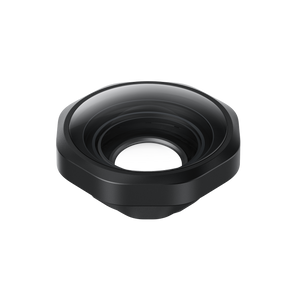

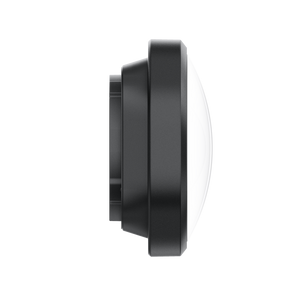



Insta360 Ace Pro 2 Ultra Wide Lens
Bring More Of The Scene Into Your Story The Insta360 Ace Pro 2 Ultra Wide Lens expands the camera’s perspective for immersive first-person footage, landscapes and scenes where space matters. Its optical design reaches a maximum field of view of 189°, with the recorded view determined by the selected resolution, field-of-view mode and stabilisation. Fit the removable lens, select its Lens Master setting and give the camera a wider way to frame the action. Highlights Removable optical lens designed for Insta360 Ace Pro 2 Maximum optical field of view of 189°, dependent on shooting settings Manufacturer comparison shows a taller and wider view under specified 4K conditions Dedicated Ultra Wide Lens setting in the camera’s Lens Master menu Includes silicone cap, cleaning cloth, wrench and brush Key Features An Expansive Perspective For Moving Scenes A wider view can retain more of the surroundings when the camera is close to the action or mounted where you cannot step back. The lens is designed for an optical maximum of 189°. This is not a promise that every recording mode captures that angle, because the camera’s correction and stabilisation affect the final frame. A Clear Comparison Under Defined Settings Insta360 reports a 36% taller and 32% wider field of view than the regular Ace Pro 2 lens when tested in 4K60fps Video mode, 16:9, UltraWide field of view and Standard stabilisation. Those conditions matter when comparing footage, so use matching settings rather than applying the percentages to every mode. Lens Master Keeps The Image Corrected After fitting the lens, open Accessories, then Lens Master, and select Ultra Wide Lens. This enables the camera’s corresponding correction. If the preview has dark corners, check this setting first. Update the camera firmware and Insta360 app before use, and return Lens Master to Standard when the accessory is removed. Retain High-Resolution Recording Options Official support confirms that 8K recording remains supported with this lens. At 8K with Standard stabilisation, the horizontal field of view reaches up to 134° in MegaView and UltraWide modes. Choose the recording mode for the perspective and output you need rather than assuming the optical maximum survives every crop. A Removable Addition With Care Tools Included Remove the camera’s silicone lens-guard ring and standard Lens Guard using the supplied wrench, then fit the Ultra Wide Lens with a 45° clockwise turn. The included cap, cloth and brush help keep the accessory clean between shoots. Work in a clean area and follow the fitting guide; the camera is sold separately. Summary The Ace Pro 2 Ultra Wide Lens suits creators who want a more immersive perspective from their existing camera. Correct installation and the matching Lens Master setting bring the optical accessory and the camera’s image correction together for the intended view. Frequently Asked Questions Does Every Mode Record A 189° View?ExpandCollapse No. The 189° figure is the optical design’s maximum. The recorded field of view changes with resolution, field-of-view mode, stabilisation and correction settings. Why Are The Preview Corners Dark?ExpandCollapse Check that Ultra Wide Lens is selected under Accessories > Lens Master. Official support explains that using the wrong lens setting prevents the appropriate perspective correction and can cause dark corners. Can I Still Record In 8K?ExpandCollapse Yes. Official support confirms 8K recording. With Standard stabilisation, MegaView and UltraWide provide a horizontal field of view up to 134° at 8K. This is different from the 189° optical maximum. How Does It Attach?ExpandCollapse Remove the silicone lens-guard ring, use the included wrench to remove the standard Lens Guard and fit the Ultra Wide Lens with a 45° clockwise turn. Select its Lens Master setting and follow the supplied guide. Refit the original guard and select Standard after removing it. What Comes In The Box?ExpandCollapse One Ultra Wide Lens, one silicone lens cap, one lens cleaning cloth, one wrench and one brush are included. The Insta360 Ace Pro 2 camera is sold separately.
Pickup available at 3005, Ubi Avenue 3, #01-88
Usually ready in 2-4 Business Day (Excluding Public Holiday)
Insta360 Ace Pro 2 Ultra Wide Lens
Paglalarawan
Bring More Of The Scene Into Your Story
The Insta360 Ace Pro 2 Ultra Wide Lens expands the camera’s perspective for immersive first-person footage, landscapes and scenes where space matters. Its optical design reaches a maximum field of view of 189°, with the recorded view determined by the selected resolution, field-of-view mode and stabilisation. Fit the removable lens, select its Lens Master setting and give the camera a wider way to frame the action.
Highlights
- Removable optical lens designed for Insta360 Ace Pro 2
- Maximum optical field of view of 189°, dependent on shooting settings
- Manufacturer comparison shows a taller and wider view under specified 4K conditions
- Dedicated Ultra Wide Lens setting in the camera’s Lens Master menu
- Includes silicone cap, cleaning cloth, wrench and brush
Key Features
An Expansive Perspective For Moving Scenes
A wider view can retain more of the surroundings when the camera is close to the action or mounted where you cannot step back. The lens is designed for an optical maximum of 189°. This is not a promise that every recording mode captures that angle, because the camera’s correction and stabilisation affect the final frame.
A Clear Comparison Under Defined Settings
Insta360 reports a 36% taller and 32% wider field of view than the regular Ace Pro 2 lens when tested in 4K60fps Video mode, 16:9, UltraWide field of view and Standard stabilisation. Those conditions matter when comparing footage, so use matching settings rather than applying the percentages to every mode.
Lens Master Keeps The Image Corrected
After fitting the lens, open Accessories, then Lens Master, and select Ultra Wide Lens. This enables the camera’s corresponding correction. If the preview has dark corners, check this setting first. Update the camera firmware and Insta360 app before use, and return Lens Master to Standard when the accessory is removed.
Retain High-Resolution Recording Options
Official support confirms that 8K recording remains supported with this lens. At 8K with Standard stabilisation, the horizontal field of view reaches up to 134° in MegaView and UltraWide modes. Choose the recording mode for the perspective and output you need rather than assuming the optical maximum survives every crop.
A Removable Addition With Care Tools Included
Remove the camera’s silicone lens-guard ring and standard Lens Guard using the supplied wrench, then fit the Ultra Wide Lens with a 45° clockwise turn. The included cap, cloth and brush help keep the accessory clean between shoots. Work in a clean area and follow the fitting guide; the camera is sold separately.
Summary
The Ace Pro 2 Ultra Wide Lens suits creators who want a more immersive perspective from their existing camera. Correct installation and the matching Lens Master setting bring the optical accessory and the camera’s image correction together for the intended view.
Frequently Asked Questions
Does Every Mode Record A 189° View?
No. The 189° figure is the optical design’s maximum. The recorded field of view changes with resolution, field-of-view mode, stabilisation and correction settings.
Why Are The Preview Corners Dark?
Check that Ultra Wide Lens is selected under Accessories > Lens Master. Official support explains that using the wrong lens setting prevents the appropriate perspective correction and can cause dark corners.
Can I Still Record In 8K?
Yes. Official support confirms 8K recording. With Standard stabilisation, MegaView and UltraWide provide a horizontal field of view up to 134° at 8K. This is different from the 189° optical maximum.
How Does It Attach?
Remove the silicone lens-guard ring, use the included wrench to remove the standard Lens Guard and fit the Ultra Wide Lens with a 45° clockwise turn. Select its Lens Master setting and follow the supplied guide. Refit the original guard and select Standard after removing it.
What Comes In The Box?
One Ultra Wide Lens, one silicone lens cap, one lens cleaning cloth, one wrench and one brush are included. The Insta360 Ace Pro 2 camera is sold separately.
Mga detalye
Insta360 Ace Pro 2 Ultra Wide Lens
This removable optical accessory is designed for Insta360 Ace Pro 2 and works with a dedicated Lens Master setting. Its maximum optical field of view and the camera’s final recorded view are different measurements: resolution, correction and stabilisation determine what appears in the finished frame. The table records the manufacturer’s stated comparison conditions and the separate 8K support guidance. Fit the lens in a clean environment and restore the standard guard and camera setting when removing it.
| Specification | Details |
|---|---|
| Camera And Optical Performance | |
| Compatible Camera | Insta360 Ace Pro 2 |
| Maximum Optical Field Of View | 189°; recorded results vary with settings |
| Manufacturer Comparison | 36% taller and 32% wider than the regular lens, measured in 4K60fps Video mode, 16:9, UltraWide FOV and Standard stabilisation |
| 8K Recording | Supported; up to 134° horizontal FOV in MegaView and UltraWide with Standard stabilisation at 8K |
| Installation And Camera Setup | |
| Attachment | Remove silicone lens-guard ring and standard Lens Guard; rotate accessory 45° clockwise to secure |
| Required Camera Setting | Accessories > Lens Master > Ultra Wide Lens |
| After Removal | Refit standard Lens Guard and silicone ring; select Lens Master > Standard |
| Software Preparation | Update camera firmware and Insta360 app to current supported versions |
| Dark Preview Corners | Confirm the correct Lens Master option to enable perspective correction |
| Physical Details And Contents | |
| Dimensions | 46 × 46 × 22 mm |
| Manufacturer Weight | 49.5 g; lens weight, not packed shipping weight |
| Materials | Plastic, glass, silicone and metal |
| In The Box | 1 Ultra Wide Lens, 1 silicone lens cap, 1 lens cleaning cloth, 1 wrench and 1 brush |
| Sold Separately | Insta360 Ace Pro 2 camera |