


D-Link G530 5G AX3000 Wi-Fi 6 Router
5G Broadband with AX3000 Wi-Fi and App Control The D-Link G530 is a 5G NR SA/NSA with 4G LTE fallback router with AX3000 dual-band Wi-Fi 6, designed for a home or shared workspace that wants indoor 5G service, faster dual-band Wi-Fi and accessible app-based management. Insert a compatible active SIM, configure the mobile service and share the connection with wireless and Ethernet devices. The indoor design keeps the cellular and Wi-Fi hardware together in one unit. Position it for a usable mobile signal, then choose the wired or wireless connection that suits each device. A suitable SIM plan and mains power are required. Highlights Mobile Broadband and Wi-Fi 5G NR SA/NSA with 4G LTE fallback AX3000 dual-band Wi-Fi 6 1 × SIM/UICC slot Connections for Your Setup 1 × Gigabit WAN; 1 × Gigabit LAN 4 internal cellular antennas; 2 internal 2.4GHz and 2 internal 5GHz Wi-Fi antennas Practical Management D-Link Falcon app and web-based management WPA/WPA2/WPA3; SPI and anti-spoofing; IP/MAC filtering and DMZ 3-year hardware warranty Key Features Share a Mobile-Data Connection G530 connects through a compatible operator SIM and data plan. Check the operator's supported bands, APN requirements and router-use policy before installation. Cellular headline rates are theoretical radio capabilities; coverage, congestion, plan limits, signal strength and the connected device determine actual performance. Put Dual-Band Wi-Fi 6 to Work Dual-band Wi-Fi provides separate 2.4GHz and 5GHz connections for compatible clients. 2.4GHz up to 574 Mbps; 5GHz up to 2402 Mbps. These are wireless link rates, not promised internet speeds or a combined speed for one device. Client capability, distance, walls and interference affect the usable connection. Connect Wired Equipment with the Right Port 1 × Gigabit WAN; 1 × Gigabit LAN. Gigabit Ethernet is useful for fixed PCs, switches and other compatible wired equipment. The router port speed does not by itself establish the speed of the mobile internet service. Keep Setup and Access Manageable Use the D-Link Falcon app or browser-based management to configure the network and access controls. Set strong administrator and Wi-Fi credentials, keep a configuration record and install suitable firmware updates when available. Service access and remote-management features should be enabled only when required. Choose Placement and Security Carefully Set up this indoor router where the mobile signal is usable and ventilation remains clear. WPA/WPA2/WPA3; SPI and anti-spoofing; IP/MAC filtering and DMZ. These controls support a managed network, but do not guarantee protection from every threat or replace secure client devices and sensible access settings. Summary Choose the D-Link G530 when 5G NR SA/NSA with 4G LTE fallback, AX3000 dual-band Wi-Fi 6 and its specific wired interfaces match the site. Plan the mobile service and placement first, then use the router's available controls to build a clear, manageable connection for the devices that matter. Frequently Asked Questions Does the G530 Need a SIM and Mobile Plan?ExpandCollapse Yes. A compatible active SIM and an appropriate mobile-data plan are required for cellular internet. They are not supplied with the router. Confirm supported bands, APN details and any operator restrictions on router use. Does It Support Both 5G and 4G?ExpandCollapse 5G NR SA/NSA with 4G LTE fallback. Availability depends on the operator, location, compatible SIM and plan. 5GHz Wi-Fi is a local wireless band and is different from a 5G mobile service. What Wired Connections Are Available?ExpandCollapse 1 × Gigabit WAN; 1 × Gigabit LAN. The Ethernet network interfaces support Gigabit connections; the mobile service may run at a different speed. How Is the Router Configured?ExpandCollapse D-Link Falcon app and web-based management. Use secure administrator credentials and check the required mobile-service settings during setup. Will the Advertised Wireless Rate Be My Internet Speed?ExpandCollapse No. 2.4GHz up to 574 Mbps; 5GHz up to 2402 Mbps. These describe theoretical wireless link capabilities. The cellular service, signal, client device and local radio conditions determine actual internet throughput. What Should I Check Before Buying?ExpandCollapse Confirm the operator's bands and plan policy, SIM requirements, wired port speeds and the installation's power arrangements. Published technical details follow the current regional B1 datasheet; confirm any essential band requirement for the supplied hardware revision. 3-year hardware warranty is provided; it is not a commitment to a fixed firmware-support period.
Maaaring kunin sa 3005, Ubi Avenue 3, #01-88
Usually ready in 2-4 Business Day (Excluding Public Holiday)
D-Link G530 5G AX3000 Wi-Fi 6 Router
Paglalarawan
5G Broadband with AX3000 Wi-Fi and App Control
The D-Link G530 is a 5G NR SA/NSA with 4G LTE fallback router with AX3000 dual-band Wi-Fi 6, designed for a home or shared workspace that wants indoor 5G service, faster dual-band Wi-Fi and accessible app-based management. Insert a compatible active SIM, configure the mobile service and share the connection with wireless and Ethernet devices.
The indoor design keeps the cellular and Wi-Fi hardware together in one unit. Position it for a usable mobile signal, then choose the wired or wireless connection that suits each device. A suitable SIM plan and mains power are required.
Highlights
Mobile Broadband and Wi-Fi
- 5G NR SA/NSA with 4G LTE fallback
- AX3000 dual-band Wi-Fi 6
- 1 × SIM/UICC slot
Connections for Your Setup
- 1 × Gigabit WAN; 1 × Gigabit LAN
- 4 internal cellular antennas; 2 internal 2.4GHz and 2 internal 5GHz Wi-Fi antennas
Practical Management
- D-Link Falcon app and web-based management
- WPA/WPA2/WPA3; SPI and anti-spoofing; IP/MAC filtering and DMZ
- 3-year hardware warranty
Key Features
Share a Mobile-Data Connection
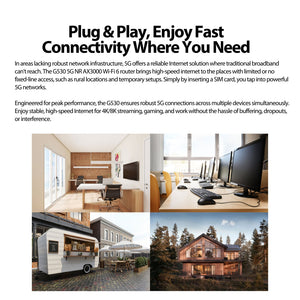
G530 connects through a compatible operator SIM and data plan. Check the operator's supported bands, APN requirements and router-use policy before installation. Cellular headline rates are theoretical radio capabilities; coverage, congestion, plan limits, signal strength and the connected device determine actual performance.
Put Dual-Band Wi-Fi 6 to Work
Dual-band Wi-Fi provides separate 2.4GHz and 5GHz connections for compatible clients. 2.4GHz up to 574 Mbps; 5GHz up to 2402 Mbps. These are wireless link rates, not promised internet speeds or a combined speed for one device. Client capability, distance, walls and interference affect the usable connection.
Connect Wired Equipment with the Right Port
1 × Gigabit WAN; 1 × Gigabit LAN. Gigabit Ethernet is useful for fixed PCs, switches and other compatible wired equipment. The router port speed does not by itself establish the speed of the mobile internet service.
Keep Setup and Access Manageable
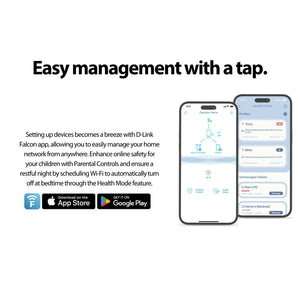
Use the D-Link Falcon app or browser-based management to configure the network and access controls. Set strong administrator and Wi-Fi credentials, keep a configuration record and install suitable firmware updates when available. Service access and remote-management features should be enabled only when required.
Choose Placement and Security Carefully
Set up this indoor router where the mobile signal is usable and ventilation remains clear. WPA/WPA2/WPA3; SPI and anti-spoofing; IP/MAC filtering and DMZ. These controls support a managed network, but do not guarantee protection from every threat or replace secure client devices and sensible access settings.
Summary
Choose the D-Link G530 when 5G NR SA/NSA with 4G LTE fallback, AX3000 dual-band Wi-Fi 6 and its specific wired interfaces match the site. Plan the mobile service and placement first, then use the router's available controls to build a clear, manageable connection for the devices that matter.
Frequently Asked Questions
Does the G530 Need a SIM and Mobile Plan?
Yes. A compatible active SIM and an appropriate mobile-data plan are required for cellular internet. They are not supplied with the router. Confirm supported bands, APN details and any operator restrictions on router use.
Does It Support Both 5G and 4G?
5G NR SA/NSA with 4G LTE fallback. Availability depends on the operator, location, compatible SIM and plan. 5GHz Wi-Fi is a local wireless band and is different from a 5G mobile service.
What Wired Connections Are Available?
1 × Gigabit WAN; 1 × Gigabit LAN. The Ethernet network interfaces support Gigabit connections; the mobile service may run at a different speed.
How Is the Router Configured?
D-Link Falcon app and web-based management. Use secure administrator credentials and check the required mobile-service settings during setup.
Will the Advertised Wireless Rate Be My Internet Speed?
No. 2.4GHz up to 574 Mbps; 5GHz up to 2402 Mbps. These describe theoretical wireless link capabilities. The cellular service, signal, client device and local radio conditions determine actual internet throughput.
What Should I Check Before Buying?
Confirm the operator's bands and plan policy, SIM requirements, wired port speeds and the installation's power arrangements. Published technical details follow the current regional B1 datasheet; confirm any essential band requirement for the supplied hardware revision. 3-year hardware warranty is provided; it is not a commitment to a fixed firmware-support period.
Mga detalye
D-Link G530 5G AX3000 Wi-Fi 6 Router
The D-Link G530 combines 5G NR SA/NSA with 4G LTE fallback mobile connectivity with AX3000 dual-band Wi-Fi 6 for an indoor shared network. Its Ethernet interfaces, SIM arrangement and power requirements determine how it fits into the installation. The specifications below distinguish cellular radio rates from local Wi-Fi and wired links, and include supported bands, management functions, physical details and environmental limits. Check operator compatibility and actual coverage before selecting a mobile-data service.
| Specification | Details |
|---|---|
| Cellular Connectivity | |
| Cellular Technology | 5G NR SA/NSA with 4G LTE fallback |
| Cellular Data Rates | 5G SA up to 2 Gbps down / 1 Gbps up; NSA up to 2.6 Gbps down / 650 Mbps up; LTE up to 600/150 Mbps; theoretical maximums, service-dependent |
| SIM Interface | 1 × SIM/UICC slot |
| Supported Cellular Bands | 5G SA n1/3/5/7/8/20/28/38/40/41/66/77/78; NSA n1/3/7/20/28/38/40/41/77/78; LTE B1/2/3/4/5/7/8/20/28/38/40/41/66; WCDMA B1/2/5/8 |
| Antenna System | 4 internal cellular antennas; 2 internal 2.4GHz and 2 internal 5GHz Wi-Fi antennas |
| Wi-Fi and Wired Networking | |
| Wi-Fi Standard and Class | AX3000 dual-band Wi-Fi 6 |
| Wireless Link Rates | 2.4GHz up to 574 Mbps; 5GHz up to 2402 Mbps |
| Network Interfaces | 1 × Gigabit WAN; 1 × Gigabit LAN |
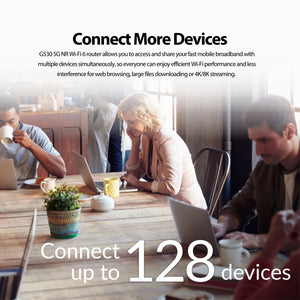
| Wireless Client Reference | Manufacturer lists up to 128 connected clients; capacity is not a throughput or coverage guarantee |
| Network Modes | Cellular router; compatible D-Link X Series mesh connectivity |
| Management and Security | |
| Wireless and Network Security | WPA/WPA2/WPA3; SPI and anti-spoofing; IP/MAC filtering and DMZ |
| Management and Services | D-Link Falcon app and web-based management |
| Physical and Power | |
| Dimensions | 137 × 146 × 205 mm |
| Device Weight | 623 g |
| Power | 12V DC / 2.5A adapter |
| Installation | Indoor use; maintain ventilation and check mobile-signal conditions |
| Environment | |
| Operating Temperature | 0 to 40°C |
| Storage Temperature | −10 to 70°C |
| Humidity | Operating 10–90% RH; storage 0–95% RH, non-condensing |
| Warranty and Deployment | |
| Warranty | 3 years |
| Security Updates | D-Link commits to security updates until 31-Dec-2027. Extended support and individual patch releases remain at D-Link's discretion. This commitment is separate from the hardware warranty. |
| Service Requirements | Compatible operator SIM and data plan; usable coverage; suitable power source |
| Performance Conditions | Cellular and Wi-Fi rates are theoretical. Actual throughput depends on network, plan, client, placement and radio conditions |
| Regional Specification | Current regional B1 datasheet; confirm essential carrier-band requirements for the supplied revision |