


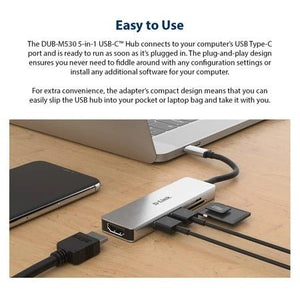


D-Link DUB-M530 5-in-1 USB-C Hub
From Memory Card to a Larger Workspace Review photographs, connect everyday peripherals and use a larger screen from one compact hub. The D-Link DUB-M530 combines HDMI, two USB-A ports and separate SD and microSD slots for a practical mobile workspace. It is particularly useful when a thin laptop has lost the card readers and full-size ports your workflow still needs. The aluminium alloy enclosure and integrated USB-C cable make it straightforward to pack alongside the computer. Highlights Display and Desk Connections HDMI up to 4K at 30 Hz 2 × USB-A 3.0 up to 5 Gbps Separate SD and microSD card slots Designed for a Compatible USB-C Host Integrated USB-C host cable DisplayPort Alternate Mode required for video Plug-and-play operation with supported Windows, macOS and ChromeOS computers Key Features A Clearer View Through HDMI Connect an external monitor, television or projector through HDMI at up to 4K30. The 30 Hz output suits documents, presentations and detailed still imagery. The achieved mode depends on the computer, cable and display. Make Room for Established USB Devices Use the 2 USB-A sockets for compatible storage and peripherals without replacing them simply because the laptop uses USB-C. USB 3.0 supports a signalling rate up to 5 Gbps; actual transfer performance depends on the device and workload. Read Cards Without Another Adapter Separate SD and microSD slots provide direct access to compatible camera and mobile memory cards. This makes it easier to review and move files from removable media. The card format and computer determine compatibility; the hub does not add Power Delivery charging. Bring Removable Media into the Workflow Use the built-in SD and microSD readers to access compatible cards alongside the external screen and USB peripherals. The supported SD, SDHC and SDXC formats keep familiar removable media in use. Storage cards are separate accessories. Compact Enough to Move Between Desks The 96 × 29 × 9 mm enclosure and integrated 11.5 cm USB-C cable form a compact travel companion. At 42 g, the hub can stay with the computer instead of being a permanent desktop fixture. Allow space around the ports for connected cables. Choose the Host Connection Carefully USB-C describes a connector, so not every matching socket provides video or accepts charging. Verify DisplayPort Alternate Mode for HDMI, and USB-C PD charging support if you plan to power the laptop through the hub. This avoids buying a hub for a host port that cannot provide the required function. Summary D-Link DUB-M530 5-in-1 USB-C Hub gives a compatible computer a considered selection of everyday connections. Choose it for display, removable media and peripheral access. Confirm the host’s video support before ordering. Frequently Asked Questions Will Every USB-C Port Support the HDMI Output?ExpandCollapse No. The computer’s USB-C port must support DisplayPort Alternate Mode. A USB-C charging or data-only port is insufficient. The display, HDMI cable and host must also support the selected resolution and refresh rate. Can This Hub Charge My Laptop?ExpandCollapse No USB-C Power Delivery input is specified for this model. It is powered from the host computer and provides display, USB and card-reader connections. How Fast Are the USB Ports?ExpandCollapse The USB 3.0 ports support a signalling rate up to 5 Gbps. This is not a guaranteed file-transfer speed; the host, storage device, cable and other connected devices affect practical throughput. Which Memory Cards Can I Use?ExpandCollapse The separate SD and microSD slots support the documented SD, SDHC and SDXC formats up to version 3.0. Check your card and computer for compatibility. Cards are not included; simultaneous use and speed beyond the documented capability are not guaranteed. Does It Need a Separate Power Supply?ExpandCollapse The hub is powered from the USB-C host connection. A compatible external PD charger is needed only when using the model’s specified pass-through charging function; external chargers and display cables are separate accessories. What Warranty Is Included?ExpandCollapse The hardware warranty is 1 year. Compatibility depends on the host computer and connected equipment; check the documented port functions before choosing the hub.
Pickup available at 3005, Ubi Avenue 3, #01-88
Usually ready in 2-4 Business Day (Excluding Public Holiday)
D-Link DUB-M530 5-in-1 USB-C Hub
Paglalarawan
From Memory Card to a Larger Workspace
Review photographs, connect everyday peripherals and use a larger screen from one compact hub. The D-Link DUB-M530 combines HDMI, two USB-A ports and separate SD and microSD slots for a practical mobile workspace.
It is particularly useful when a thin laptop has lost the card readers and full-size ports your workflow still needs. The aluminium alloy enclosure and integrated USB-C cable make it straightforward to pack alongside the computer.
Highlights
Display and Desk Connections
- HDMI up to 4K at 30 Hz
- 2 × USB-A 3.0 up to 5 Gbps
- Separate SD and microSD card slots
Designed for a Compatible USB-C Host
- Integrated USB-C host cable
- DisplayPort Alternate Mode required for video
- Plug-and-play operation with supported Windows, macOS and ChromeOS computers
Key Features
A Clearer View Through HDMI
Connect an external monitor, television or projector through HDMI at up to 4K30. The 30 Hz output suits documents, presentations and detailed still imagery. The achieved mode depends on the computer, cable and display.
Make Room for Established USB Devices
Use the 2 USB-A sockets for compatible storage and peripherals without replacing them simply because the laptop uses USB-C. USB 3.0 supports a signalling rate up to 5 Gbps; actual transfer performance depends on the device and workload.
Read Cards Without Another Adapter
Separate SD and microSD slots provide direct access to compatible camera and mobile memory cards. This makes it easier to review and move files from removable media. The card format and computer determine compatibility; the hub does not add Power Delivery charging.
Bring Removable Media into the Workflow
Use the built-in SD and microSD readers to access compatible cards alongside the external screen and USB peripherals. The supported SD, SDHC and SDXC formats keep familiar removable media in use. Storage cards are separate accessories.
Compact Enough to Move Between Desks
The 96 × 29 × 9 mm enclosure and integrated 11.5 cm USB-C cable form a compact travel companion. At 42 g, the hub can stay with the computer instead of being a permanent desktop fixture. Allow space around the ports for connected cables.
Choose the Host Connection Carefully
USB-C describes a connector, so not every matching socket provides video or accepts charging. Verify DisplayPort Alternate Mode for HDMI, and USB-C PD charging support if you plan to power the laptop through the hub. This avoids buying a hub for a host port that cannot provide the required function.
Summary
D-Link DUB-M530 5-in-1 USB-C Hub gives a compatible computer a considered selection of everyday connections. Choose it for display, removable media and peripheral access. Confirm the host’s video support before ordering.
Frequently Asked Questions
Will Every USB-C Port Support the HDMI Output?
No. The computer’s USB-C port must support DisplayPort Alternate Mode. A USB-C charging or data-only port is insufficient. The display, HDMI cable and host must also support the selected resolution and refresh rate.
Can This Hub Charge My Laptop?
No USB-C Power Delivery input is specified for this model. It is powered from the host computer and provides display, USB and card-reader connections.
How Fast Are the USB Ports?
The USB 3.0 ports support a signalling rate up to 5 Gbps. This is not a guaranteed file-transfer speed; the host, storage device, cable and other connected devices affect practical throughput.
Which Memory Cards Can I Use?
The separate SD and microSD slots support the documented SD, SDHC and SDXC formats up to version 3.0. Check your card and computer for compatibility. Cards are not included; simultaneous use and speed beyond the documented capability are not guaranteed.
Does It Need a Separate Power Supply?
The hub is powered from the USB-C host connection. A compatible external PD charger is needed only when using the model’s specified pass-through charging function; external chargers and display cables are separate accessories.
What Warranty Is Included?
The hardware warranty is 1 year. Compatibility depends on the host computer and connected equipment; check the documented port functions before choosing the hub.
Mga detalye
D-Link DUB-M530 5-in-1 USB-C Hub
D-Link DUB-M530 5-in-1 USB-C Hub adds practical connections to a compatible USB-C computer without a full-size desktop dock. Its integrated host cable brings the documented display and peripheral interfaces together in a compact enclosure. Check the host’s DisplayPort Alternate Mode support for video, then match the monitor, cables and connected devices to the specified limits. The grouped specifications below separate display capability, USB connections, power requirements and physical details so the intended setup is clear.
| Specification | Details |
|---|---|
| Display Output | |
| HDMI | 1 × HDMI 1.4; up to 3840 × 2160 or 4096 × 2160 at 30 Hz; HDCP 2.2 |
| Host Video Requirement | USB-C DisplayPort Alternate Mode |
| USB and Peripheral Connections | |
| Host Connection | Integrated USB-C connector; compatible Thunderbolt host port providing required USB-C functions |
| USB-A Ports | 2 × USB 3.0 up to 5 Gbps; backwards compatible with USB 2.0/1.1 |
| Card Readers | Separate SD and microSD slots; SD v 1.0, SDHC v 2.0, SDXC v 3.0 |
| Power and Compatibility | |
| Power Source | USB bus powered |
| Typical Consumption | 131 mA at 5 V DC |
| Operating Systems | Windows, macOS and ChromeOS; host functionality and device support apply |
| Physical and Environment | |
| Dimensions | 96 × 29 × 9 mm |
| Integrated Cable | 11.5 cm |
| Weight | 42 g |
| Temperature | Operating 0–70°C; storage−25–85°C |
| Humidity | Operating/storage 5–80%RH non-condensing |
| Warranty | |
| Hardware Warranty | 1 year |