


D-Link DGS-1210-26 24-Port Gigabit Smart Managed Switch with SFP
A Full Gigabit Access Layer with Dedicated Fibre Uplinks The D-Link DGS-1210-26 brings managed Gigabit connectivity to an office access layer serving workstations, printers and shared storage. It combines 24 Gigabit RJ45 ports plus 2 dedicated 100/1000 Mbps SFP ports, 52 Gbps switching capacity and a fanless chassis, giving everyday wired devices a straightforward path into an organised business network. Move beyond basic plug-and-play switching with VLAN segmentation, traffic prioritisation, link aggregation and IPv4/IPv6 static routing. A browser interface, compact command line and SNMP give administrators several ways to configure and monitor the network, while dual firmware images and configuration files help make maintenance more controlled. Highlights Connectivity and Installation 24 Gigabit RJ45 ports plus 2 dedicated 100/1000 Mbps SFP ports. 52 Gbps switching capacity and up to 38.7 Mpps packet forwarding. Fanless metal chassis with an internal 100–240 V AC power supply. Network Control 802.1Q VLANs, eight QoS queues and IGMP/MLD multicast controls. STP, RSTP, MSTP and LACP support for planned redundant links. 802.1X authentication, ACLs and IP-MAC-port binding. Key Features Keep Fibre Uplinks Separate from Endpoint Ports Dedicated SFP ports let you build fibre links without giving up a copper endpoint port. With 24 Gigabit RJ45 ports and 2 separate SFP cages, the switch can connect local devices and an upstream network at the same time. Choose compatible transceivers and fibre to suit the link distance, connector and equipment at the other end. Separate Business Traffic with Purpose Create VLANs for staff, voice, surveillance and other network roles instead of placing every device in one broadcast domain. Auto Voice VLAN and Surveillance Mode support compatible deployments, while eight QoS queues let you prioritise time-sensitive traffic. These controls are useful when office applications, calls and video share a switch, provided the wider network is configured to carry the same policies. Build Resilience into the Topology STP, RSTP and MSTP help manage redundant paths and avoid switching loops. LACP can combine compatible links into an aggregated connection, increasing the capacity available across multiple traffic flows and supporting a more resilient design. Loopback detection and cable diagnostics help the administrator locate common faults; they complement a planned network rather than replacing sound configuration and monitoring. Control Access at the Network Edge Port-based 802.1X authentication works with a RADIUS service to control who connects. Access control lists, port security, DHCP screening and IP-MAC-port binding add further ways to restrict unwanted traffic. D-Link Safeguard Engine and storm controls help protect switch resources from flooding, giving the administrator a practical set of safeguards for a shared business network. Route Selected Traffic Between VLANs Layer 3 static routing allows communication between configured IP networks without sending every local exchange through an external router. The switch supports four IP interfaces, up to 124 IPv4 static routes and 50 IPv6 static routes. This suits straightforward inter-VLAN routing plans; internet access, firewall inspection and dynamic routing requirements still need the appropriate gateway and network design. Manage Quietly and Maintain with Confidence The fanless design suits offices and nearby equipment spaces where fan noise is undesirable. Configure the switch through its web interface, compact CLI or SNMP, and use D-Link Network Assistant for device discovery. Compatible current firmware also enables Nuclias Connect management. Dual images and configuration files provide maintenance options, while logs and port diagnostics help track changes and investigate faults. Summary For an office access layer serving workstations, printers and shared storage, the DGS-1210-26 combines flexible Gigabit connections with the VLAN, security and maintenance controls needed to run a more structured network. Its fanless design keeps installation practical, while dedicated SFP uplinks provide a clear route into the wider infrastructure. Select compatible optics and configure the network policies to match your deployment. Frequently Asked Questions How Many Connections Can I Use at the Same Time?ExpandCollapse The 2 SFP ports are independent of the 24 copper ports, so all 26 network ports can be used together. All copper connections support up to 1 Gbps; the SFP interfaces support compatible 100 Mbps or 1 Gbps modules. Does This Switch Have 10G Uplinks?ExpandCollapse No. The DGS-1210-26 uses Gigabit RJ45 ports and 100/1000 Mbps SFP interfaces. It does not provide 10G SFP+ or 2.5/5GbE copper ports. Choose an appropriate 10G-uplink model if your backbone needs more than 1 Gbps per link. Can It Power Access Points or Cameras?ExpandCollapse This is a non-PoE switch and does not supply power through its Ethernet ports. PoE-powered devices need a compatible injector or a separate PoE switch, or their own supported power supply. Can I Separate Traffic and Route Between VLANs?ExpandCollapse Yes. It supports 802.1Q VLANs, QoS and static IPv4/IPv6 routing. Up to four IP interfaces, 124 IPv4 static routes and 50 IPv6 static routes are specified. Configure access rules and a suitable gateway for the traffic and security policies you require. Can I Manage It with Nuclias Connect?ExpandCollapse Yes, with compatible current switch firmware and a suitable Nuclias Connect installation. Standalone web management, compact CLI and SNMP are also available. Nuclias Connect compatibility does not mean the switch includes a D-Lite cloud service or a hosted management subscription. Is It Fanless and How Is It Powered?ExpandCollapse Yes. The DGS-1210-26 is fanless and uses an internal 100–240 V AC, 50/60 Hz power supply. Keep its ventilation openings clear and use an installation location within the specified temperature range. Hardware warranty coverage is five years.
Maaaring kunin sa 3005, Ubi Avenue 3, #01-88
Usually ready in 2-4 Business Day (Excluding Public Holiday)
D-Link DGS-1210-26 24-Port Gigabit Smart Managed Switch with SFP
Paglalarawan
A Full Gigabit Access Layer with Dedicated Fibre Uplinks
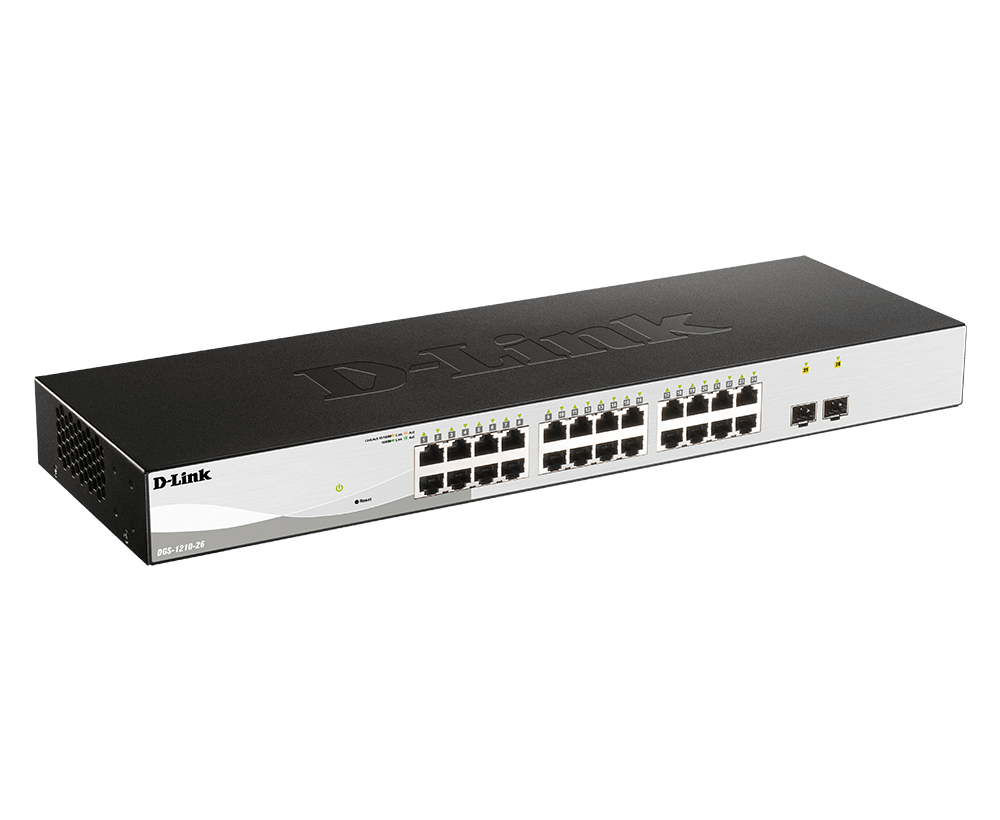
The D-Link DGS-1210-26 brings managed Gigabit connectivity to an office access layer serving workstations, printers and shared storage. It combines 24 Gigabit RJ45 ports plus 2 dedicated 100/1000 Mbps SFP ports, 52 Gbps switching capacity and a fanless chassis, giving everyday wired devices a straightforward path into an organised business network.
Move beyond basic plug-and-play switching with VLAN segmentation, traffic prioritisation, link aggregation and IPv4/IPv6 static routing. A browser interface, compact command line and SNMP give administrators several ways to configure and monitor the network, while dual firmware images and configuration files help make maintenance more controlled.
Highlights
Connectivity and Installation
- 24 Gigabit RJ45 ports plus 2 dedicated 100/1000 Mbps SFP ports.
- 52 Gbps switching capacity and up to 38.7 Mpps packet forwarding.
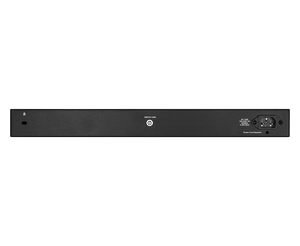
- Fanless metal chassis with an internal 100–240 V AC power supply.
Network Control
- 802.1Q VLANs, eight QoS queues and IGMP/MLD multicast controls.
- STP, RSTP, MSTP and LACP support for planned redundant links.
- 802.1X authentication, ACLs and IP-MAC-port binding.
Key Features
Keep Fibre Uplinks Separate from Endpoint Ports
Dedicated SFP ports let you build fibre links without giving up a copper endpoint port. With 24 Gigabit RJ45 ports and 2 separate SFP cages, the switch can connect local devices and an upstream network at the same time. Choose compatible transceivers and fibre to suit the link distance, connector and equipment at the other end.
Separate Business Traffic with Purpose
Create VLANs for staff, voice, surveillance and other network roles instead of placing every device in one broadcast domain. Auto Voice VLAN and Surveillance Mode support compatible deployments, while eight QoS queues let you prioritise time-sensitive traffic. These controls are useful when office applications, calls and video share a switch, provided the wider network is configured to carry the same policies.
Build Resilience into the Topology
STP, RSTP and MSTP help manage redundant paths and avoid switching loops. LACP can combine compatible links into an aggregated connection, increasing the capacity available across multiple traffic flows and supporting a more resilient design. Loopback detection and cable diagnostics help the administrator locate common faults; they complement a planned network rather than replacing sound configuration and monitoring.
Control Access at the Network Edge
Port-based 802.1X authentication works with a RADIUS service to control who connects. Access control lists, port security, DHCP screening and IP-MAC-port binding add further ways to restrict unwanted traffic. D-Link Safeguard Engine and storm controls help protect switch resources from flooding, giving the administrator a practical set of safeguards for a shared business network.
Route Selected Traffic Between VLANs
Layer 3 static routing allows communication between configured IP networks without sending every local exchange through an external router. The switch supports four IP interfaces, up to 124 IPv4 static routes and 50 IPv6 static routes. This suits straightforward inter-VLAN routing plans; internet access, firewall inspection and dynamic routing requirements still need the appropriate gateway and network design.
Manage Quietly and Maintain with Confidence
The fanless design suits offices and nearby equipment spaces where fan noise is undesirable. Configure the switch through its web interface, compact CLI or SNMP, and use D-Link Network Assistant for device discovery. Compatible current firmware also enables Nuclias Connect management. Dual images and configuration files provide maintenance options, while logs and port diagnostics help track changes and investigate faults.
Summary
For an office access layer serving workstations, printers and shared storage, the DGS-1210-26 combines flexible Gigabit connections with the VLAN, security and maintenance controls needed to run a more structured network. Its fanless design keeps installation practical, while dedicated SFP uplinks provide a clear route into the wider infrastructure. Select compatible optics and configure the network policies to match your deployment.
Frequently Asked Questions
How Many Connections Can I Use at the Same Time?
The 2 SFP ports are independent of the 24 copper ports, so all 26 network ports can be used together. All copper connections support up to 1 Gbps; the SFP interfaces support compatible 100 Mbps or 1 Gbps modules.
Does This Switch Have 10G Uplinks?
No. The DGS-1210-26 uses Gigabit RJ45 ports and 100/1000 Mbps SFP interfaces. It does not provide 10G SFP+ or 2.5/5GbE copper ports. Choose an appropriate 10G-uplink model if your backbone needs more than 1 Gbps per link.
Can It Power Access Points or Cameras?
This is a non-PoE switch and does not supply power through its Ethernet ports. PoE-powered devices need a compatible injector or a separate PoE switch, or their own supported power supply.
Can I Separate Traffic and Route Between VLANs?
Yes. It supports 802.1Q VLANs, QoS and static IPv4/IPv6 routing. Up to four IP interfaces, 124 IPv4 static routes and 50 IPv6 static routes are specified. Configure access rules and a suitable gateway for the traffic and security policies you require.
Can I Manage It with Nuclias Connect?
Yes, with compatible current switch firmware and a suitable Nuclias Connect installation. Standalone web management, compact CLI and SNMP are also available. Nuclias Connect compatibility does not mean the switch includes a D-Lite cloud service or a hosted management subscription.
Is It Fanless and How Is It Powered?
Yes. The DGS-1210-26 is fanless and uses an internal 100–240 V AC, 50/60 Hz power supply. Keep its ventilation openings clear and use an installation location within the specified temperature range. Hardware warranty coverage is five years.
Mga detalye
D-Link DGS-1210-26 24-Port Gigabit Smart Managed Switch with SFP
The D-Link DGS-1210-26 is a non-PoE smart managed switch for an office access layer serving workstations, printers and shared storage. Its copper and fibre interfaces operate at Gigabit speeds, with dedicated SFP ports determining how uplinks are connected. The grouped specifications below cover switching performance, traffic management, routing, security and installation requirements. Plan compatible optics and the upstream topology alongside the switch, and use firmware matched to the supplied hardware revision when configuring management features.
| Specification | Details |
|---|---|
| Interfaces and Connectivity | |
| Copper Interfaces | 24 × 10/100/1000BASE-T RJ45 |
| Fibre Interfaces | 2 × dedicated 100/1000 Mbps SFP ports |
| Simultaneous Network Ports | 26; copper and SFP ports can be used together |
| Ethernet and Power Delivery | Auto-negotiation and Auto MDI/MDIX; IEEE 802.3x flow control; no PoE output |
| Cabling | Copper runs up to 100 m with suitable Category 5e or better cable; select compatible optics and fibre for SFP links |
| Switching Performance | |
| Switching and Forwarding | 52 Gbps switching capacity; up to 38.7 Mpps with 64-byte packets; store-and-forward |
| MAC Table and Packet Buffer | 8K MAC entries; 4.1 Mbit packet buffer |
| System Memory | 128 MB DDR3; 32 MB flash |
| Jumbo Frames | Up to 10,000 bytes |
| Traffic Management and Resilience | |
| VLANs | IEEE 802.1Q; up to 256 static VLAN groups; VLAN IDs 1–4094; asymmetric, Auto Voice and Auto Surveillance VLAN |
| Link Resilience | STP/RSTP/MSTP; LACP up to 8 groups and eight ports per group, within available physical ports; loopback detection |
| Multicast | IGMP v1/v2 snooping, v3 awareness and snooping querier; 256 IGMP groups; MLD v1/v2 snooping with 256 groups |
| Quality of Service | Eight queues per port; 802.1p/DSCP prioritisation; strict priority or WRR scheduling; ingress/egress bandwidth control |
| Routing and Security | |
| Static Routing | Four IP interfaces; up to 124 IPv4 and 50 IPv6 static route entries; IPv4/IPv6 dual stack |
| Access Control | Up to 50 ACLs and 768 rules shared by IPv4, IPv6 and MAC; port security up to 64 MAC addresses per port |
| Authentication and Inspection | 802.1X with local/RADIUS authentication; IP-MAC-port binding; ARP spoofing prevention and inspection; DHCP snooping and server screening |
| Traffic Protection | Broadcast/multicast/unicast storm control; D-Link Safeguard Engine; traffic segmentation |
| Management and Maintenance | |
| Management Interfaces | Web GUI; compact CLI through Telnet; SNMP v1/v2c/v3; D-Link Network Assistant |
| Centralised Management | Nuclias Connect compatibility requires suitable current switch firmware and a configured management platform |
| Configuration and Monitoring | Dual software images and configurations; configuration backup/restore; system logs; LLDP/LLDP-MED; RMON |
| Diagnostics | Cable diagnostics, port mirroring and loopback detection |
| Power and Cooling | |
| Power Supply | Internal 100–240 V AC, 50/60 Hz |
| Power Consumption | Maximum 15.11 W; standby 5.06 W |
| Cooling and Acoustics | Fanless; manufacturer-rated acoustic output 0 dBA |
| Heat Dissipation | 51.57 BTU/hr |
| Energy Features | IEEE 802.3az Energy Efficient Ethernet; link-status and cable-length-based power management |
| Physical and Environmental | |
| Dimensions and Device Weight | 440 × 140 × 44 mm (L × W × H); 2.06 kg |
| Temperature | Operating −5 to 50 °C; storage −20 to 70 °C |
| Humidity | Operating and storage 0–95% relative humidity |
| Installation | Indoor installation with ventilation clearance; use mounting hardware appropriate to the chassis and rack |
| Hardware Warranty | 5 years |