

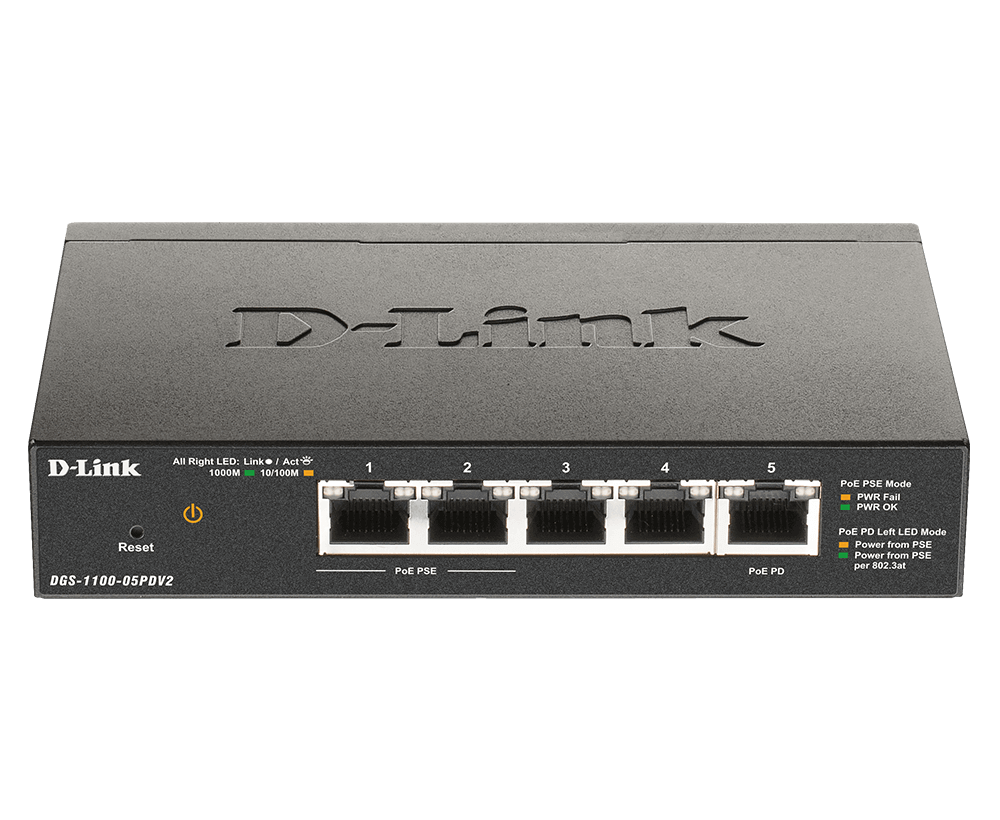


D-Link DGS-1100-05PDV2 5-Port Gigabit PoE Smart Managed Switch and PoE Extender
A compact network extension powered by PoE Bring Gigabit connections to a location without a convenient power socket. The D-Link DGS-1100-05PDV2 receives power through its Ethernet uplink and provides five Gigabit ports in a compact, fanless desktop enclosure. Two ports can pass power to compatible low-power PoE devices, making it useful for a carefully planned network extension near an IP phone, camera or access point. The important difference is the power arrangement: port 5 receives PoE, while ports 1 and 2 provide IEEE 802.3af PoE output. Their shared output budget depends on the upstream power source. Web management, VLANs, traffic priority and diagnostic tools provide practical control without turning a small local extension into an unmanaged part of the network. Highlights Connections and Power Five 10/100/1000Mbps RJ45 ports. Port 5 accepts IEEE 802.3af/at PoE input; no separate power supply is required. Ports 1–2 provide IEEE 802.3af PoE output within the shared passthrough budget. Smart Local Control Up to 18W shared PoE output with 802.3at input, or 8W with 802.3af input. Web management, VLANs, QoS, loopback detection and cable diagnostics. Compact enclosure and fanless operation. Key Features Install Where a Power Socket Is Inconvenient The switch receives its operating power through port 5 from a compatible IEEE 802.3af or 802.3at source. This allows a suitable Ethernet run to carry both the network uplink and power to the switch. It does not use a separate mains adapter, so the upstream PoE source and cable run must be included in the installation plan. Share PoE Within a Defined Budget Ports 1 and 2 can supply IEEE 802.3af power to compatible devices. The manufacturer specifies a shared passthrough budget up to 18W with an 802.3at input, or 8W with an 802.3af input. Each output port remains an 802.3af port, not a 30W PoE+ output. Add the requirements of both connected devices before choosing the upstream supply. Keep Local Connections at Gigabit Speed Five auto-negotiating RJ45 ports support 10, 100 and 1000Mbps Ethernet, with automatic MDI/MDIX to simplify cabling. A 10Gbps switching-capacity reference and up to 7.44Mpps forwarding rate support the compact access layer. The uplink remains a shared connection, so actual application performance depends on traffic, endpoints and the wider network. Organise Traffic With Smart Management Use the browser interface to configure port-based and IEEE 802.1Q VLANs, surveillance and voice VLAN functions, and a management VLAN. Four traffic queues per port, 802.1p and DSCP priority and bandwidth control help organise shared resources. These are Layer 2 controls that work alongside the router, gateway and firewall policies in the installation. Find Common Network Faults More Easily Loopback detection, copper cable diagnostics and port mirroring provide useful tools when a connection behaves unexpectedly. IGMP snooping helps control multicast traffic, while storm control and traffic segmentation add further safeguards. Configure and maintain these functions around the network design rather than relying on a small switch to provide the security role of a firewall. Choose a Quiet and Compact Installation A fanless enclosure avoids a cooling fan at the desk or equipment position. The switch measures 150 × 97 × 28 mm and weighs 380 g, with indoor operation specified from 0 to 40 °C. Leave space for the cables and ventilation, and use the PoE input and output labels to prevent confusion during installation or later maintenance. Summary The D-Link DGS-1100-05PDV2 combines a PoE-powered Gigabit switch with two low-power PoE passthrough outputs and useful web-managed controls. Choose it for a compact local network extension when the upstream source, cable run and shared output budget suit the connected equipment. Frequently Asked Questions Does the DGS-1100-05PDV2 Need a Power Adapter?ExpandCollapse No. It is powered through port 5 by a compatible IEEE 802.3af or 802.3at PoE switch or injector. There is no separate power-supply requirement at the switch, but the upstream PoE source and Ethernet cabling must be suitable for the installation. Which Ports Receive and Supply PoE Power?ExpandCollapse Port 5 receives PoE power. Ports 1 and 2 provide IEEE 802.3af PoE output to compatible devices, while the other two ports are data connections. Check the port labels before connecting equipment. The PoE outputs are not 30W IEEE 802.3at outputs. How Much Power Can the Two Outputs Provide?ExpandCollapse The total passthrough budget is up to 18W with an IEEE 802.3at input or 8W with an IEEE 802.3af input. That budget is shared by both outputs. The downstream devices must also meet the per-port IEEE 802.3af requirement, and their combined demand must fit the available budget. Can It Power Any Access Point or Camera?ExpandCollapse No. Check the device’s PoE standard and required power. A device needing PoE+, PoE++ or more power than the available passthrough budget requires another suitable source. A high-power device should not be selected simply because its Ethernet plug fits. How Is the Switch Managed?ExpandCollapse Use its web-based management interface on the local network. It provides VLAN, QoS, multicast, security and diagnostic controls appropriate to this compact smart switch. Cloud enrolment or a dedicated cloud-management subscription is not required for the described browser-managed setup. Is It Fanless and Suitable for Outdoor Use?ExpandCollapse It is fanless and intended for indoor use within its specified operating conditions. It is not an outdoor-rated switch. Keep the enclosure and connectors protected, with sufficient cable clearance and ventilation.
Paglalarawan
A compact network extension powered by PoE
Bring Gigabit connections to a location without a convenient power socket. The D-Link DGS-1100-05PDV2 receives power through its Ethernet uplink and provides five Gigabit ports in a compact, fanless desktop enclosure. Two ports can pass power to compatible low-power PoE devices, making it useful for a carefully planned network extension near an IP phone, camera or access point.
The important difference is the power arrangement: port 5 receives PoE, while ports 1 and 2 provide IEEE 802.3af PoE output. Their shared output budget depends on the upstream power source. Web management, VLANs, traffic priority and diagnostic tools provide practical control without turning a small local extension into an unmanaged part of the network.
Highlights
Connections and Power
- Five 10/100/1000Mbps RJ45 ports.
- Port 5 accepts IEEE 802.3af/at PoE input; no separate power supply is required.
- Ports 1–2 provide IEEE 802.3af PoE output within the shared passthrough budget.
Smart Local Control
- Up to 18W shared PoE output with 802.3at input, or 8W with 802.3af input.
- Web management, VLANs, QoS, loopback detection and cable diagnostics.
- Compact enclosure and fanless operation.
Key Features
Install Where a Power Socket Is Inconvenient
The switch receives its operating power through port 5 from a compatible IEEE 802.3af or 802.3at source. This allows a suitable Ethernet run to carry both the network uplink and power to the switch. It does not use a separate mains adapter, so the upstream PoE source and cable run must be included in the installation plan.
Share PoE Within a Defined Budget
Ports 1 and 2 can supply IEEE 802.3af power to compatible devices. The manufacturer specifies a shared passthrough budget up to 18W with an 802.3at input, or 8W with an 802.3af input. Each output port remains an 802.3af port, not a 30W PoE+ output. Add the requirements of both connected devices before choosing the upstream supply.
Keep Local Connections at Gigabit Speed
Five auto-negotiating RJ45 ports support 10, 100 and 1000Mbps Ethernet, with automatic MDI/MDIX to simplify cabling. A 10Gbps switching-capacity reference and up to 7.44Mpps forwarding rate support the compact access layer. The uplink remains a shared connection, so actual application performance depends on traffic, endpoints and the wider network.
Organise Traffic With Smart Management
Use the browser interface to configure port-based and IEEE 802.1Q VLANs, surveillance and voice VLAN functions, and a management VLAN. Four traffic queues per port, 802.1p and DSCP priority and bandwidth control help organise shared resources. These are Layer 2 controls that work alongside the router, gateway and firewall policies in the installation.
Find Common Network Faults More Easily
Loopback detection, copper cable diagnostics and port mirroring provide useful tools when a connection behaves unexpectedly. IGMP snooping helps control multicast traffic, while storm control and traffic segmentation add further safeguards. Configure and maintain these functions around the network design rather than relying on a small switch to provide the security role of a firewall.
Choose a Quiet and Compact Installation
A fanless enclosure avoids a cooling fan at the desk or equipment position. The switch measures 150 × 97 × 28 mm and weighs 380 g, with indoor operation specified from 0 to 40 °C. Leave space for the cables and ventilation, and use the PoE input and output labels to prevent confusion during installation or later maintenance.
Summary
The D-Link DGS-1100-05PDV2 combines a PoE-powered Gigabit switch with two low-power PoE passthrough outputs and useful web-managed controls. Choose it for a compact local network extension when the upstream source, cable run and shared output budget suit the connected equipment.
Frequently Asked Questions
Does the DGS-1100-05PDV2 Need a Power Adapter?
No. It is powered through port 5 by a compatible IEEE 802.3af or 802.3at PoE switch or injector. There is no separate power-supply requirement at the switch, but the upstream PoE source and Ethernet cabling must be suitable for the installation.
Which Ports Receive and Supply PoE Power?
Port 5 receives PoE power. Ports 1 and 2 provide IEEE 802.3af PoE output to compatible devices, while the other two ports are data connections. Check the port labels before connecting equipment. The PoE outputs are not 30W IEEE 802.3at outputs.
How Much Power Can the Two Outputs Provide?
The total passthrough budget is up to 18W with an IEEE 802.3at input or 8W with an IEEE 802.3af input. That budget is shared by both outputs. The downstream devices must also meet the per-port IEEE 802.3af requirement, and their combined demand must fit the available budget.
Can It Power Any Access Point or Camera?
No. Check the device’s PoE standard and required power. A device needing PoE+, PoE++ or more power than the available passthrough budget requires another suitable source. A high-power device should not be selected simply because its Ethernet plug fits.
How Is the Switch Managed?
Use its web-based management interface on the local network. It provides VLAN, QoS, multicast, security and diagnostic controls appropriate to this compact smart switch. Cloud enrolment or a dedicated cloud-management subscription is not required for the described browser-managed setup.
Is It Fanless and Suitable for Outdoor Use?
It is fanless and intended for indoor use within its specified operating conditions. It is not an outdoor-rated switch. Keep the enclosure and connectors protected, with sufficient cable clearance and ventilation.
Mga detalye
D-Link DGS-1100-05PDV2 5-Port Gigabit PoE Smart Managed Switch and PoE Extender
The D-Link DGS-1100-05PDV2 is a compact, PoE-powered smart managed switch with five Gigabit Ethernet ports. Port 5 receives the upstream power, while ports 1 and 2 can provide low-power PoE passthrough. The available output budget depends on the input standard. The specifications below separate those power roles and group the switching, VLAN, traffic-management, diagnostic and environmental requirements needed to plan a suitable indoor installation.
| Specification | Details |
|---|---|
| Interfaces and Switching | |
| Ethernet Ports | 5 × 10/100/1000Mbps RJ45; automatic negotiation and MDI/MDIX. |
| Port Roles | Port 5: PoE-powered uplink; ports 1–2: IEEE 802.3af PoE output; ports 3–4: data. |
| Switching Performance | 10Gbps switching capacity; up to 7.44Mpps packet forwarding. |
| MAC Table and Packet Buffer | 2K MAC address entries; 1Mbit packet buffer. |
| Jumbo Frames | Up to 9,216 bytes. |
| PoE Input and Passthrough | |
| Power Input | IEEE 802.3af/at PoE only through port 5; no separate power supply. |
| PoE Output Standard | IEEE 802.3af on ports 1–2; up to 15.4W per output subject to the shared budget. |
| Shared Output Budget | Up to 18W with IEEE 802.3at input, or 8W with IEEE 802.3af input; total across both output ports. |
| Maximum Consumption | 24.08W with PoE output enabled; 3.24W with PoE output disabled. |
| Power Planning | Use a compatible upstream source and ensure the connected devices meet both the output standard and shared power budget. |
| VLAN and Traffic Management | |
| VLAN Functions | Port-based, IEEE 802.1Q tagged, surveillance, voice, management and asymmetric VLANs. |
| VLAN Scale | Up to 32 static VLAN groups; VLAN IDs up to 4094. |
| Quality of Service | 4 queues per port; 802.1p and DSCP priority; strict and weighted round-robin scheduling; ingress/egress bandwidth control. |
| Multicast | IGMP v1/v2 snooping; up to 128 groups. |
| Static Trunking | One static trunk group. |
| Management and Protection | |
| Administration | IPv4 web-based management interface. |
| Diagnostics | Loopback detection, copper cable diagnostics, port statistics and port mirroring. |
| Access and Traffic Protection | Static MAC controls, traffic segmentation, port security and broadcast/multicast/unknown-unicast storm control. |
| Energy Features | IEEE 802.3az Energy-Efficient Ethernet and link-status-based power saving. |
| Physical and Environment | |
| Enclosure and Cooling | Compact desktop enclosure; fanless. |
| Dimensions and Device Weight | 150 × 97 × 28 mm; 380 g. |
| Operating Temperature | 0–40 °C. |
| Storage Temperature | −40–70 °C. |
| Humidity | Operating 0–90% RH; storage 0–95% RH, non-condensing. |