

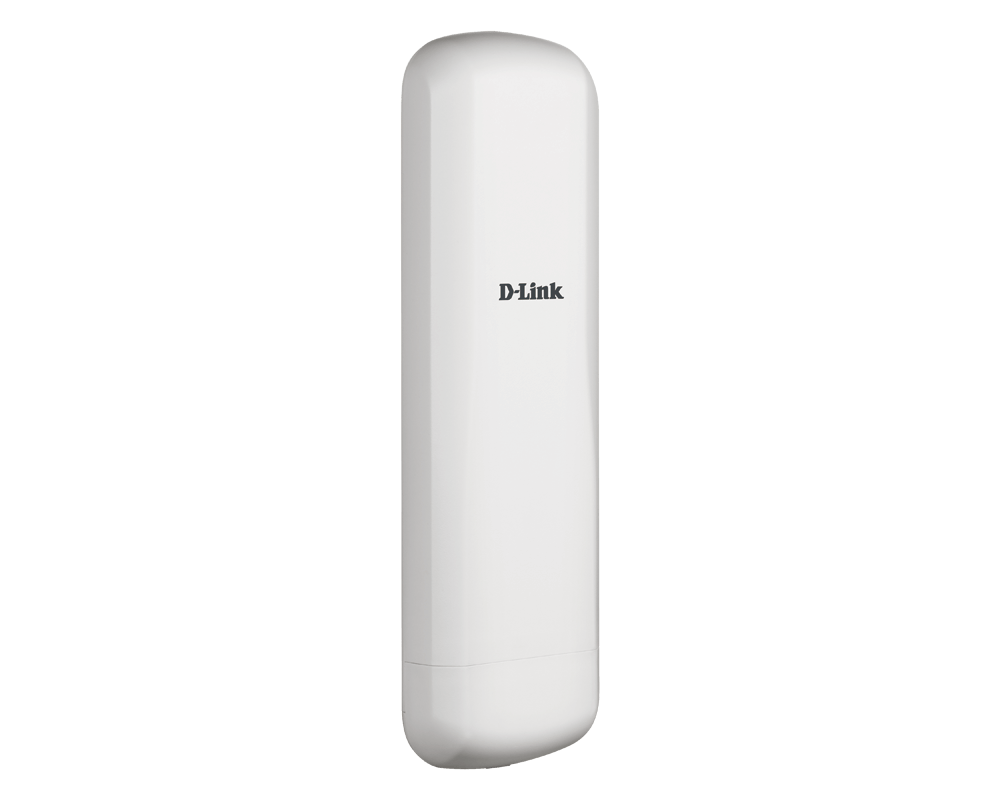


D-Link DAP-3711 5KM 5GHz Outdoor Wireless Bridge
Connect Separated Sites with a Planned Wireless Bridge The D-Link DAP-3711 carries a network connection across a clear outdoor link using a directional 15 dBi antenna and 5 GHz Wi-Fi 5 radio. It is designed for installations where laying a cable between buildings, remote equipment or another network location is difficult. The manufacturer specifies links up to 5 km between two matching units under suitable conditions. This is a purpose-built wireless bridge rather than a cellular 5G router or a general indoor Wi-Fi access point. Correct alignment, an unobstructed radio path and an appropriate power and mounting arrangement matter more than the advertised distance alone. Plan the link at both ends, including the receiving equipment, local radio regulations and the network connection behind each unit. Highlights Directional Outdoor Connectivity 15 dBi integrated directional antenna Manufacturer-rated distance up to 5 km between two matching units Point-to-point and point-to-multipoint deployment options Wireless Link Control 5 GHz IEEE 802.11a/n/ac radio Up to 867 Mbps maximum wireless signal rate TDMA, automatic ACK and intelligent rate control Practical Installation 2 × Gigabit Ethernet ports IP66-rated ABS enclosure 24 V PoE input using the correctly matched power equipment Key Features Bridge a Gap in the Network Use a matching bridge at each end to connect a remote network location without running a cable along the entire route. A clear line of sight and adequate Fresnel-zone clearance are essential. Trees, new structures, terrain, interference and mounting movement can reduce the usable link quality. The up-to-5-km figure is a planning limit under suitable conditions, not a promise for every site. Align the Directional Antenna Carefully The integrated 15 dBi antenna concentrates coverage along the intended link. Its published beamwidth is 40° horizontally and 15° vertically. Secure mounting, accurate alignment and a stable pole or bracket help maintain the radio path. This directional design serves a different purpose from an omnidirectional access point used to cover people moving around a room or outdoor area. Manage Airtime and Diagnose the Link TDMA gives transmissions scheduled airtime, while automatic ACK timing and rate control help the bridge adapt to a long-distance connection. The management tools include a spectrum analyser, throughput testing, ping, traceroute and a ping watchdog. Use these tools alongside a site survey and a realistic traffic plan; the 867 Mbps radio rate is not an end-to-end throughput guarantee. Match Power and Outdoor Protection The DAP-3711 is specified for 24 V PoE input, and the manufacturer lists a PoE injector with the product. Use the matching supplied power equipment rather than assuming every PoE source is interchangeable. The IP66 enclosure and manufacturer-listed 8 kV protection still require correctly sealed cable entries, suitable outdoor cabling, earthing and surge protection appropriate to the site. Keep the Bridge and Client Wi-Fi Roles Clear A building-to-building bridge transports the network between locations. A separate access point may still be needed to provide convenient Wi-Fi coverage for phones, laptops or other clients at the remote end. Configure the appropriate bridge mode, addressing, VLANs and security policies for the wider network. The unit does not replace an internet subscription, router or firewall. Summary The DAP-3711 combines a 15 dBi directional antenna, 5 GHz wireless link controls and an IP66 outdoor housing for planned connections between separated network locations. Choose it around the actual radio path, mounting, traffic and power requirements, with a matching unit or compatible link equipment selected for the other end. Frequently Asked Questions Do I Need Two Units for a Building-to-Building Link?ExpandCollapse A typical point-to-point installation uses a matching unit at each end. The manufacturer’s up-to-5-km reference is specified between two DAP-3711 units. This listing represents the existing individual product offer; do not assume that a complete two-unit link is supplied unless your order explicitly identifies a pair. Is This a Cellular 5G Router?ExpandCollapse No. It uses the 5 GHz Wi-Fi radio band to bridge a network connection. It has no cellular 5G modem or SIM service. An internet gateway or another network source is still required where the installation needs internet access. Will It Reach 5 km at Every Site?ExpandCollapse No. That is the manufacturer’s maximum bridging-distance reference between two matching units under suitable conditions. A clear line of sight, Fresnel-zone clearance, correct antenna alignment, legal transmit settings and an interference assessment are important. A site survey is needed to assess a real installation. Does 867 Mbps Mean the Same Internet Speed?ExpandCollapse No. It is the maximum wireless signal rate under the Wi-Fi standard. Actual application throughput is lower and depends on radio conditions, channel width, interference, traffic, network overhead and the equipment at each end. Your internet service remains a separate limit. Can I Connect It to Any PoE Switch?ExpandCollapse Do not assume that. The manufacturer specifies 24 V input for this model, which must not be confused with a normal 48 V PoE connection. Use the correctly matched included injector or power equipment explicitly suitable for the unit. Confirm the voltage, polarity and connection method before applying power. What Does IP66 Protection Mean for Installation?ExpandCollapse The enclosure is designed to resist dust and powerful water jets when correctly installed. It does not remove the need to seal cable entries or use appropriate outdoor cabling, mounting, earthing and surge protection. The listed 8 kV protection is not a guarantee against lightning damage.
Paglalarawan
Connect Separated Sites with a Planned Wireless Bridge
The D-Link DAP-3711 carries a network connection across a clear outdoor link using a directional 15 dBi antenna and 5 GHz Wi-Fi 5 radio. It is designed for installations where laying a cable between buildings, remote equipment or another network location is difficult. The manufacturer specifies links up to 5 km between two matching units under suitable conditions.
This is a purpose-built wireless bridge rather than a cellular 5G router or a general indoor Wi-Fi access point. Correct alignment, an unobstructed radio path and an appropriate power and mounting arrangement matter more than the advertised distance alone. Plan the link at both ends, including the receiving equipment, local radio regulations and the network connection behind each unit.
Highlights
Directional Outdoor Connectivity
- 15 dBi integrated directional antenna
- Manufacturer-rated distance up to 5 km between two matching units
- Point-to-point and point-to-multipoint deployment options
Wireless Link Control
- 5 GHz IEEE 802.11a/n/ac radio
- Up to 867 Mbps maximum wireless signal rate
- TDMA, automatic ACK and intelligent rate control
Practical Installation
- 2 × Gigabit Ethernet ports
- IP66-rated ABS enclosure
- 24 V PoE input using the correctly matched power equipment
Key Features
Bridge a Gap in the Network
Use a matching bridge at each end to connect a remote network location without running a cable along the entire route. A clear line of sight and adequate Fresnel-zone clearance are essential. Trees, new structures, terrain, interference and mounting movement can reduce the usable link quality. The up-to-5-km figure is a planning limit under suitable conditions, not a promise for every site.
Align the Directional Antenna Carefully
The integrated 15 dBi antenna concentrates coverage along the intended link. Its published beamwidth is 40° horizontally and 15° vertically. Secure mounting, accurate alignment and a stable pole or bracket help maintain the radio path. This directional design serves a different purpose from an omnidirectional access point used to cover people moving around a room or outdoor area.
Manage Airtime and Diagnose the Link
TDMA gives transmissions scheduled airtime, while automatic ACK timing and rate control help the bridge adapt to a long-distance connection. The management tools include a spectrum analyser, throughput testing, ping, traceroute and a ping watchdog. Use these tools alongside a site survey and a realistic traffic plan; the 867 Mbps radio rate is not an end-to-end throughput guarantee.
Match Power and Outdoor Protection
The DAP-3711 is specified for 24 V PoE input, and the manufacturer lists a PoE injector with the product. Use the matching supplied power equipment rather than assuming every PoE source is interchangeable. The IP66 enclosure and manufacturer-listed 8 kV protection still require correctly sealed cable entries, suitable outdoor cabling, earthing and surge protection appropriate to the site.
Keep the Bridge and Client Wi-Fi Roles Clear
A building-to-building bridge transports the network between locations. A separate access point may still be needed to provide convenient Wi-Fi coverage for phones, laptops or other clients at the remote end. Configure the appropriate bridge mode, addressing, VLANs and security policies for the wider network. The unit does not replace an internet subscription, router or firewall.
Summary
The DAP-3711 combines a 15 dBi directional antenna, 5 GHz wireless link controls and an IP66 outdoor housing for planned connections between separated network locations. Choose it around the actual radio path, mounting, traffic and power requirements, with a matching unit or compatible link equipment selected for the other end.
Frequently Asked Questions
Do I Need Two Units for a Building-to-Building Link?
A typical point-to-point installation uses a matching unit at each end. The manufacturer’s up-to-5-km reference is specified between two DAP-3711 units. This listing represents the existing individual product offer; do not assume that a complete two-unit link is supplied unless your order explicitly identifies a pair.
Is This a Cellular 5G Router?
No. It uses the 5 GHz Wi-Fi radio band to bridge a network connection. It has no cellular 5G modem or SIM service. An internet gateway or another network source is still required where the installation needs internet access.
Will It Reach 5 km at Every Site?
No. That is the manufacturer’s maximum bridging-distance reference between two matching units under suitable conditions. A clear line of sight, Fresnel-zone clearance, correct antenna alignment, legal transmit settings and an interference assessment are important. A site survey is needed to assess a real installation.
Does 867 Mbps Mean the Same Internet Speed?
No. It is the maximum wireless signal rate under the Wi-Fi standard. Actual application throughput is lower and depends on radio conditions, channel width, interference, traffic, network overhead and the equipment at each end. Your internet service remains a separate limit.
Can I Connect It to Any PoE Switch?
Do not assume that. The manufacturer specifies 24 V input for this model, which must not be confused with a normal 48 V PoE connection. Use the correctly matched included injector or power equipment explicitly suitable for the unit. Confirm the voltage, polarity and connection method before applying power.
What Does IP66 Protection Mean for Installation?
The enclosure is designed to resist dust and powerful water jets when correctly installed. It does not remove the need to seal cable entries or use appropriate outdoor cabling, mounting, earthing and surge protection. The listed 8 kV protection is not a guarantee against lightning damage.
Mga detalye
D-Link DAP-3711 5KM 5GHz Outdoor Wireless Bridge
The DAP-3711 is a single-band outdoor wireless bridge with a 15 dBi directional antenna and two Gigabit Ethernet ports. Its maximum wireless signal rate is 867 Mbps, with 20, 40 or 80 MHz channel widths. The manufacturer’s distance reference assumes two matching units and suitable site conditions. Power input, antenna alignment, radio regulations and weatherproof installation must be planned for the actual link rather than inferred from the distance rating alone.
| Specification | Details |
|---|---|
| Wireless and Antenna | |
| Wireless Standard | IEEE 802.11a/n/ac; single-band 5 GHz |
| Maximum Signal Rate | Up to 867 Mbps; actual throughput varies |
| Channel Widths | 20, 40 and 80 MHz |
| Antenna | Integrated 15 dBi directional antenna |
| Beamwidth | Horizontal 40°; vertical 15° |
| Maximum Bridging Distance | Up to 5 km between two matching DAP-3711 units under suitable conditions |
| Operating Frequencies | Manufacturer reference: 5,180–5,320 MHz and 5,745–5,825 MHz; permitted channels depend on the country configuration |
| Maximum Transmit Power | Up to 27 dBm; subject to regional regulations |
| Interfaces and Deployment | |
| Ethernet | 2 × 100/1000 Mbps Ethernet ports |
| Controls | Reset button |
| Operating Modes | Access Point, Station, WDS AP and WDS Station |
| Deployment | Point-to-point or point-to-multipoint with correctly configured compatible equipment |
| Addressing | Static IP or DHCP |
| VLAN | VLAN support |
| Wireless Controls and Security | |
| Radio Controls | Automatic channel selection, transmit-power selection and SSID broadcast control |
| Link Technologies | TDMA, automatic ACK timing, intelligent rate control and co-channel interference avoidance |
| Authentication and Encryption | IEEE 802.11i; 128-bit AES personal/enterprise security |
| Traffic Filtering | IP and MAC filtering |
| Station Control | Maximum-station limit |
| Management and Diagnostics | |
| Administration | Web-based configuration and firmware upgrade |
| Diagnostic Tools | Ping, traceroute, NTP, ping watchdog, syslog, spectrum analyser and throughput testing |
| Monitoring | Throughput, interfaces, routing table, bridge table, ARP table and access-point information |
| Power and Outdoor Installation | |
| Power Input | 24 V PoE; use correctly matched power equipment |
| Maximum Consumption | 15 W |
| Included Power Equipment | Manufacturer lists a PoE injector; regional supply and plug should match the order |
| Enclosure | ABS; IP66 |
| Protection | Manufacturer-listed 8 kV ESD/surge protection; appropriate site protection is still required |
| Physical and Environment | |
| Dimensions | 288 × 88 × 45 mm |
| Device Weight | 600 g |
| Operating Temperature | −40 to 65 °C |
| Storage Temperature | −40 to 85 °C |
| Humidity | 0–90% |
| Certifications | CE and FCC; regional compliance applies |
| Performance Conditions | Distance and signal rates are manufacturer references, not guaranteed throughput or coverage at a particular site |