

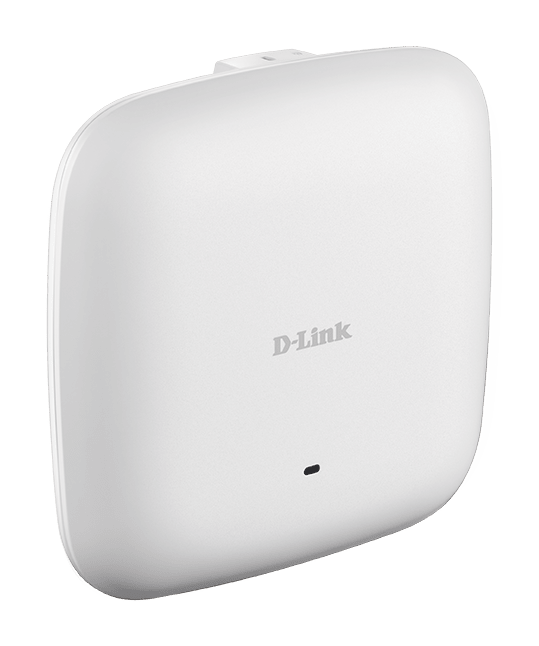




D-Link DAP-2680 Nuclias Connect AC1750 Wave 2 PRO Dual-Band PoE Access Point
Managed Business Wi-Fi With a Discreet Indoor Design The D-Link DAP-2680 adds manageable dual-band Wi-Fi to an office, meeting area or another indoor business space. Its AC1750 Wave 2 radio combines MU-MIMO, beamforming and band steering with a Gigabit Ethernet uplink, helping compatible devices share a carefully planned wireless network. Install it on a wall or ceiling and use an 802.3at PoE+ connection for power and data over the network cable. Configure an individual access point through its management interface, or bring multiple supported access points together in Nuclias Connect with the appropriate firmware. Highlights Dual-Band Wireless Wi-Fi 5 with simultaneous 2.4GHz and 5GHz operation Link rates up to 450Mbps and 1300Mbps respectively MU-MIMO, beamforming and band steering Business Network Control Standalone or Nuclias Connect management Up to 16 SSIDs with network-segmentation options WPA2-Personal and WPA2-Enterprise authentication Flexible Indoor Installation One Gigabit Ethernet LAN uplink 802.3at PoE+ power input Wall and ceiling mounting hardware included Key Features Give Compatible Devices Two Wireless Bands Simultaneous dual-band operation lets a planned network accommodate a mix of client equipment. The published rates are up to 450Mbps on 2.4GHz and 1300Mbps on 5GHz. These are radio link rates rather than an Internet-speed guarantee or a single-device 1750Mbps connection; actual throughput depends on the client, signal conditions, interference and network load. Share Wireless Airtime More Efficiently MU-MIMO can serve multiple compatible clients more efficiently, while beamforming directs the radio transmission towards supported devices. Band steering helps guide suitable clients towards the preferred band. These features assist a well-designed deployment, but they do not replace sensible access-point placement, channel planning or sufficient wired uplink capacity. Choose Standalone or Centralised Management Manage an individual unit through its browser interface or use compatible Nuclias Connect firmware to organise supported access points centrally. Nuclias Connect software is free to download; a suitable host or separately purchased controller is still required for central management. The installed firmware, controller version and selected operating mode determine which configuration options are available. Separate Staff and Guest Access Multiple SSIDs and VLAN configuration help an administrator separate appropriate groups of users, with up to eight SSIDs per radio. WPA2-Personal suits a shared-key deployment, while WPA2-Enterprise can work with RADIUS authentication. Guest portals, access controls and client-isolation settings provide additional configuration options. They must be planned alongside a suitable router, firewall and network policy. Bring Power to the Mounting Position An 802.3at PoE+ switch or suitable PoE+ injector can supply the access point through its Gigabit network connection. This reduces the need for a power outlet beside a wall or ceiling installation. The access point does not include a PoE injector or power supply. Check the available PoE budget and the complete cable route before installation. Adapt the Access Point to the Network Layout Access-point, WDS bridge, WDS with AP and wireless-client modes support different deployment requirements. Use the mode appropriate to the connected network and compatible equipment. The compact white enclosure can be mounted on a wall or ceiling with the supplied brackets; it is designed for indoor use rather than exposure to rain or outdoor conditions. Summary The D-Link DAP-2680 suits an indoor business network that needs managed Wi-Fi 5, a Gigabit wired uplink and PoE+ installation. Its dual-band radio, operating modes and Nuclias Connect compatibility provide practical deployment options when matched to suitable firmware, network equipment, power and site planning. Frequently Asked Questions Is This an Internet Router?ExpandCollapse It is an access point, not a replacement for the router or Internet service. Connect it to a suitable existing network to provide wireless access. Its wireless-client and WDS modes serve different network arrangements and require compatible configuration. What Powers the Access Point?ExpandCollapse Use a suitable IEEE 802.3at PoE+ switch or PoE+ injector. The maximum published power consumption is 17.53W. A PoE injector and power supply are not included, so check the chosen power equipment and its available budget. Can It Join Nuclias Connect?ExpandCollapse Yes, with the appropriate Nuclias Connect-compatible firmware. Central management also requires a supported controller or suitable software host. Check the installed firmware and controller compatibility before adding it to an existing deployment. Does AC1750 Mean a 1750Mbps Internet Connection?ExpandCollapse No. AC1750 combines the maximum published radio rates of 450Mbps on 2.4GHz and 1300Mbps on 5GHz. A client's actual connection and throughput depend on its capabilities, radio conditions, shared airtime, the Gigabit uplink and the Internet service. Can Staff and Guest Networks Be Separated?ExpandCollapse The access point supports multiple SSIDs and VLAN configuration, with up to eight SSIDs per radio. Appropriate switches, routing, firewall rules and authentication settings are also needed to maintain the intended separation. Can It Be Mounted Outdoors?ExpandCollapse No. This is an indoor access point with wall and ceiling mounting hardware. Position it within the specified operating conditions, with suitable ventilation and a planned cable route.
Maaaring kunin sa 3005, Ubi Avenue 3, #01-88
Usually ready in 2-4 Business Day (Excluding Public Holiday)
D-Link DAP-2680 Nuclias Connect AC1750 Wave 2 PRO Dual-Band PoE Access Point
Paglalarawan
Managed Business Wi-Fi With a Discreet Indoor Design
The D-Link DAP-2680 adds manageable dual-band Wi-Fi to an office, meeting area or another indoor business space. Its AC1750 Wave 2 radio combines MU-MIMO, beamforming and band steering with a Gigabit Ethernet uplink, helping compatible devices share a carefully planned wireless network.
Install it on a wall or ceiling and use an 802.3at PoE+ connection for power and data over the network cable. Configure an individual access point through its management interface, or bring multiple supported access points together in Nuclias Connect with the appropriate firmware.
Highlights
Dual-Band Wireless
- Wi-Fi 5 with simultaneous 2.4GHz and 5GHz operation
- Link rates up to 450Mbps and 1300Mbps respectively
- MU-MIMO, beamforming and band steering
Business Network Control
- Standalone or Nuclias Connect management
- Up to 16 SSIDs with network-segmentation options
- WPA2-Personal and WPA2-Enterprise authentication
Flexible Indoor Installation
- One Gigabit Ethernet LAN uplink
- 802.3at PoE+ power input
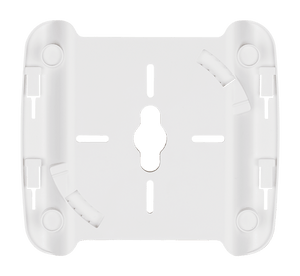
- Wall and ceiling mounting hardware included
Key Features
Give Compatible Devices Two Wireless Bands
Simultaneous dual-band operation lets a planned network accommodate a mix of client equipment. The published rates are up to 450Mbps on 2.4GHz and 1300Mbps on 5GHz. These are radio link rates rather than an Internet-speed guarantee or a single-device 1750Mbps connection; actual throughput depends on the client, signal conditions, interference and network load.
Share Wireless Airtime More Efficiently
MU-MIMO can serve multiple compatible clients more efficiently, while beamforming directs the radio transmission towards supported devices. Band steering helps guide suitable clients towards the preferred band. These features assist a well-designed deployment, but they do not replace sensible access-point placement, channel planning or sufficient wired uplink capacity.
Choose Standalone or Centralised Management
Manage an individual unit through its browser interface or use compatible Nuclias Connect firmware to organise supported access points centrally. Nuclias Connect software is free to download; a suitable host or separately purchased controller is still required for central management. The installed firmware, controller version and selected operating mode determine which configuration options are available.
Separate Staff and Guest Access
Multiple SSIDs and VLAN configuration help an administrator separate appropriate groups of users, with up to eight SSIDs per radio. WPA2-Personal suits a shared-key deployment, while WPA2-Enterprise can work with RADIUS authentication. Guest portals, access controls and client-isolation settings provide additional configuration options. They must be planned alongside a suitable router, firewall and network policy.
Bring Power to the Mounting Position
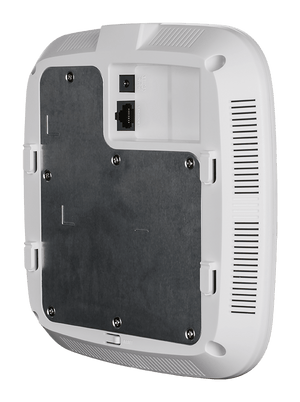
An 802.3at PoE+ switch or suitable PoE+ injector can supply the access point through its Gigabit network connection. This reduces the need for a power outlet beside a wall or ceiling installation. The access point does not include a PoE injector or power supply. Check the available PoE budget and the complete cable route before installation.
Adapt the Access Point to the Network Layout
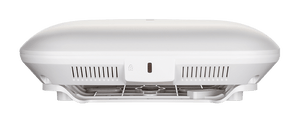
Access-point, WDS bridge, WDS with AP and wireless-client modes support different deployment requirements. Use the mode appropriate to the connected network and compatible equipment. The compact white enclosure can be mounted on a wall or ceiling with the supplied brackets; it is designed for indoor use rather than exposure to rain or outdoor conditions.
Summary
The D-Link DAP-2680 suits an indoor business network that needs managed Wi-Fi 5, a Gigabit wired uplink and PoE+ installation. Its dual-band radio, operating modes and Nuclias Connect compatibility provide practical deployment options when matched to suitable firmware, network equipment, power and site planning.
Frequently Asked Questions
Is This an Internet Router?
It is an access point, not a replacement for the router or Internet service. Connect it to a suitable existing network to provide wireless access. Its wireless-client and WDS modes serve different network arrangements and require compatible configuration.
What Powers the Access Point?
Use a suitable IEEE 802.3at PoE+ switch or PoE+ injector. The maximum published power consumption is 17.53W. A PoE injector and power supply are not included, so check the chosen power equipment and its available budget.
Can It Join Nuclias Connect?
Yes, with the appropriate Nuclias Connect-compatible firmware. Central management also requires a supported controller or suitable software host. Check the installed firmware and controller compatibility before adding it to an existing deployment.
Does AC1750 Mean a 1750Mbps Internet Connection?
No. AC1750 combines the maximum published radio rates of 450Mbps on 2.4GHz and 1300Mbps on 5GHz. A client's actual connection and throughput depend on its capabilities, radio conditions, shared airtime, the Gigabit uplink and the Internet service.
Can Staff and Guest Networks Be Separated?
The access point supports multiple SSIDs and VLAN configuration, with up to eight SSIDs per radio. Appropriate switches, routing, firewall rules and authentication settings are also needed to maintain the intended separation.
Can It Be Mounted Outdoors?
No. This is an indoor access point with wall and ceiling mounting hardware. Position it within the specified operating conditions, with suitable ventilation and a planned cable route.
Mga detalye
D-Link DAP-2680 Nuclias Connect AC1750 Wave 2 PRO Dual-Band PoE Access Point
The DAP-2680 is an indoor, simultaneous dual-band Wi-Fi 5 access point with a single Gigabit LAN uplink and IEEE 802.3at PoE+ power. It supports standalone configuration and Nuclias Connect management with compatible firmware. Match the operating mode, VLAN configuration and power equipment to the installation. The wireless figures are maximum radio link rates, while practical throughput depends on client capability, interference, network load and the wired infrastructure.
| Specification | Details |
|---|---|
| Wireless Connectivity | |
| Wireless Standard | IEEE 802.11a/b/g/n/ac Wave 2, Wi-Fi 5 |
| Band Operation | Simultaneous 2.4GHz and 5GHz |
| Maximum Radio Link Rates | 2.4GHz up to 450Mbps; 5GHz up to 1300Mbps |
| Antennas | Three internal dual-band omnidirectional antennas; 3×3 radio arrangement |
| Published Antenna Gain | 2.4GHz 3.6dBi; 5GHz 4.2dBi |
| Radio Features | MU-MIMO, beamforming, band steering, automatic channel selection and wireless scheduling |
| Regional Radio Operation | Available channels and transmit power depend on the supplied regional configuration and local regulations |
| Performance Conditions | Published radio link rates are not guaranteed throughput; client capability, interference and network load affect performance |
| Interfaces and Operating Modes | |
| LAN Uplink | One 10/100/1000Mbps RJ45 Ethernet port with PoE+ input |
| Console | Console interface for administration; not a second LAN uplink |
| Operating Modes | Access Point, WDS bridge, WDS with AP and wireless client |
| Status Indicator | Power and status LED |
| Security and Traffic Management | |
| Authentication | WPA2-Personal and WPA2-Enterprise; RADIUS authentication support |
| Network Segmentation | Up to 16 SSIDs in total, up to eight per radio; VLAN configuration |
| Access Controls | MAC filtering, SSID broadcast control, WLAN partitioning and client isolation |
| Guest Access | Captive-portal options with supported authentication configuration |
| Traffic Features | WMM, QoS, traffic control, AP load balancing and IGMP snooping |
| Network Services | IPv6, DHCP server, NTP and rogue-access-point detection support |
| Management | |
| Standalone Management | Browser interface, HTTPS/SSL, SSH and SNMP v1/v2c/v3 |
| Central Management | Nuclias Connect software or compatible Nuclias Connect controller with supported firmware |
| Software Licensing | Nuclias Connect software is free to download; controller hardware or a suitable host is separate |
| Feature Availability | Depends on the installed firmware, controller compatibility and selected operating mode |
| Power and Installation | |
| Power Input | IEEE 802.3at PoE+ |
| Maximum Power Consumption | 17.53W |
| Installation | Indoor wall or ceiling mounting |
| Required Separately | Compatible network, Ethernet cable and suitable PoE+ switch or injector |
| Physical and Environmental | |
| Dimensions | 190 × 190 × 44.8mm |
| Device Weight | 580g without mounting base; 636.5g with mounting base |
| Enclosure | White plastic housing |
| Operating Conditions | 0–40°C; 10–90% relative humidity, non-condensing |
| Storage Conditions | −20–65°C; 5–95% relative humidity, non-condensing |
| Published MTBF | More than 30,000 hours; a statistical reliability figure rather than a guaranteed service life |
| Supplied Equipment | |
| Package Contents | Access point, mounting brackets, ceiling brackets and quick-start documentation |
| Power Equipment | PoE injector and power supply not included |