







TP-Link VIGI NVR1004H-4P 4 Channel PoE+ Network Video Recorder
A compact recording centre for a smaller camera system The TP-Link VIGI NVR1004H-4P keeps a smaller surveillance installation straightforward. Four built-in PoE+ camera ports carry power and video over Ethernet, and local recording provides an accessible record of day-to-day activity. Its compact format suits a small shop, office or other site where a larger recorder would add unnecessary complexity. Highlights A clear recording platform 4 IP-camera input channels Local recording, event review and supported clip export Connections suited to the installation 4 PoE+ camera ports with 53 W shared budget 1 SATA drive interface for local storage Useful viewing and management 4K HDMI monitor output and VGA connection Supported VIGI management and ONVIF interoperability, subject to compatibility Key Features Plan camera connections and power together Four integrated PoE+ ports reduce the number of separate power components needed for a compact deployment. The shared 53 W budget is a system limit, not four independent 30 W supplies. Add the maximum camera loads before installation and retain headroom for night illumination and other power-demanding functions. Separate recording capacity from viewing performance The recorder accepts up to 4 camera inputs, but the number of streams it can decode at high resolution is a separate limit. The HDMI output can support a 4K monitor; that does not mean every connected camera can be displayed at full 4K resolution simultaneously. Size the main streams, substreams and overall bitrate around the actual viewing and recording needs. Keep local recording useful for the working day Local recording gives the site a place to review events, locate a time period and export relevant footage. Continuous and scheduled recording can be combined with supported event triggers to suit the installation. Recording duration depends on the installed drives, camera bitrate, frame rate and recording schedule, so a fixed number of storage days should not be assumed. Choose storage for continuous surveillance Use compatible surveillance-grade SATA hard drives designed for sustained camera recording. Check the exact drive and capacity against the recorder’s hardware and firmware rather than choosing by capacity alone. A failed drive or an overwritten recording can still lose important footage, so export critical incidents and maintain any separately required backup process. Review events through an appropriate management path Supported VIGI applications provide a practical way to review a site without standing beside the recorder. Use authorised accounts and a properly configured network for remote access. ONVIF provides a route to mixed-camera installations, while advanced detection, two-way audio and other functions remain dependent on the camera, protocol and firmware. Match the supplied revision to the project The published device and adapter ratings are separate. Do not treat the adapter rated output as measured NVR consumption. HDD capacity and camera support must match the supplied hardware and firmware. Summary Choose the VIGI NVR1004H-4P for an integrated PoE camera installation with local recording and a clearly planned power budget. Match the camera streams, supported HDDs and supplied revision to the installation, and keep important evidence separately when required. Frequently Asked Questions How many cameras can this recorder connect?ExpandCollapse It provides up to 4 IP-camera inputs. The actual usable configuration also depends on camera resolution, bitrate, codecs, compatibility and the recorder’s bandwidth limits. Recording-channel capacity is separate from simultaneous full-resolution display or playback. Does this recorder power the cameras directly?ExpandCollapse 4 built-in PoE+ camera ports share 53 W, with a maximum of 30 W per port. Plan total camera demand within the shared budget. Is a recording hard drive included?ExpandCollapse This is the recorder-only offer. Add a compatible surveillance-grade 3.5-inch SATA hard drive for local recording. Choose capacity against the required retention period, camera bitrate and the exact hardware/firmware compatibility; a separate copy of important evidence remains advisable. Can every camera play back in 4K at once?ExpandCollapse The 4-channel input specification does not mean 4 simultaneous full-resolution 4K streams can be decoded. Playback and live-view quality depend on the decoding limits listed in Specs, stream settings and supplied revision. Lower-resolution substreams can be useful for multi-camera viewing. Can I use cameras from another brand?ExpandCollapse The manufacturer lists ONVIF interoperability, but exact video, audio, events, PTZ and advanced analytics support depend on the camera, protocol profile and firmware. Verify the required functions for the proposed camera rather than assuming every feature transfers between brands. Can I review footage remotely and export an incident?ExpandCollapse Authorised users can use supported VIGI applications or local management for viewing and review. Remote access requires a correctly configured network and appropriate account security. Use the recorder’s supported clip-export and backup functions to keep important incidents separately from routine recording.
Mga Dagdag na Produkto (1)
Maaaring kunin sa 3005, Ubi Avenue 3, #01-88
Karaniwang handa sa loob ng 2-4 na araw ng negosyo (hindi kasama ang mga pampublikong pista opisyal)
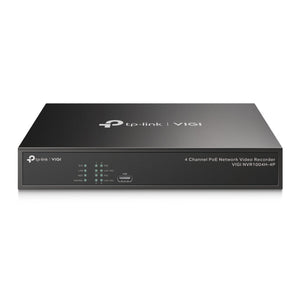
TP-Link VIGI NVR1004H-4P 4 Channel PoE+ Network Video Recorder
Paglalarawan
A compact recording centre for a smaller camera system
The TP-Link VIGI NVR1004H-4P keeps a smaller surveillance installation straightforward. Four built-in PoE+ camera ports carry power and video over Ethernet, and local recording provides an accessible record of day-to-day activity. Its compact format suits a small shop, office or other site where a larger recorder would add unnecessary complexity.
Highlights
A clear recording platform
- 4 IP-camera input channels
- Local recording, event review and supported clip export
Connections suited to the installation
- 4 PoE+ camera ports with 53 W shared budget
- 1 SATA drive interface for local storage
Useful viewing and management
- 4K HDMI monitor output and VGA connection
- Supported VIGI management and ONVIF interoperability, subject to compatibility
Key Features
Plan camera connections and power together
Four integrated PoE+ ports reduce the number of separate power components needed for a compact deployment. The shared 53 W budget is a system limit, not four independent 30 W supplies. Add the maximum camera loads before installation and retain headroom for night illumination and other power-demanding functions.
Separate recording capacity from viewing performance
The recorder accepts up to 4 camera inputs, but the number of streams it can decode at high resolution is a separate limit. The HDMI output can support a 4K monitor; that does not mean every connected camera can be displayed at full 4K resolution simultaneously. Size the main streams, substreams and overall bitrate around the actual viewing and recording needs.
Keep local recording useful for the working day
Local recording gives the site a place to review events, locate a time period and export relevant footage. Continuous and scheduled recording can be combined with supported event triggers to suit the installation. Recording duration depends on the installed drives, camera bitrate, frame rate and recording schedule, so a fixed number of storage days should not be assumed.
Choose storage for continuous surveillance
Use compatible surveillance-grade SATA hard drives designed for sustained camera recording. Check the exact drive and capacity against the recorder’s hardware and firmware rather than choosing by capacity alone. A failed drive or an overwritten recording can still lose important footage, so export critical incidents and maintain any separately required backup process.
Review events through an appropriate management path
Supported VIGI applications provide a practical way to review a site without standing beside the recorder. Use authorised accounts and a properly configured network for remote access. ONVIF provides a route to mixed-camera installations, while advanced detection, two-way audio and other functions remain dependent on the camera, protocol and firmware.
Match the supplied revision to the project
The published device and adapter ratings are separate. Do not treat the adapter rated output as measured NVR consumption. HDD capacity and camera support must match the supplied hardware and firmware.
Summary
Choose the VIGI NVR1004H-4P for an integrated PoE camera installation with local recording and a clearly planned power budget. Match the camera streams, supported HDDs and supplied revision to the installation, and keep important evidence separately when required.
Frequently Asked Questions
How many cameras can this recorder connect?
It provides up to 4 IP-camera inputs. The actual usable configuration also depends on camera resolution, bitrate, codecs, compatibility and the recorder’s bandwidth limits. Recording-channel capacity is separate from simultaneous full-resolution display or playback.
Does this recorder power the cameras directly?
4 built-in PoE+ camera ports share 53 W, with a maximum of 30 W per port. Plan total camera demand within the shared budget.
Is a recording hard drive included?
This is the recorder-only offer. Add a compatible surveillance-grade 3.5-inch SATA hard drive for local recording. Choose capacity against the required retention period, camera bitrate and the exact hardware/firmware compatibility; a separate copy of important evidence remains advisable.
Can every camera play back in 4K at once?
The 4-channel input specification does not mean 4 simultaneous full-resolution 4K streams can be decoded. Playback and live-view quality depend on the decoding limits listed in Specs, stream settings and supplied revision. Lower-resolution substreams can be useful for multi-camera viewing.
Can I use cameras from another brand?
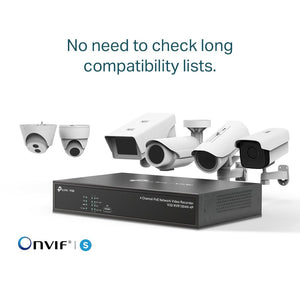
The manufacturer lists ONVIF interoperability, but exact video, audio, events, PTZ and advanced analytics support depend on the camera, protocol profile and firmware. Verify the required functions for the proposed camera rather than assuming every feature transfers between brands.
Can I review footage remotely and export an incident?
Authorised users can use supported VIGI applications or local management for viewing and review. Remote access requires a correctly configured network and appropriate account security. Use the recorder’s supported clip-export and backup functions to keep important incidents separately from routine recording.
Mga detalye
TP-Link VIGI NVR1004H-4P 4 Channel PoE+ Network Video Recorder
A 4-channel IP network video recorder with 4 PoE+ camera ports and a 53 W shared camera-power budget. The table separates recording, decoding, storage and connection limits, including material revision differences.
| Specification | Details |
|---|---|
| Video and Recording | |
| IP camera inputs | 4 channels |
| Recording resolution | Up to 8MP in current manufacturer specifications; confirm supplied revision and stream settings |
| Video bandwidth | 80 Mbps incoming / 60 Mbps outgoing |
| Video codecs | H.265+, H.265, H.264+ and H.264; codec compatibility required |
| Simultaneous playback | Up to 4 channels, within decoding and stream limits |
| Decoding capability | 2× 8MP or 4× 4MP, within the manufacturer stream and frame-rate conditions |
| Recording and search | Manual, scheduled and motion-triggered recording; time, event and tagged playback where supported |
| Evidence export | Supported USB/clip backup; keep important recordings separately |
| Storage and Networking | |
| Internal storage | 1× SATA interface; current manufacturer limit up to 10 TB per HDD, subject to compatibility |
| Drive supply | Hard drives sold separately for this recorder-only offer |
| External storage interface | None |
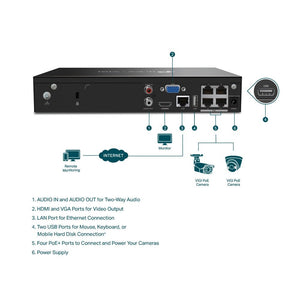
| LAN connection | 1× 10/100 Mbps RJ45 LAN |
| Interoperability | ONVIF and CGI; confirm camera feature compatibility |
| Remote access | Supported VIGI mobile and desktop applications; network and account configuration required |
| Camera Power and Connections | |
| Camera PoE connections | 4 built-in PoE+ camera ports share 53 W, with a maximum of 30 W per port. Plan total camera demand within the shared budget. |
| Video outputs | 1× HDMI up to 3840 × 2160 at 30 Hz; 1× VGA up to 1920 × 1080 at 60 Hz |
| Display modes | HDMI and VGA simultaneous output |
| USB interfaces | 2× USB 2.0 |
| Audio connections | RCA audio input and output; audio functions require compatible cameras or external equipment |
| Alarm and serial interfaces | No external alarm terminals |
| Management and Events | |
| Local management | Recorder GUI and supported web/desktop management |
| Camera events | Motion, tampering and supported smart events depend on the connected camera and firmware |
| System alerts | Video loss, offline/IP conflicts, disk exceptions and login exceptions where supported |
| Security and access | Use current supported firmware, controlled user access and appropriate network security |
| Physical and Environment | |
| Dimensions W × D × H | 246.2 × 148.2 × 45 mm |
| Power input | 53.5 V DC / 1.31 A adapter |
| Device power consumption | 4.25 W without HDD; HDD and PoE camera loads are additional |
| Operating temperature | -10 to 55°C for NVR; external adapter 0 to 40°C |
| Storage and humidity | Storage -40 to 70°C; operating/storage humidity 10-90% RH, non-condensing |
| Warranty and Package | |
| Warranty | 5 years |
| Included equipment | Recorder, supplied power adapter, mouse, installation guide and applicable HDD/mounting hardware |
| Revision and compatibility | The published device and adapter ratings are separate. Do not treat the adapter rated output as measured NVR consumption. HDD capacity and camera support must match the supplied hardware and firmware. |
Mga Dagdag na Produkto

