

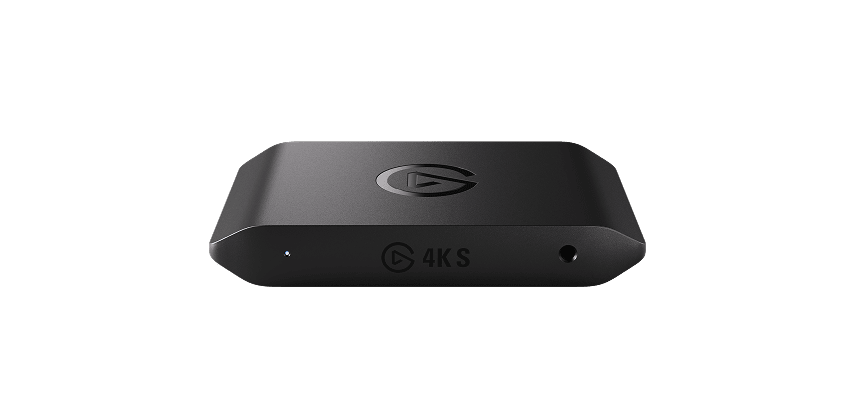
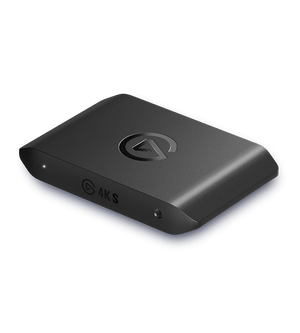
Elgato Game Capture 4K S External HDMI Capture Card
Capture in 4K60 with a compact USB setup Elgato Game Capture 4K S is an external capture card for console and camera workflows. Connect the source over HDMI, pass the picture through to your display and send the recording feed to a compatible computer. It keeps the capture equipment separate from the gaming screen. Highlights Capture Capture up to 4K60 over USB Passthrough Pass through up to 4K60, 1440p120 or 1080p240 HDMI and audio HDMI 2.0 passthrough with VRR support 3.5 mm analogue audio input for supported audio connections Key Features 4K60 external recording The USB capture feed supports up to 4K60 using compatible equipment. Use a suitable HDMI source and capture mode in the host application. High-refresh display connection Pass supported formats through to the gaming display, including 1440p120. The selected capture mode has its own resolution and frame-rate limit. HDR10 and VRR conditions HDR10 passthrough supports up to 4K60. On Windows, the HDR10 capture limit is 1080p60. VRR requires compatible source and display equipment. Audio and cables Use the 3.5 mm analogue input for an appropriate audio source. The box includes USB-C and HDMI 2.0 cables. Summary A good fit for 4K60 console recording when a compact USB card and a separate HDMI gaming display are part of the setup. Frequently Asked Questions Can I record at 4K60?ExpandCollapse Yes, with a supported HDMI source and host. Check the capture mode in your software. Can I play at 120 fps and record at 60 fps?ExpandCollapse Yes at supported input modes such as 1440p120 passthrough. The capture feed is limited by the selected recording mode. What HDR capture is supported?ExpandCollapse HDR10 passthrough reaches 4K60. HDR10 recording is supported at up to 1080p60 on Windows. Can it record protected video?ExpandCollapse Capture requires an unencrypted HDMI signal. Protected video cannot be recorded through the card. Which cables are included?ExpandCollapse A USB-C to USB-C cable and HDMI 2.0 cable are included.
Maaaring kunin sa 3005, Ubi Avenue 3, #01-88
Karaniwang handa sa loob ng 2-4 na araw ng negosyo (hindi kasama ang mga pampublikong pista opisyal)
Elgato Game Capture 4K S External HDMI Capture Card
Paglalarawan
Capture in 4K60 with a compact USB setup
Elgato Game Capture 4K S is an external capture card for console and camera workflows. Connect the source over HDMI, pass the picture through to your display and send the recording feed to a compatible computer. It keeps the capture equipment separate from the gaming screen.
Highlights
Capture
- Capture up to 4K60 over USB
Passthrough
- Pass through up to 4K60, 1440p120 or 1080p240
HDMI and audio
- HDMI 2.0 passthrough with VRR support
- 3.5 mm analogue audio input for supported audio connections
Key Features
4K60 external recording
The USB capture feed supports up to 4K60 using compatible equipment. Use a suitable HDMI source and capture mode in the host application.
High-refresh display connection
Pass supported formats through to the gaming display, including 1440p120. The selected capture mode has its own resolution and frame-rate limit.
HDR10 and VRR conditions
HDR10 passthrough supports up to 4K60. On Windows, the HDR10 capture limit is 1080p60. VRR requires compatible source and display equipment.
Audio and cables
Use the 3.5 mm analogue input for an appropriate audio source. The box includes USB-C and HDMI 2.0 cables.

Summary
A good fit for 4K60 console recording when a compact USB card and a separate HDMI gaming display are part of the setup.
Frequently Asked Questions
Can I record at 4K60?
Yes, with a supported HDMI source and host. Check the capture mode in your software.
Can I play at 120 fps and record at 60 fps?
Yes at supported input modes such as 1440p120 passthrough. The capture feed is limited by the selected recording mode.
What HDR capture is supported?
HDR10 passthrough reaches 4K60. HDR10 recording is supported at up to 1080p60 on Windows.
Can it record protected video?
Capture requires an unencrypted HDMI signal. Protected video cannot be recorded through the card.
Which cables are included?
A USB-C to USB-C cable and HDMI 2.0 cable are included.
Mga detalye
Elgato Game Capture 4K S External HDMI Capture Card
Game Capture 4K S is an external HDMI capture device with USB-C data output and a separate HDMI connection for the gaming display. Capture resolution and display passthrough have separate limits. Check both against your source and screen, especially for HDR or high refresh rates. A dedicated analogue audio input gives supported workflows another path for sound.
| Specification | Details |
|---|---|
| Video | |
| Input and output | HDMI 2.0 input and passthrough output |
| Capture | Up to 2160p60, with 1440p60 and 1080p120 modes |
| Passthrough | Up to 2160p60, 1440p120 or 1080p240 |
| HDR and VRR | HDR10 passthrough up to 4K60, HDR10 capture up to 1080p60 on Windows, VRR passthrough |
| Connections and Setup | |
| Host | USB-C on a compatible host |
| Audio input | 3.5 mm analogue |
| Dimensions and weight | 112 × 72 × 18 mm, 90 g |
| Included cables | USB-C to USB-C, HDMI 2.0 |
| USB host interface | USB-C, USB 3.2 Gen 1 at 5 Gbps |
| Host operating systems | Windows 11 or later, macOS 14.2 or later, or USB-C iPad with iPadOS 18 |
| Host performance | Windows or Apple Silicon hardware must meet the capture mode’s CPU and graphics requirements |