

Elgato Facecam MK.2 Full HD 60 fps USB Webcam
A steady Full HD frame for calls, streams and recordings Elgato Facecam MK.2 gives a desk setup a fixed-focus camera, an 84° view and Full HD60 video. The Sony STARVIS sensor and manual controls are useful when the lighting changes during a call or live stream. Mount it on a monitor or use the 1/4-inch thread for more precise positioning. Highlights Full HD video 1080p60 capture with uncompressed modes through USB 3.0 Imaging Sony STARVIS CMOS sensor and 84° field of view Focus and placement Fixed-focus lens for a consistent desk framing distance USB-C connection and monitor mount Key Features Keep motion clear at Full HD Facecam MK.2 supports 1080p60 on a suitable USB connection. The smoother motion is useful for a presenter who moves naturally or for demonstrations that include hands and tools. Use the higher-bandwidth connection for compatible uncompressed modes and select the format that your host application accepts. Make a fixed-focus lens work for your desk The lens covers an 84° field of view with a stated working distance of about 30 to 120 cm. Set your seat or demonstration area inside that range and aim the camera before a call or recording. It is useful for a repeatable desk layout where the subject stays in a known position. Manage mixed lighting from the camera controls Use Camera Hub on a supported system to adjust exposure, framing and colour. HDR helps with some high-contrast scenes, such as a bright window behind the presenter. Check the actual image in your meeting or streaming app to see how that app handles the selected video mode. Keep your settings and control privacy Onboard settings storage gives you a more consistent starting point between sessions. Use the integrated privacy shutter when you want to cover the lens between meetings. If you use a shared computer, check the active settings and camera source before a call so the framing stays appropriate. Set up picture and sound as separate parts Mount the camera using the supplied monitor mount or a compatible support, then choose your preferred separate microphone or headset in the meeting app. Keeping picture and sound choices separate is useful for teaching or calls where consistent voice pickup matters as much as the image. Summary Facecam MK.2 works well for creators and professionals who want smooth Full HD, a stable camera position and more exposure control than a basic webcam typically provides. Place it at a comfortable speaking distance, use a USB connection that supports the desired mode and select a separate microphone for the audio side of the setup. Frequently Asked Questions Does Facecam MK.2 support 60 fps?ExpandCollapse Yes, at listed modes up to 1080p60 with a compatible port and app. Can it run over USB 2.0?ExpandCollapse It supports USB 2.0 using compressed MJPEG. Use USB 3.0 for the uncompressed modes. Does it autofocus?ExpandCollapse The lens is fixed focus. Elgato recommends working within approximately 30–120 cm. Can it mount on a tripod?ExpandCollapse Use the 1/4-inch thread with a compatible tripod or camera arm. Can I adjust the image manually?ExpandCollapse Use Elgato Studio on a supported host to adjust the available camera controls.
Maaaring kunin sa 3005, Ubi Avenue 3, #01-88
Karaniwang handa sa loob ng 2-4 na araw ng negosyo (hindi kasama ang mga pampublikong pista opisyal)
Elgato Facecam MK.2 Full HD 60 fps USB Webcam
Paglalarawan
A steady Full HD frame for calls, streams and recordings
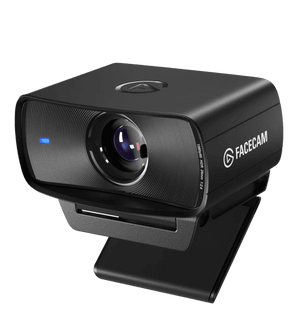
Elgato Facecam MK.2 gives a desk setup a fixed-focus camera, an 84° view and Full HD60 video. The Sony STARVIS sensor and manual controls are useful when the lighting changes during a call or live stream. Mount it on a monitor or use the 1/4-inch thread for more precise positioning.
Highlights
Full HD video
- 1080p60 capture with uncompressed modes through USB 3.0
Imaging
- Sony STARVIS CMOS sensor and 84° field of view
Focus and placement
- Fixed-focus lens for a consistent desk framing distance
- USB-C connection and monitor mount
Key Features
Keep motion clear at Full HD
Facecam MK.2 supports 1080p60 on a suitable USB connection. The smoother motion is useful for a presenter who moves naturally or for demonstrations that include hands and tools. Use the higher-bandwidth connection for compatible uncompressed modes and select the format that your host application accepts.
Make a fixed-focus lens work for your desk
The lens covers an 84° field of view with a stated working distance of about 30 to 120 cm. Set your seat or demonstration area inside that range and aim the camera before a call or recording. It is useful for a repeatable desk layout where the subject stays in a known position.
Manage mixed lighting from the camera controls
Use Camera Hub on a supported system to adjust exposure, framing and colour. HDR helps with some high-contrast scenes, such as a bright window behind the presenter. Check the actual image in your meeting or streaming app to see how that app handles the selected video mode.
Keep your settings and control privacy
Onboard settings storage gives you a more consistent starting point between sessions. Use the integrated privacy shutter when you want to cover the lens between meetings. If you use a shared computer, check the active settings and camera source before a call so the framing stays appropriate.
Set up picture and sound as separate parts
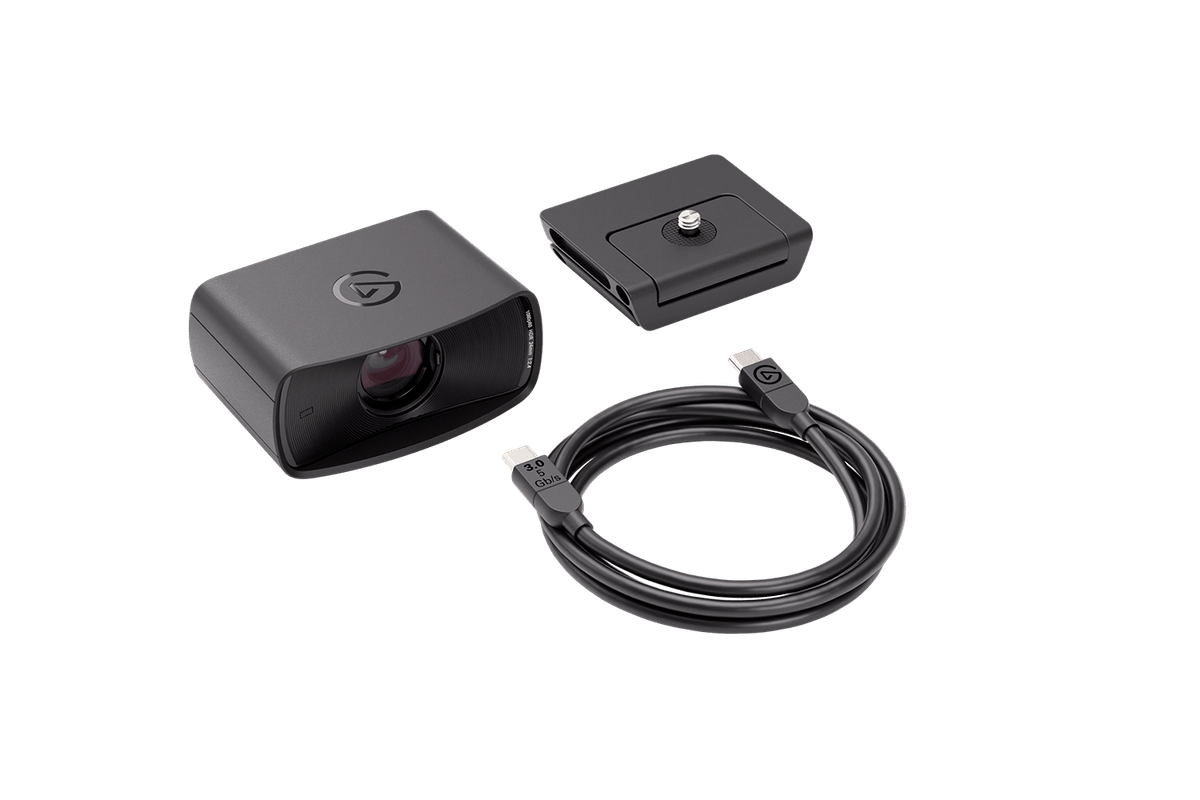
Mount the camera using the supplied monitor mount or a compatible support, then choose your preferred separate microphone or headset in the meeting app. Keeping picture and sound choices separate is useful for teaching or calls where consistent voice pickup matters as much as the image.
Summary
Facecam MK.2 works well for creators and professionals who want smooth Full HD, a stable camera position and more exposure control than a basic webcam typically provides. Place it at a comfortable speaking distance, use a USB connection that supports the desired mode and select a separate microphone for the audio side of the setup.
Frequently Asked Questions
Does Facecam MK.2 support 60 fps?
Yes, at listed modes up to 1080p60 with a compatible port and app.
Can it run over USB 2.0?
It supports USB 2.0 using compressed MJPEG. Use USB 3.0 for the uncompressed modes.
Does it autofocus?
The lens is fixed focus. Elgato recommends working within approximately 30–120 cm.
Can it mount on a tripod?
Use the 1/4-inch thread with a compatible tripod or camera arm.
Can I adjust the image manually?
Use Elgato Studio on a supported host to adjust the available camera controls.
Mga detalye
Elgato Facecam MK.2 Full HD 60 fps USB Webcam
Facecam MK.2 captures Full HD video from a Sony STARVIS sensor and fixed-focus lens. The stated focus range guides positioning on a monitor or stand. A supported USB connection enables the appropriate output modes, and Camera Hub provides controls on compatible systems. Check the mounting and platform requirements when the camera shares a desk with other equipment.
| Specification | Details |
|---|---|
| Imaging and Optics | |
| Sensor | Sony STARVIS, 1/2.5-inch CMOS |
| Lens and view | Fixed-focus f/2.4 lens, 84° field of view |
| Focus range | 30–120 cm |
| Aperture and equivalent focal length | f/2.4 and 24 mm full-frame equivalent. |
| Settings storage | Onboard flash memory for supported image settings. |
| Video and USB | |
| Capture | Up to 1080p60 |
| USB formats | Uncompressed modes via USB 3.0, MJPEG via USB 2.0 |
| Connector | USB-C, UVC 1.5 |
| Host operating systems | Windows 11 or later or macOS 13.3 or later, with compatible hardware |
| USB video class | UVC 1.5. |
| HDR | Supported Full HD HDR modes through compatible settings. |
| Privacy | Integrated lens shutter. |
| Mounting and Package | |
| Mount point | 1/4-inch thread |
| Dimensions and weight | 84 × 38 × 61 mm, 90 g without mount |
| Included | Camera, monitor mount, 1.8 m USB-C USB 3.0 cable |
| Weight with monitor mount | 136 g |
| Supplied cable | 2 m detachable USB-A to USB-C USB 3.0 cable. |